


Here’s a wild stat: over 50 million phone screens are cracked in the United States every single year. That’s roughly one shattered display every 0.6 seconds! A cracked iPhone screen feels like a crisis. And the anxiety doesn’t stop at the damage itself, it extends to the repair. What are they actually doing back there? Are they being careful with my phone? Am I going to get cheap parts? Will my Face ID still work?
Here’s the thing most people don’t realize: a professional iPhone screen repair isn’t just “pop the old screen off and slap a new one on.” Not even close. There’s an intricate, multi-step process happening behind that repair bench, one that involves specialized tools, precise technique, and thorough testing. Understanding that process is the difference between white-knuckling your way through a repair and walking in with total confidence.
- Why Understanding the iPhone Screen Repair Process Matters
- Step 1 — Initial Diagnostic Assessment and Intake
- Step 2 — Powering Down and Opening the Device Safely
- Step 3 — Disconnecting Internal Components and Removing the Broken Screen
- Step 4 — Preparing and Installing the New Screen Assembly
- Step 5 — Post-Repair Testing and Quality Assurance
- Step 6 — Reassembly, Adhesive Curing, and Final Sealing
- Common iPhone Screen Repair Myths — Debunked
- How to Choose a Trustworthy iPhone Screen Repair Service
- What to Expect After Your iPhone Screen Repair
- Final Thoughts
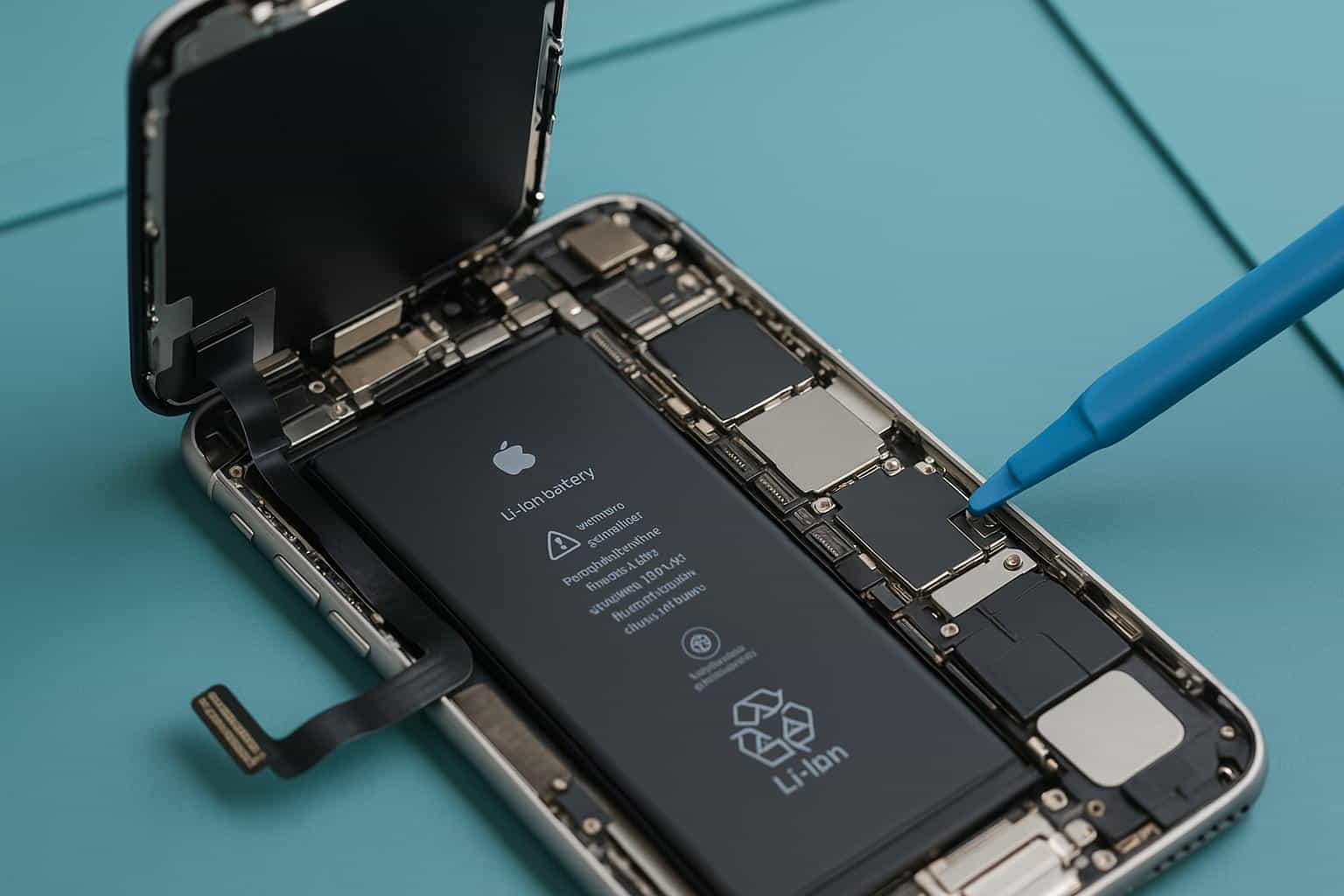
I’ve spent years watching certified technicians work on these devices, and honestly? The precision involved is fascinating. In this guide, I’m pulling back the curtain on exactly what happens to your iPhone from the moment it hits the repair bench to the moment it’s handed back to you, good as new. If you’re in the Eagan, Minnesota area and need professional iPhone screen repair, you can see this process firsthand. But whether you’re local or not, this guide will give you the knowledge to feel confident anywhere.
Let’s dive in.
Why Understanding the iPhone Screen Repair Process Matters
Let’s be real, there’s a trust gap in the phone repair industry. Horror stories circulate online about repair shops swapping out good batteries for degraded ones, using bottom-tier aftermarket screens that yellow within weeks, or charging $200 for what turned out to be a $40 fix. Some of those stories are exaggerated. Some aren’t.
That uncertainty is exactly why transparency matters. When you understand what a screen repair actually involves, the tools, the steps, the testing, you become a more informed consumer. You can ask better questions. You can spot red flags. And you can tell the difference between a shop that’s cutting corners and one that’s doing the job right.
It also helps to know that not all repair paths are created equal. Getting your screen fixed at an Apple Store is a different experience than visiting an Apple Authorized Service Provider, an independent repair shop, or attempting a DIY fix at your kitchen table. Each option comes with different trade-offs in cost, turnaround time, parts quality, and warranty implications.
Bottom line: Knowledge is leverage. The more you understand about the iPhone screen replacement process, the better equipped you are to make a decision you won’t regret — and to hold your repair provider accountable.
Step 1 — Initial Diagnostic Assessment and Intake
Every quality repair begins before a single tool touches your phone. The first thing a certified technician does is conduct a thorough diagnostic assessment, and this step is more important than most people think.
- Diagnosis: The technician starts with a visual inspection. They’re documenting the extent of the screen damage, sure, but they’re also noting everything else. Pre-existing scratches on the housing. Dents on the frame. Whether the device powers on at all. This protects both you and the shop by creating a baseline record of the phone’s condition before work begins.
- Functional Testing: Before anything gets taken apart, the technician will check:
- Touch responsiveness (or lack thereof) across the damaged display
- Face ID or Touch ID functionality
- Front and rear camera operation
- Earpiece speaker and bottom speaker output
- Microphone input
- Proximity sensor and ambient light sensor behavior
- Charging port and wireless charging
Why test all of this for a screen repair? Because these tests determine whether the damage is truly limited to the display, or if there’s deeper internal damage that the cracked screen was masking. A phone that fell hard enough to shatter the glass may also have a damaged front camera flex cable or a dislodged earpiece speaker. Catching that upfront prevents surprises later.
Based on the diagnostic results, the technician generates a repair quote. If additional issues are found, a reputable shop will communicate that to you before proceeding, not tack on surprise charges after the fact.
Pro tip: Always back up your iPhone before handing it over for any repair. While a screen replacement doesn’t involve your data, unexpected complications can occasionally require a factory reset. An iCloud or computer backup takes minutes and provides peace of mind.
Step 2 — Powering Down and Opening the Device Safely
With the diagnostic complete and the repair greenlit, the real work begins.
- Step one? The phone gets completely powered off and the battery is disconnected. This isn’t optional, working on a live device risks short circuits, which can fry internal components and turn a straightforward screen swap into a logic board repair. No good technician skips this.
- Now for the actual opening. If you’ve never looked closely at the bottom of an iPhone, you’ll notice two tiny screws flanking the Lightning or USB-C port. These aren’t Phillips or flathead, they’re pentalobe screws, a proprietary five-pointed design Apple uses specifically to discourage casual disassembly. Removing them requires a precision P2 pentalobe screwdriver.
- With the screws out, the technician reaches for a suction cup and a thin pry tool called a spudger. The suction cup attaches to the screen and creates just enough upward tension to form a tiny gap between the display assembly and the phone’s chassis. The spudger slides into that gap and carefully works around the perimeter, separating the adhesive bond that seals the screen to the frame.
- This is where experience really matters. The display assembly is connected to the phone’s logic board by delicate flex cables, paper-thin ribbons that carry data, touch input, and power. Open the screen too aggressively or at the wrong angle, and you risk tearing those cables. A seasoned technician knows the exact cable positions for each iPhone model and opens the device accordingly.
For newer models with especially strong adhesive (looking at you, iPhone 14 and later), some technicians will use a heat gun or a heated pad to gently warm the edges of the device first. This softens the adhesive and makes separation cleaner. The key word is gently — too much heat can damage the OLED panel or the battery underneath.
Step 3 — Disconnecting Internal Components and Removing the Broken Screen
The phone is open. But the broken screen isn’t ready to come out just yet, it’s still tethered to the phone’s internals by multiple connections.
The first thing the technician does is locate the metal shield brackets. These are small metal plates held in place by incredibly tiny tri-point or Phillips screws (we’re talking 1.2mm small). The brackets cover and protect the flex cable connectors where the display plugs into the logic board. The technician carefully removes these screws, usually three to five of them, depending on the model, and lifts off the brackets.
Underneath, you’ll find the flex cable connectors themselves. A typical iPhone display assembly has two to three connections: the display data cable, the digitizer cable (which handles touch input), and the front sensor assembly cable (which bundles the front camera, earpiece speaker, proximity sensor, and ambient light sensor). Each connector pops off with gentle leverage from a plastic spudger, never metal, which could cause a short.
“Every screw in an iPhone is a different size. Mix up even one, and you risk driving a longer screw through a circuit trace on the logic board. That’s why we use magnetic project mats with labeled zones for every single screw.”
With the connectors freed, the old display panel can be removed. But here’s the thing, the display itself is just one piece of the puzzle. Several components mounted on the old screen need to be transferred to the new one:
- The earpiece speaker assembly
- The front camera and sensor array
- The ambient light sensor (critical for auto-brightness and True Tone)
- The Home Button (on iPhone SE and older models with Touch ID)
The Home Button transfer deserves special mention. On models that have one, the Home Button is cryptographically paired to the phone’s logic board. You can’t just drop in a replacement; it has to be the original button. If it’s damaged or lost, Touch ID functionality is permanently gone for that device. A careful technician treats this component like gold.
Each of these small components is secured by its own set of micro-screws and adhesive. The technician removes them from the old screen one at a time, inspects them for damage, and sets them aside in organized, labeled positions. This entire step is meticulous, deliberate work, rush it, and something will break.
Step 4 — Preparing and Installing the New Screen Assembly
Now comes the moment everything has been building toward, the new screen goes in. But not before some critical preparation.
1) Understanding Screen Quality Tiers
Not all replacement screens are created equal, and this is where repair quality can diverge dramatically. There are generally three tiers:
- OEM (Original Equipment Manufacturer): Same factory, same specs as what Apple uses. Highest cost, best quality. Identical color accuracy, brightness, and touch response.
- Premium Aftermarket: Third-party screens built to OEM specifications. Good color accuracy, solid touch response, and strong durability. Mid-range pricing. Often virtually indistinguishable from OEM in daily use.
- Budget Aftermarket: Lower-cost alternatives. May have noticeable color shifts, reduced maximum brightness, or touch sensitivity issues. You get what you pay for.
A reputable repair shop like Helpertech will be transparent about which tier they’re using and let you choose. If a shop won’t tell you where their parts come from, that’s a red flag.
Component Transfer and Installation
With the new screen prepped and out of its packaging, the technician begins transferring the components from the old display. The earpiece speaker assembly is carefully positioned and screwed into place. The front camera and sensor array gets seated and connected. If applicable, the Home Button is installed with its original gasket intact to maintain the waterproof seal.
Fresh adhesive strips are applied around the perimeter of the phone’s chassis. This adhesive does more than hold the screen in place, it creates a seal that protects the phone’s internals from dust, lint, and minor moisture exposure. Cheap repairs that skip proper adhesive leave the device vulnerable.
Now the flex cables get reconnected. The technician carefully aligns each connector over its socket and presses down until it clicks into place. This isn’t a “close enough” situation, an improperly seated digitizer cable is one of the most common causes of ghost touch issues, where the screen registers phantom taps and swipes on its own.
The metal shield brackets go back on, the screws go back in, and the new display is gently folded down and aligned with the chassis. A light, even pressure along the edges seats the screen into the adhesive. It’s in.
Step 5 — Post-Repair Testing and Quality Assurance
The screen is installed, but the repair isn’t done. Not by a long shot. A professional shop now runs a comprehensive post-repair quality assurance check. This is the step that separates a great repair from a mediocre one.
Here’s what that testing checklist typically looks like:
- Display quality: Color accuracy, brightness levels, uniform backlighting, no dead pixels or discoloration
- Touch responsiveness: Multi-touch testing across all screen zones — corners, edges, and center
- Haptic Touch / 3D Touch: Pressure-sensitive input on supported models
- Face ID / Touch ID: Full biometric verification to ensure the sensor array is functioning
- Proximity sensor: Screen should turn off when you hold the phone to your ear during a call
- Ambient light sensor: Auto-brightness should adjust smoothly in different lighting conditions
- True Tone: Display should adapt its white balance to ambient lighting (when supported)
- Earpiece speaker: Clear audio during phone calls
- Microphone: Voice recording and call quality check
- Front and rear cameras: Focus, exposure, and image quality
- Battery health: Verifying no power anomalies emerged during the repair
That’s not a short list. And it shouldn’t be. Every single one of those functions interfaces with the display assembly in some way, which means every single one could potentially be affected by the repair.
The best shops run these tests systematically using dedicated diagnostic software, not just a quick glance and a “looks good to me.” Some will even walk you through the test results in person or provide a written report. If your repair shop does this, that’s a very good sign.
Step 6 — Reassembly, Adhesive Curing, and Final Sealing
With all tests passed, it’s time to button everything up. The two pentalobe screws go back in at the bottom of the device, torqued to the precise specification for the model. Over-tightening can strip the threading or crack the housing; under-tightening can leave the screen loose. Precision matters right down to the final turn of the screwdriver.
The adhesive seal needs time to fully bond. Most technicians recommend avoiding heavy pressure on the screen and keeping the device away from moisture for the first hour or so after the repair. The adhesive reaches full strength within 24 to 48 hours.
A note on water resistance: Your original iPhone came with a factory-applied water-resistant seal rated to a specific IP standard (IP67 or IP68, depending on your model). A screen repair — even a good one — may reduce that original level of water resistance. Apple’s own repairs come closest to restoring the factory seal, but no third-party repair can guarantee the original IP rating. This doesn’t mean your phone is suddenly fragile; it just means you shouldn’t go swimming with it right after a repair.
The final step is almost ceremonial: the technician gives the phone a thorough external cleaning. Fingerprints are wiped away, any adhesive residue is removed, and the phone is polished up before being returned to you. It should look, and feel, like a device that’s been treated with care.
Common iPhone Screen Repair Myths — Debunked
There’s a lot of misinformation floating around about iPhone screen repairs. Let’s set the record straight on the biggest myths.
“Screen repairs ruin your phone’s water resistance forever.”
Not exactly. A proper repair with quality adhesive restores a significant degree of the seal. It may not match the original factory IP68 rating perfectly, but your phone isn’t going to flood from a rain splash. That said, don’t submerge it intentionally, that’s good advice even for phones that have never been repaired.
“Third-party screens are always garbage.”
This one drives me crazy. Quality varies enormously. Premium aftermarket screens from reputable manufacturers can be virtually indistinguishable from OEM in daily use. The key is knowing what tier your repair shop uses and having the option to choose. “Third-party” isn’t a synonym for “bad”, “cheap and unvetted” is.
“You’ll lose all your data during a screen repair.”
Nope. A screen replacement doesn’t touch your storage or logic board. Your photos, apps, messages, and everything else should be exactly where you left them. The only scenario where data is at risk is if the repair encounters a severe complication, which is rare but is exactly why you should always back up first.
“DIY is just as good as professional repair.”
I respect the DIY spirit. truly. But iPhone screen repair has a steep learning curve. Stripped screws, torn flex cables, lost True Tone calibration, and improperly seated connectors are all common outcomes for first-time DIYers. The tools alone can cost $50–$80 for a quality kit. And if something goes wrong mid-repair, you’ve now turned a $100 fix into a $400 problem.
“Apple is the only place that can fix it properly.”
Apple does excellent work, full stop. But they’re not the only game in town. Apple Authorized Service Providers use genuine Apple parts and follow Apple’s repair procedures. And Apple’s Independent Repair Provider program now gives qualified independent shops access to genuine parts, tools, and training. You have more good options than you think.
How to Choose a Trustworthy iPhone Screen Repair Service
Not all repair shops deserve your business. Here’s how to separate the professionals from the pretenders.
Questions to Ask Before You Commit
Walk into any repair shop and ask these questions. The way they answer will tell you everything you need to know:
- What quality of screen do you use? They should be able to clearly explain OEM vs. aftermarket tiers without getting defensive.
- Do you run post-repair diagnostics? The answer should be an enthusiastic yes, with specifics about what they test.
- What’s your warranty policy? A reputable shop offers at least a 90-day warranty on parts and labor. Many offer six months to a year.
- Will my Face ID / Touch ID still work? A knowledgeable technician will explain how they preserve biometric functionality during the repair.
- How long will it take? Most professional screen repairs take 30 to 60 minutes. If they’re quoting days without a clear reason, something’s off.
Certifications That Matter
Look for shops that are an Apple Authorized Service Provider (AASP) or part of Apple’s Independent Repair Provider (IRP) program. Both designations mean the shop has access to genuine Apple parts, Apple-approved tools, and Apple repair training. Beyond Apple-specific certifications, technicians with micro-soldering experience and industry certifications (like those from iFixit or mobile device repair programs) tend to deliver higher-quality work.
Red Flags to Watch For
Run, don’t walk, from any shop that can’t clearly explain their parts quality, refuses to provide a written warranty, won’t show you diagnostic results, has dramatically lower pricing than every competitor (cheap parts = cheap results), or pressures you into unnecessary add-on repairs.
What to Expect After Your iPhone Screen Repair
You’ve got your phone back. The screen is pristine, the touch is responsive, and everything feels right. But there are a few things to keep in mind over the next day or two.
The First 24–48 Hours
The display adhesive is still curing, so avoid putting heavy pressure on the screen or exposing the phone to moisture. You might notice the display feels very slightly warm immediately after the repair, that’s normal and should subside within a few hours. If your phone supports True Tone, it should recalibrate automatically, but auto-brightness may take a few cycles to settle into its normal behavior.
The “Important Display Message”
If you have an iPhone 11 or newer, you’ll likely see a notification in Settings > General > About that reads “Unable to verify this iPhone has a genuine Apple display.” Don’t panic. This message appears on any iPhone that’s had its screen replaced, even by Apple themselves in some cases. It doesn’t affect functionality. It’s simply Apple’s way of documenting that the original display has been changed. The message is permanent but harmless.
Protecting Your New Screen
You just invested in a repair, protect the investment. Especially if you’re someone who keeps their iPhone for five years or more before upgrading, a high-quality tempered glass screen protector is the single best thing you can do. It absorbs impact so your actual display doesn’t have to. Pair it with a case that has raised edges around the screen (often called a “lip”), and you’ve dramatically reduced the odds of ending up back in the repair shop.
Follow-up: If anything feels off after your repair, unresponsive spots on the screen, Face ID issues, weird sensor behavior, contact your repair shop immediately. Most warranty claims happen in the first week, and a good shop will address the issue quickly and without hassle.
Final Thoughts
Your iPhone screen repair isn’t magic, it’s a precise, methodical process carried out by skilled hands using specialized tools. From the initial diagnostic assessment to the final adhesive cure, every step exists for a reason: to get your phone back to its best possible condition while protecting the delicate ecosystem of sensors, cables, and components living beneath that glass.
Now that you’ve seen the full process, you’re no longer in the dark. You can walk into any repair shop, ask informed questions, evaluate their answers, and make a decision you feel genuinely good about. That’s the power of understanding what happens behind the bench.
The key takeaway? A great repair starts with a great technician, quality parts, and a transparent process. Don’t settle for mystery. Whether you’re dealing with a hairline crack or a completely shattered display, knowledge puts the power back in your hands.

