


Spotify is rolling out Smart Reorder for Premium users, a new option that automatically reshuffles your playlist by tempo (BPM) and musical key to create smoother, DJ‑style transitions. It builds on the platform’s existing Mix tools, which already let you add fades and adjust per‑track transitions, but now it goes a step further by optimizing the entire running order for flow with a single tap.
What Smart Reorder Actually Does for Seamless Playlists
At its core, Smart Reorder is harmonic and tempo‑aware sequencing. Instead of shuffling purely by preference or date added, it clusters songs that live near each other in BPM and compatible keys, helping beats line up and melodies resolve naturally from one track to the next. Think of it as the playlist equivalent of a DJ reading the Camelot Wheel and keeping the energy consistent without jarring key clashes.
- What Smart Reorder Actually Does for Seamless Playlists
- How to Use Smart Reorder on Spotify Premium Playlists
- Why It Matters for Everyday Listening and Playlist Flow
- How It Compares With Rivals in Music Streaming Apps
- Real-World Use Cases and Caveats for Playlist Mixing
- The Bottom Line on Spotify’s New Smart Reorder Feature
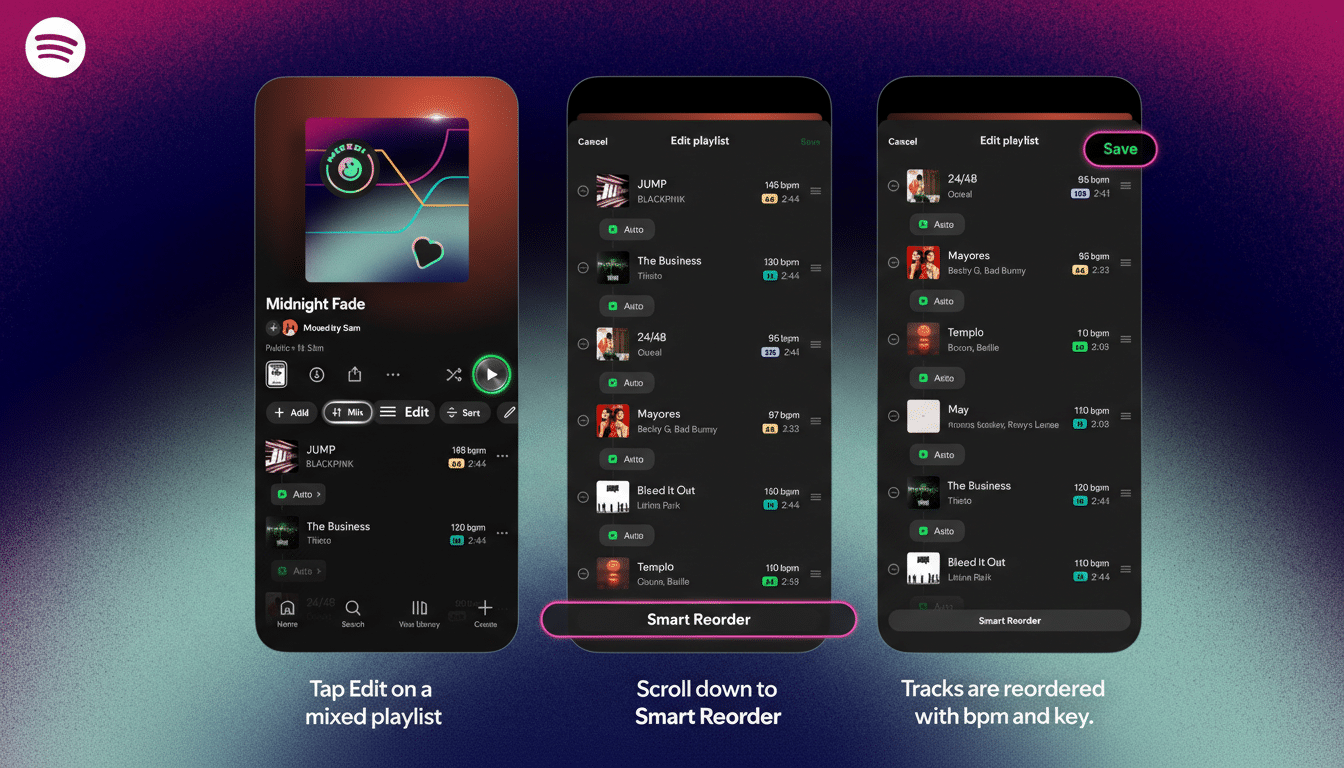
This isn’t just a longer crossfade. Crossfades can mask awkward changes, but they don’t stop an abrupt key shift from sounding off. By prioritizing BPM and key, Smart Reorder reduces those “needle‑lift” moments and preserves momentum, whether you’re curating a house set at 126 BPM or a pop mix that ebbs between 90 and 110 BPM.
How to Use Smart Reorder on Spotify Premium Playlists
Open a playlist you created, tap Edit, and look for the Smart Reorder button at the bottom. One tap reorders your tracks based on their key and beats per minute. You can accept the new sequence, tweak the order manually, or go deeper by setting transitions between specific songs with presets like Fade and Rise, or by letting Spotify handle transitions automatically.
Under the hood, Spotify has long analyzed each track’s audio profile—tempo, key, energy, and more—data it exposes in its developer tools. Smart Reorder appears to lean on this analysis to group tracks that play nicely together. The result is a “best path” through your songs that aims to keep rhythm and harmony intact from start to finish.
Why It Matters for Everyday Listening and Playlist Flow
Playlists are how many people listen now, and flow matters. A single key clash or tempo crash can derail a workout, study session, or party. Smart Reorder reduces the friction of hand‑crafting that flow, giving casual listeners a pro‑level baseline mix that’s ready in seconds. Power users still get control: you can fine‑tune transitions on a per‑track basis or rearrange after Smart Reorder does its pass.
For creators and curators, this also shortens the path from discovery to a publish‑ready set. If your folder holds 60 new tracks, Smart Reorder can propose a coherent running order instantly—handy for social sharing or collaborative playlists where taste varies but pacing needs to feel intentional.

How It Compares With Rivals in Music Streaming Apps
Apple Music’s AutoMix introduced beat‑matched transitions for certain playlists and radio‑style streams, but it’s largely a black box with limited user control. Spotify’s approach is more hands‑on: you can let it automate, then adjust transitions or override the order with your own choices.
YouTube Music offers a basic crossfade, but it doesn’t provide beat‑ and key‑aware automatic reordering or detailed per‑track transition editing. For listeners who care about a set’s arc—especially in electronic, hip‑hop, and pop where BPM and key continuity shine—Spotify now has the most granular mainstream toolset.
Real-World Use Cases and Caveats for Playlist Mixing
In testing with a 90‑minute running playlist, Smart Reorder pulled 120–128 BPM tracks forward, chained compatible keys, and parked slower cuts at the tail—no more mid‑run tempo drops. A party mix of 2010s dance pop gained cleaner handoffs as well, with transitions landing closer to downbeats, so vocal hooks didn’t collide.
There are limits. Songs with dramatic tempo changes, loose live drumming, or long ambient intros can still produce odd segues. Genre‑hopping sets may benefit from using Smart Reorder as a first draft, then manually moving “bridge” tracks to manage energy and key changes. And while Smart Reorder boosts flow, it isn’t a live DJ—there’s no beatgridding, hot cues, or creative looping.
The Bottom Line on Spotify’s New Smart Reorder Feature
Smart Reorder makes Spotify Premium feel more like a lightweight mixing desk for everyday playlists. It lowers the barrier to great sequencing, respects users who want to tinker, and acknowledges how people actually listen today. For anyone chasing a banger playlist with minimal effort, this is a meaningful and surprisingly musical upgrade.
