


The Internet has become the most widely used means of communication and the most popular virtual playground for children across the world in 2026. Hundreds of millions of people, predominantly children, teens, and young adults, are monthly active users of various social media platforms, including Snapchat.
Snapchat has gained a lot of popularity, particularly among teenagers due to its special feature: disappearing texts and media. Regrettably, the first aspect created as an entertaining privacy concept is most likely to be abused and eventually make the virtual space dangerous for children.
- The Urgency of Using Snapchat Parental Controls
- The Built-in Snapchat Parental Controls, Family Center
- Step-by-Step Guide: How to Set Up Snapchat Parental Controls
- Main Weaknesses of Built-in Parental Control Features
- Better Protection – AirDroid Parental Control
- Monitoring Tool Functionality Comparison
- Conclusion

The Urgency of Using Snapchat Parental Controls
A collaborative investigation by the National Center for Missing and Exploited Children (NCMEC) and Thorn recorded a sharp rise in organized financial sextortion cases which primarily target teenage boys. This alarming fact aligns with Snap Inc.’s five-year digital well-being study confirming that most of Generation Z has been exposed to severe online risks (such as unwanted contact, cyberbullying, and sextortion).
These cyber threats have severe psychological effects on the victims, as they usually drive the victims to self-harm. Given that these threats are borderless, Snapchat parental controls are a necessity for proactive parents.
The Built-in Snapchat Parental Controls, Family Center
Responding to high concerns regarding digital safety, the developers provide built-in Snapchat Parental Controls called Family Center. Through this specific dashboard panel, parents can now monitor their children’s average daily usage time in detail while overseeing their entire friend list and new connections.
This built-in monitoring dashboard can show context about how children might know new users through contact matches or mutual friend circles. However, this Snapchat Parental Controls system is specifically designed to protect teen privacy, so parents can only monitor interactions at a surface level and are not allowed to read message content.
Step-by-Step Guide: How to Set Up Snapchat Parental Controls
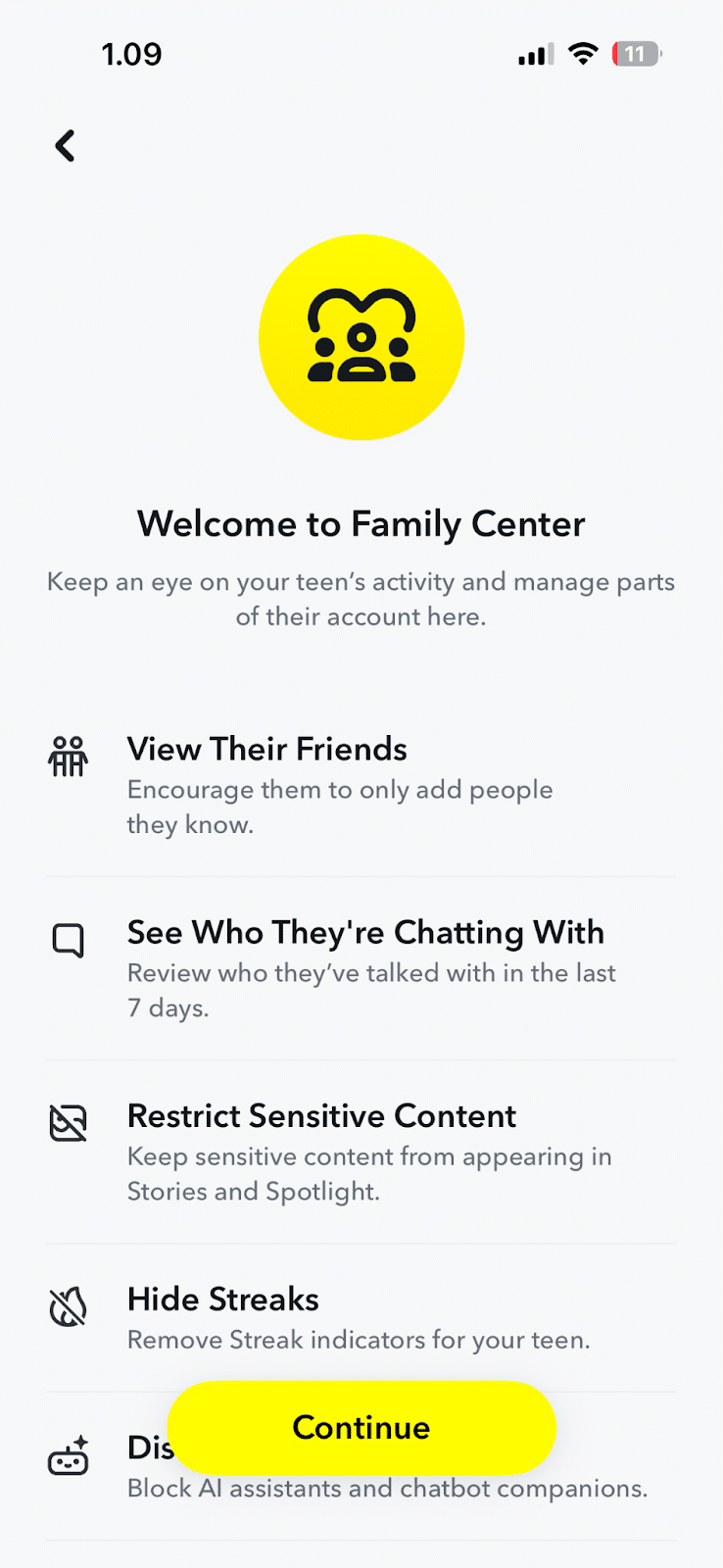
Here are the sequential instructions to activate the Family Center features and connect your monitoring account. Before setting up, make sure you already have an active account and are friends with your child’s account so the monitoring system can connect.
- Step 1: Open the app > Tap the profile picture icon in the top left corner of the screen > Select the gear icon to open the Settings menu.

- Step 2: Scroll down the screen to the Privacy Control section > Select the Family Center option and Continue.
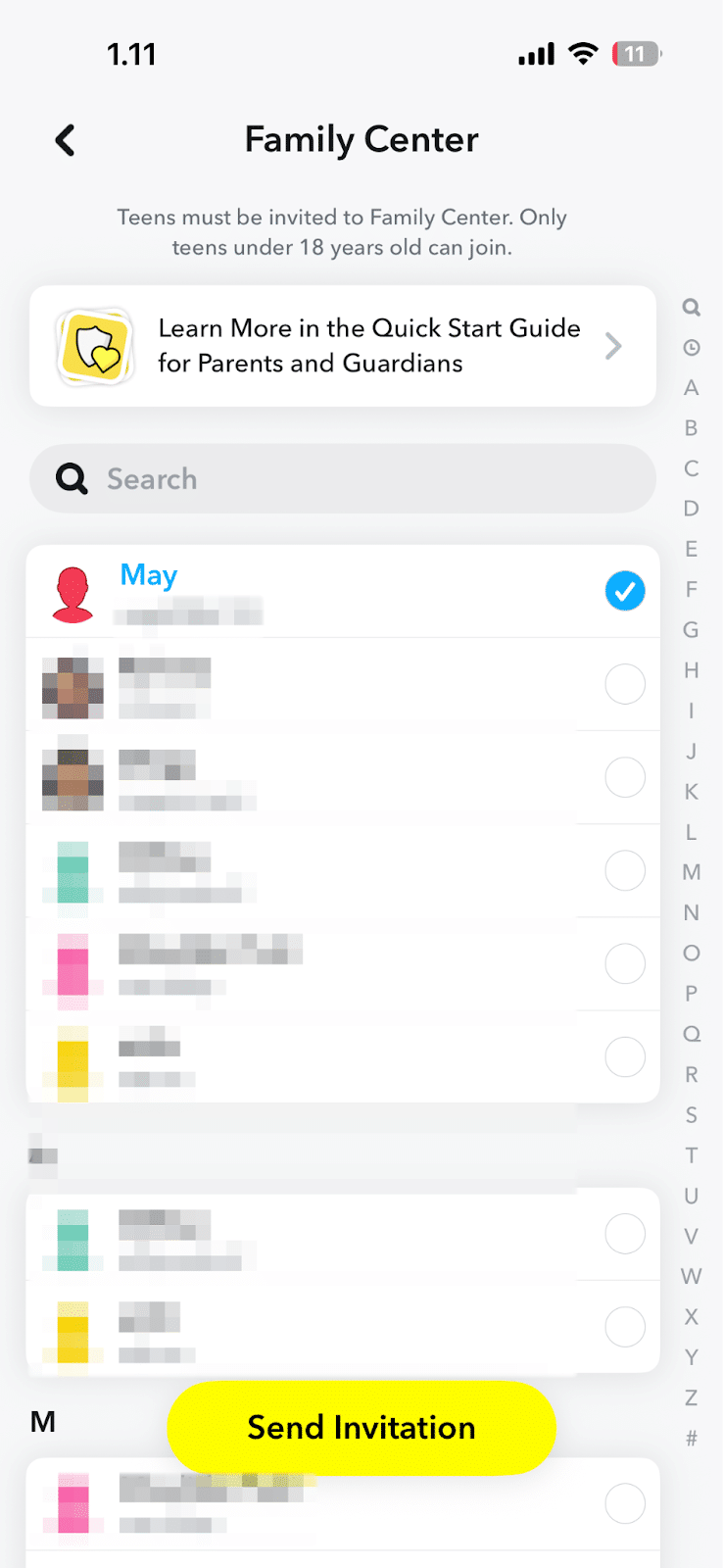
- Step 3: Search for your child’s account name from the friend list > Press the Send Invitation button.
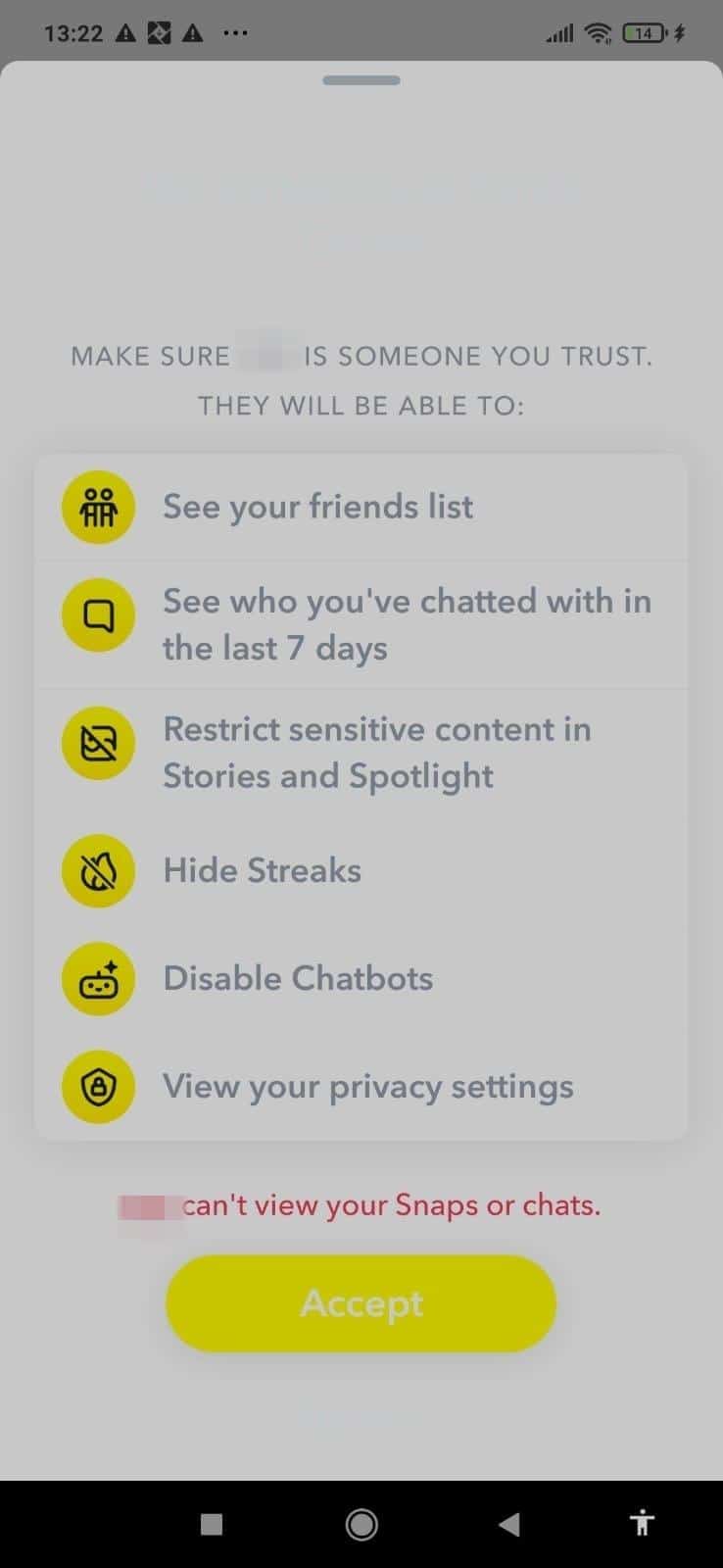
- Step 4: Open the app on the child’s phone and check the new chat message > Press the Accept button to officially start monitoring their activity.
Main Weaknesses of Built-in Parental Control Features
Although the Family Center system is a step forward, this built-in feature has a fundamental weakness because it completely denies parents access rights to evaluate their children’s messages and visual media. Due to the platform’s auto-deleting message mechanism, dangerous interactions such as cyberbullying or predator maneuvers can vanish without a trace before they can be used as valid reporting evidence.
These functional shortcomings often trigger critical discussions in various online community forums, where the majority of parents consider that current Snapchat Parental Controls are still relatively limited. Many users complain about the absence of absolute control to block the app entirely, so children can still quickly gather thousands of foreign friends even though the monitoring system is active.
Better Protection – AirDroid Parental Control
To bridge these weaknesses and inherent risks, digital security experts suggest that parents transition to using third-party software. Comprehensive services such as AirDroid Parental Control are among the strongest solutions for closing security gaps in popular messaging apps.
This app can effectively transform the monitoring pattern from mere passive observation into a fully proactive cyber protection instrument. By relying on this technology, parents can ensure social content monitoring runs smoothly to detect danger before it is too late.
Advantages of Advanced Monitoring Features
AirDroid Parental Control is supported by a smart detection system that specifically tracks sensitive keywords from the child’s entire digital activity every day. If the child’s device receives a text containing physical threats or harassment, parents will receive an instant warning notification.
If used in the Android-based device ecosystem, this app has a significant advantage: it can display the child’s device screen reflection live. With this practical method, any potentially dangerous image or text can be checked directly before the message is completely deleted.
Monitoring Tool Functionality Comparison
To help you determine the most ideal monitoring platform, here is an objective comparison table summarizing the advantages of AirDroid Parental Controls compared with the limitations of Snapchat’s built-in system.
| Features | Snapchat Native Controls | AirDroid Parental Controls |
| Snapchat Usage Report | ❌ | ✅ Supported |
| Live Screen View | ❌ | ✅ Supported |
| Sensitive Word Warning | ❌ Not Supported | ✅ Supported |
Giving children social media freedom requires a solid security layer, especially because built-in Snapchat Parental Controls fail to intervene against the spread of dangerous content directly. Therefore, implementing advanced protection apps such as AirDroid becomes an essential solution to detect threats proactively while complementing open communication in the family environment.
Conclusion
Parents are highly advised to always discuss gadget usage agreements transparently, logically, and by mutually respecting each other’s opinions. Provide a clear understanding that monitoring is not an activity to silence privacy, but rather a manifestation of responsibility to protect children from cyber scams.
Combining continuous digital literacy education with the precise implementation of Snapchat Parental Controls is the absolute key to presenting a safe online space. With this comprehensive protection strategy, children can explore their creativity on social media without having to become victims of modern cybercrimes.

