


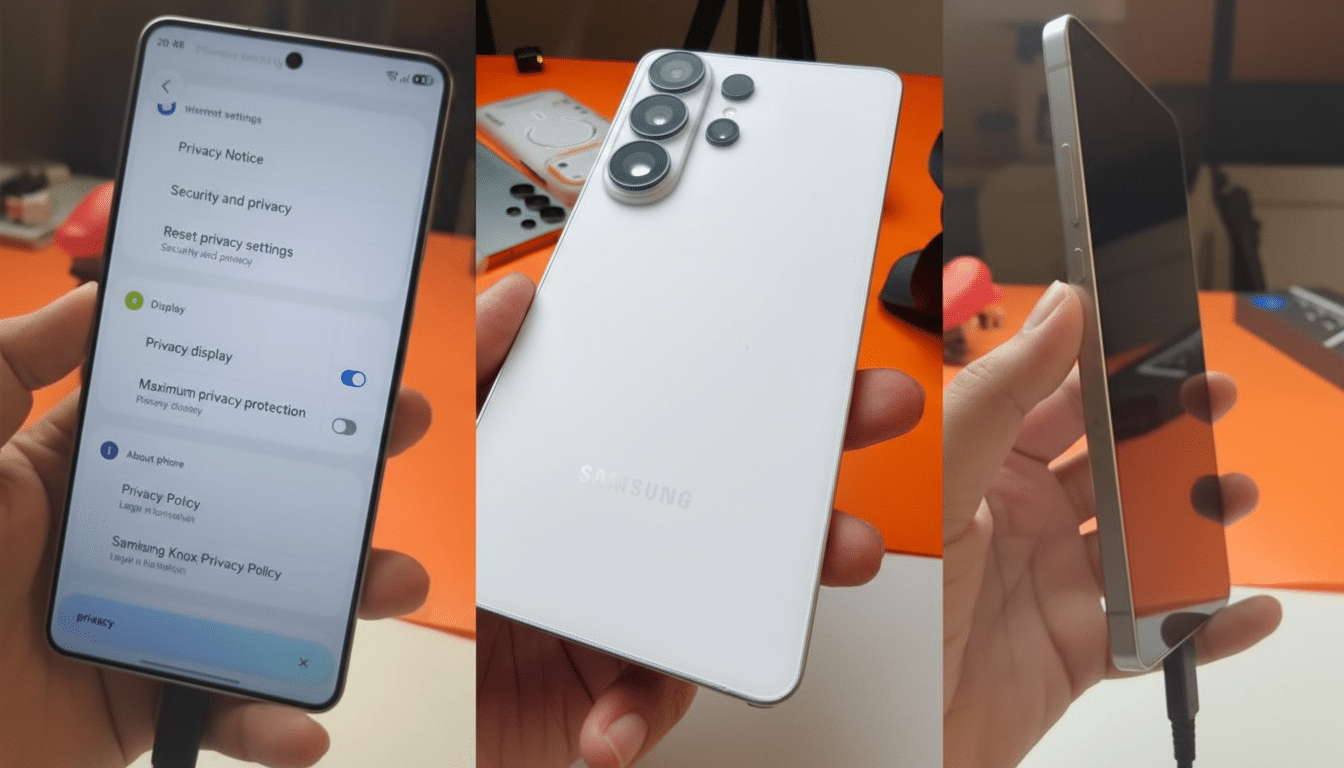
I spent hands-on time with the Samsung Galaxy S26 Ultra, and one feature jumped out as a genuine behavior-changer: an on-device privacy display mode that selectively shields notifications from side glances without blacking out your whole screen. It’s the kind of thoughtful, real-world fix that could make even entrenched iPhone users do a double take.
Why This Hands-On Matters for Real-World Privacy
We swap memes, compare menus, and hand over our phones constantly, yet our most sensitive info often lives in notifications that erupt at the worst moment. Samsung’s new approach targets that exact friction point, and it works in the flow of how people actually use phones.
The risk isn’t theoretical. The Ponemon Institute’s Visual Hacking Experiment, sponsored by 3M, found that visual data theft attempts succeeded in 91% of office trials, with sensitive information captured quickly. That was an enterprise study, but the behavior scales to coffee shops, trains, and shared couches. If a major smartphone can reduce accidental oversharing by even a fraction of that, it’s meaningful.
The Privacy Trick That Changes Behavior in Everyday Use
Here’s the standout: beyond a full-screen privacy filter, you can limit the effect to notifications only. From a shallow off-axis angle, alerts turn low-contrast and unreadable, while the content you’re showing someone front-and-center remains perfectly clear. Tilt a little further, and those alerts become effectively redacted, like they never happened.
Control is granular. In settings, I could designate specific apps—think banking, messaging, two-factor codes—to always use the angled privacy treatment. Crucially, the rest of the interface stayed shareable. This is smarter than flipping on Do Not Disturb and hoping you remembered to turn it back off, or hiding previews entirely and sacrificing utility.
Technically, this feels like a mix of software-driven contrast management and panel-level viewing-angle control on Samsung’s OLED, not just a blunt overlay. Samsung has long led on display engineering—DisplayMate has repeatedly awarded Galaxy flagships top grades—so it tracks that the fix here is elegant rather than heavy-handed.
Real examples sell it. Hand your phone to a friend to scroll photos without worrying that an RCS message flashes at the top. Pull up a QR code for a flight or concert without revealing a work alert. Demo a video in a meeting without the room seeing a banking OTP. It’s the difference between a feature you admire and one you adopt.
Hardware And Design Notes From The Floor
The Ultra feels lighter and thinner than last year’s big Samsung, with a flatter frame that’s easier to grip and a matte finish that resists smudges. The new cobalt violet color pops without screaming, a harder balance than it sounds.

The camera array sits sleekly without a giant plateau, which looks sharp but introduces a trade-off: on a table, screen-up, the phone can wobble slightly. It’s a reminder that “flat back” minimalism isn’t free. The S Pen remains integrated and responsive, and the display presents the usual Samsung cocktail of high brightness, adaptive 120Hz refresh, and strong anti-reflective properties that made text crisp under event lighting.
Performance felt instantaneous in the demo zone, with on-device AI tricks launching quickly and image edits completing in a beat. Battery claims were conservative on stage, but Samsung’s historical tuning on the Ultra line has prioritized endurance and heat management under camera and gaming loads—something I’ll want to validate in a full review.
Where It Puts Pressure on Apple’s iPhone Strategy
Apple offers robust privacy controls—hidden notification previews until unlocked, Focus modes, and on-device processing for many features—but it doesn’t offer a dynamic, angle-based privacy layer for alerts. In practice, iPhone users either silence everything or risk awkward pop-ups when sharing their screen.
That gap matters for consumers and enterprises. Gartner has noted that trust and privacy are top differentiators in premium smartphones, and Samsung’s Knox platform has long targeted compliance-conscious buyers. A subtle, user-friendly protection that reduces “visual hacking” risk could be an easy win in bring-your-own-device programs where policy meets human behavior.
Apple could counter quickly—its hardware has the brightness and panel uniformity to support a similar approach, and iOS already classifies notifications by app and context. But right now, Samsung has the cleaner answer to a daily problem that most people don’t realize is solvable.
Early Verdict on Galaxy S26 Ultra’s Privacy Approach
The Galaxy S26 Ultra’s notification-specific privacy mode is one of those features you don’t know you need until you try it, and then you can’t un-see the benefit. It preserves the joy of sharing your screen while quietly defending your private life. Combine that with the Ultra’s refined build and familiar performance headroom, and Samsung isn’t just keeping pace—it’s nudging the conversation forward.
If I were Apple, I’d watch this closely. Sometimes the most disruptive innovation is simply protecting the right pixels at the right moment.
