


Meta’s recently acquired AI startup Manus has moved from the cloud to the desktop, launching a Mac and Windows app powered by an AI agent called My Computer. The pitch is simple but ambitious: type a plain-language request and let the agent handle chores across your files, folders, and apps—whether that’s sorting images, renaming documents, sending emails, or even scaffolding simple software projects.
The release lands at a moment when “agentic” AI is shifting from demos to daily work. Instead of just drafting text, these systems take actions on your machine, invoking commands, orchestrating tools, and interacting with third-party services in the background.
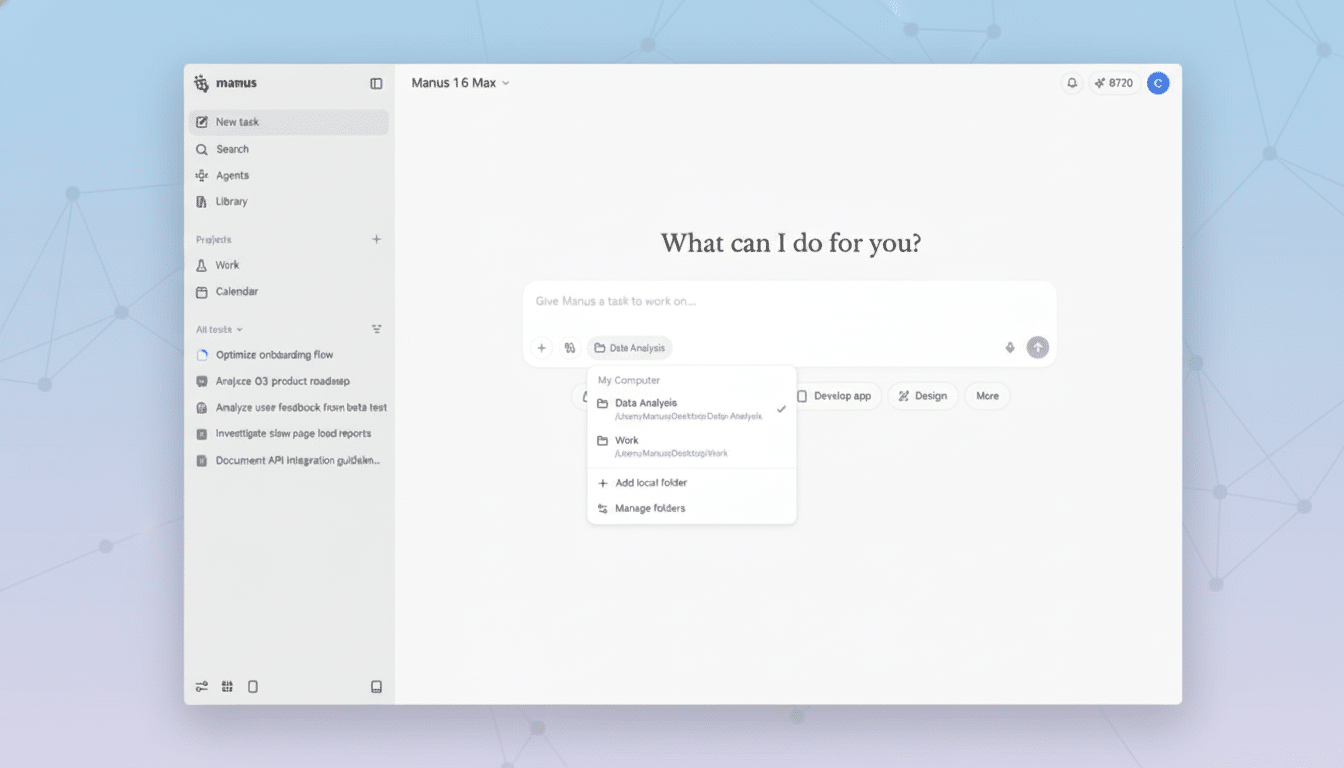
What My Computer Can Do on Manus’s Desktop App
Open the Manus app and you’re greeted by a chat-style interface with a prompt box and quick controls to attach files or entire folders. Ask it to organize a chaotic directory of photos and it will analyze contents, then create subfolders—say, bouquets, bridal shots, and decor for a florist—moving files accordingly. The company says it achieves this by executing command-line instructions locally, a more deterministic approach than pure “AI magic.”
Beyond clustering and classification, My Computer can batch-convert file formats, apply content-aware renaming, and enforce a consistent structure across shared project folders. It can also integrate with Google apps for end-to-end tasks: fetch a file from your desktop, draft an email in Gmail, and send it to a client—no manual hopping between windows.
There’s a developer angle, too. Manus says the agent can “build apps,” which in practice means generating and wiring up starter code, project scaffolding, and scripts. It can tap a local GPU to train a small machine learning model or run a large language model for on-device inference—useful when privacy, latency, or cost argues against the cloud.
Crucially, every automation is permission-gated. When you add a folder, the app asks for access with Allow, Always Allow, or Cancel. That granular control helps contain risk and offers a paper trail for what the agent can touch.
Local Control and Security for Agentic Desktop AI
Agentic tools raise new security questions because they don’t stop at suggestions; they act. The OWASP Top 10 for LLM Applications highlights threats including prompt injection, data exfiltration, and overbroad tool use. Running Manus locally lowers some exposure versus a purely cloud-based agent, but it does not eliminate risks like a malicious file triggering unintended actions.
Best practice for teams piloting tools like this includes limiting agent permissions to specific directories, enabling audit logging, and sandboxing sensitive operations. NIST’s AI Risk Management Framework—while model-agnostic—offers a useful lens for governing capabilities that blend automation with access to corporate systems.

Manus’s permission prompts are a start, and the company’s emphasis on CLI transparency could aid troubleshooting. The test for enterprise adoption will be administrative controls: role-based access, policy enforcement, and easy revocation if a workflow goes sideways.
Pricing and Availability for Manus’s Desktop App
The desktop app is available now for macOS and Windows. A free tier provides limited access; paid plans start at $20 per month, or $17 per month when billed annually, with three tiers aimed at heavier usage. Manus previously operated as a cloud-only service, but the company says a native desktop client meets users “where they do their most important work.”
Competitive and Regulatory Context for Manus and Meta
Manus enters a crowded field of action-oriented assistants. Microsoft is infusing Copilot deeper into Windows and Office, Google is expanding agent capabilities across Workspace, and newer entrants such as OpenClaw have sparked debate about how far to push autonomy on consumer machines. Gartner projects that by 2026, 80% of enterprises will have used generative AI APIs or deployed generative AI–enabled applications, up sharply from today—fertile ground for desktop agents that can actually do the work.
The startup’s trajectory adds a geopolitical wrinkle. Meta acquired Manus in December, and CNBC has reported that Chinese authorities are reviewing the legality of that deal. Manus was founded in China before relocating its headquarters to Singapore, a detail that could shape compliance considerations for multinational customers.
Why This Matters for Desktop AI Agents and Users
Most knowledge work still lives on the desktop: sprawling folders, half-finished drafts, scripts, and spreadsheets. A competent local agent that can read, write, move, and message on your behalf promises time savings on the chores that clog calendars—sorting assets, standardizing filenames, hunting for the right version, or packaging deliverables.
The upside is obvious for small businesses and freelancers who lack IT staff: point the agent at the mess and ask for order. The risk is equally clear: if an agent can operate your machine, it needs tight guardrails and transparent logs. Early adopters should start with low-stakes automations, restrict access to a sandboxed workspace, and expand as confidence grows.
For Meta, Manus’s desktop push signals a broader bet on practical, task-centric AI. If My Computer proves reliable and controllable, it could become the connective tissue between models in the cloud and the everyday files and apps people actually use—turning AI from a chat in a tab into a capable coworker on your desk.
