


Spotify is cranking up the volume on social listening. The company is also launching a new real-time sharing experience directly from Messages that helps you show friends what you are streaming and join in on collaborative Jams without ever having to leave the app. It’s a blatant ploy to keep music conversations happening on Twitter, the opposite of users link-hopping and leaving its app by way of sharing links, and to make discovery feel as much like a public group activity as scrolling feels like it’s an isolated solo pursuit.
How Spotify’s Real-Time Sharing in Messages Works
The feature now resides within Messages, Spotify’s in-app messaging service. Your current track will appear at the top of one-on-one chats after turning on Listening Activity in Privacy & Social settings. Tap a friend’s card to instantly play the song, save it to a playlist, view context menu options, or react with an emoji — no links to copy and no app switching in sight.
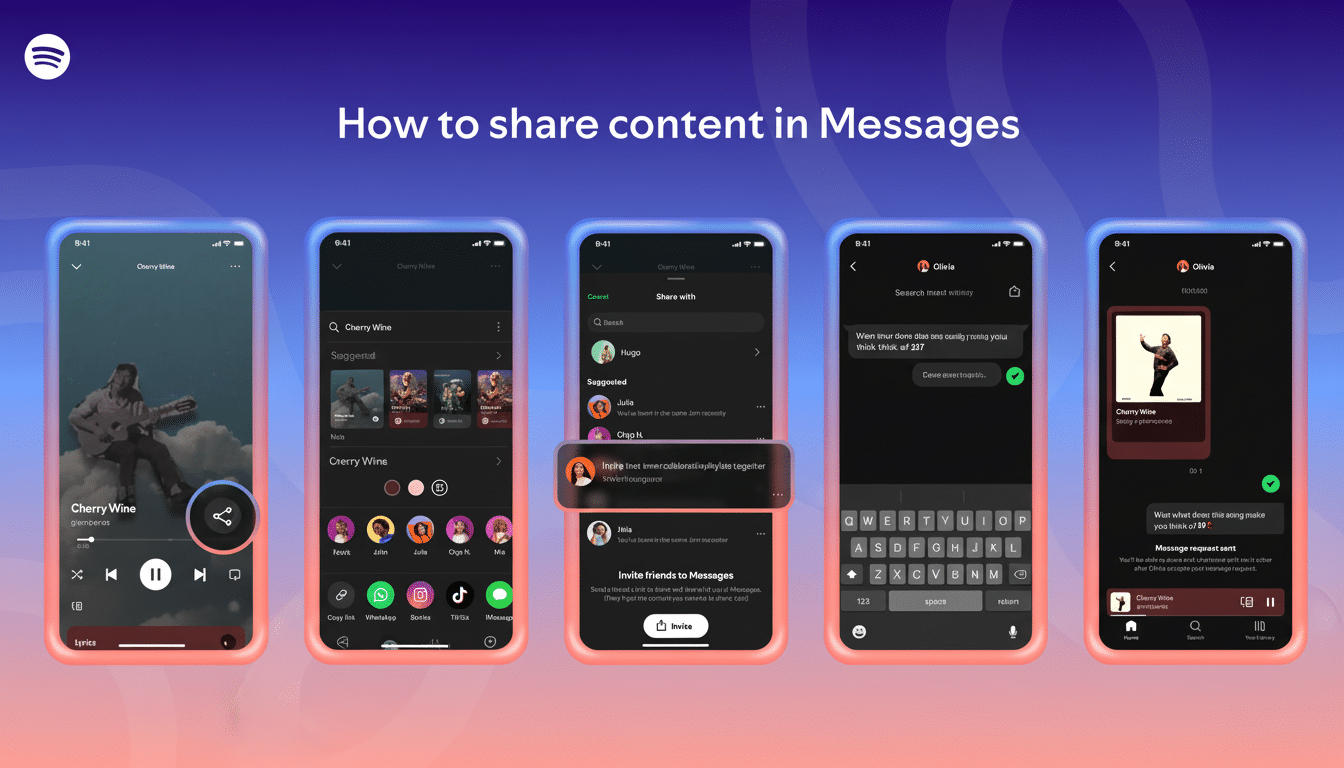
Messages is designed with guardrails. You’re also only able to message people you’ve had previous interactions with on Spotify — so a playlist collaborator or someone you joined for a Jam or Blend is fair game. Chats are encrypted while at rest and in transit, though they aren’t end-to-end encrypted. The company is also gating features in Messages, including Listening Activity, to people 16 and older.
Availability is rolling out on iOS and Android in markets where Messages are available. That phased rollout is consistent with how Spotify typically launches social features, and is testing engagement and trust settings before a global-scale push.
Collaborative Jams Get Easier With Request to Jam
Real-time sharing is accompanied by a new Request to Jam flow. Premium subscribers can click on the Jam button in the chat header to invite a friend to co-listen. If the recipient agrees, he or she becomes the host — and both people can drop tracks into a shared queue, listening to them while in sync. Free users can enter when invited by a Premium subscriber; in this way, the funnel of participation is broadened without letting everyone in on all that Premium has to offer.
Indeed, it’s a level-up: A study session, long-distance hang, or pregame playlist can go from one-way posted links to a live room where the queue turns into conversation. It also legitimizes a behavior that already occurs informally on Discord and FaceTime, though this time, it’s built into Spotify for low-friction handoffs between chat and playback.
Why Spotify Is Betting on Social Listening Features
For Spotify, the emphasis is on retention and discovery. By preventing listeners from being kicked out of the app when they share recommendations, it can now bolt closed that loop between chat, play, and save — all actions that commonly pull people into longer sessions and more frequently throughout the day. According to IFPI, streaming now accounts for most recorded music revenue worldwide, and the fight for ears has never been more intense. Social mechanics are a tried-and-true method of surfacing more catalog without paid promotion.
The move also marks a widening of Spotify’s friend features, which have been available on desktop as part of the Friend Activity feed for some time. Where competitors often lash co-listening onto broader system tools — like Apple’s upcoming SharePlay service in FaceTime, for example — Spotify’s approach keeps the experience platform-agnostic and tailor-made for music. That distinction is important for younger listeners who already consider playlists akin to social profiles. Research by industry analysts such as Luminate has observed that peer referrals and friend feeds are now the leading discovery routes, particularly with teens and young adults.
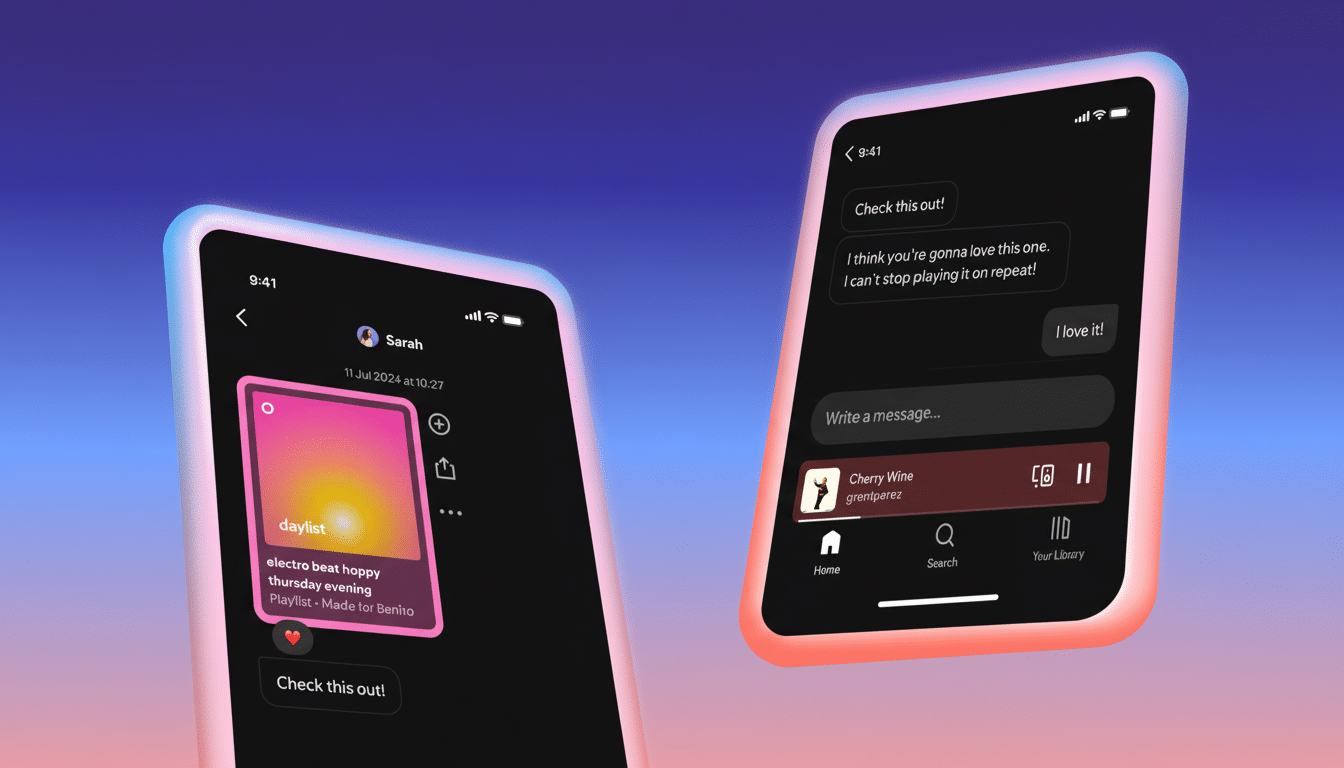
Scale gives the feature leverage. Spotify says it has a global audience in the hundreds of millions, with proportionally many listeners on mobile. And even incremental gains in shares-per-user or saves-per-session can result in significant lifts in engagement. Expect Spotify to monitor metrics such as Messages sent from Now Playing, Jam acceptance rates, and the downstream effects on playlist creation.
Privacy Controls and Etiquette for Real-Time Sharing
Real-time status can feel intimate. The first line of defense is Spotify’s opt-in Listening Activity control: If you don’t turn this feature on, your currently playing tracks aren’t shared in chats. You can also mute reactions, exit a Jam, or simply disable the setting. The absence of end-to-end encryption might be off-putting to some privacy purists, but encryption at rest and in transit is typical for many cloud services and perfectly in line with Spotify’s previous messaging on the topic.
For users, the best guideline is straightforward: use Listening Activity as a status indicator. If you wouldn’t share it to a social feed, maybe turn that sharing off when listening in private — whether that’s guilty pleasures (fine), work focus playlists, or podcasts you’d rather keep to yourself.
What Comes Next for Spotify’s Social Listening Push
Today’s update lays the groundwork for more flavorful social layers. Group chats, smarter recommendations based on friends’ queues, or weekly charts drawn from your inner circle would all be reasonable extensions. Hardware tie-ins — such as a seamless handoff to shared speakers or cars during a Jam — could help push co-listening into living rooms and on road trips.
It’s a clear strategic throughline: make discovery conversational, sharing instantaneous, and keep the music playing.
But with real-time listening now shared with friends and Jams just a tap away, Spotify is betting that the future of music streaming sounds a lot more like hanging out.
