


Picture this: you’re five minutes into an important client meeting on your iPhone 17 Pro, and your phone slowly slides forward on your desk. You scramble to prop it back up against a stack of books, losing eye contact and your train of thought in the process. It’s a scenario that plays out daily for millions of remote workers who rely on their iPhones as primary communication devices. With hybrid and fully remote work now standard across industries, your iPhone 17 Pro has become more than a phone—it’s your conference room, your presentation tool, and often your first impression in professional settings. Yet most people never consider whether their phone case is actually working against them during these critical moments. Issues like instability, awkward viewing angles, and poor ergonomics silently erode your professional presence and productivity throughout the workday. This article explores how the right iPhone 17 Pro case—one specifically optimized for video calls and desk work—can eliminate these frustrations and transform your daily communication experience from improvised to intentional.
The Critical Role of Your iPhone Case in Professional Video Calls
Most iPhone 17 Pro cases are designed with one primary goal: protection from drops and scratches. While that’s valuable, it completely ignores how you actually use your phone for hours each day. During video calls, a standard case offers no way to position your device at eye level, forcing you to lean it against objects or hold it in your hand—both of which create an unstable, unprofessional image. Camera stability directly affects how others perceive you; even subtle wobbling or shifting mid-conversation signals disorganization and distracts your colleagues from your message. Remote workers need setups that feel as reliable as a laptop on a desk, not a phone balanced precariously on a coffee mug. Beyond positioning, standard cases often trap heat during extended FaceTime or Zoom sessions, causing your iPhone 17 Pro to throttle performance or dim its display. Some cases partially block speaker grilles or muffle audio output, degrading call quality without you realizing it. Others feature slick finishes that slide on smooth desk surfaces the moment you gesture or accidentally bump your workspace. These aren’t minor inconveniences—they compound across dozens of weekly calls, quietly undermining your communication effectiveness and adding unnecessary friction to your professional routine.
- The Critical Role of Your iPhone Case in Professional Video Calls
- Key Features to Look for in a Video Call-Optimized Case
- Introducing the TORRAS Ostand Q3 Air: A Game-Changer for Remote Workers
- Step-by-Step Guide to Optimizing Your iPhone 17 Pro Case for Desk Work
- Elevate Your Video Call Setup with the Right Case
Key Features to Look for in a Video Call-Optimized Case
When shopping for an iPhone 17 Pro case that genuinely supports your video call workflow, you need to think beyond drop protection and aesthetics. The most important feature is a built-in stand mechanism that holds your phone securely at multiple angles. A good stand should lock into position firmly enough that tapping your screen to mute, share a document, or adjust settings doesn’t topple the entire setup. Look for cases offering both portrait and landscape orientations, since different apps and meeting formats demand flexibility. Non-slip materials on the base contact points are equally essential—a case with rubberized edges or textured grip pads prevents gradual sliding on wooden, glass, or laminate desk surfaces that plague so many home offices. Heat dissipation is another feature most people overlook. Extended video calls push your iPhone 17 Pro’s processor hard, and a case with ventilation channels or thermally conductive materials helps maintain performance without thermal throttling dimming your screen mid-presentation. You should also verify that the case design leaves all ports, speakers, and microphones completely unobstructed. Even a millimeter of material overlapping a microphone grille can muffle your voice or create a hollow echo that colleagues notice but rarely mention. Finally, the case should allow simultaneous charging while standing upright—whether through an open Lightning or USB-C port access, or MagSafe compatibility—so your battery never dies during back-to-back meetings. The best desk work cases integrate seamlessly into your routine rather than requiring you to remove them for specific tasks.
Why Stability Matters Most for Remote Workers
A phone that shifts or falls during a video call does more than interrupt the conversation—it signals to clients and managers that your setup isn’t professional. Imagine presenting quarterly results when your iPhone tips forward, giving your team a close-up of your ceiling fan. These moments erode credibility in ways that are hard to recover from. For remote workers who take five to ten video calls daily, stability isn’t a luxury; it’s the foundation that everything else depends on. A reliably stable case means you can gesture naturally, reach for notes, and type without ever worrying about your camera angle changing unexpectedly.
Introducing the TORRAS Ostand Q3 Air: A Game-Changer for Remote Workers
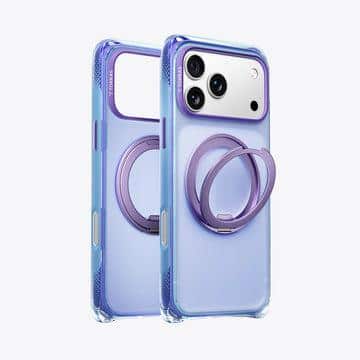
Among the growing category of function-first iPhone 17 Pro cases, the TORRAS Ostand Q3 Air stands out as a purpose-built solution for professionals who spend significant time on video calls. Unlike generic protective cases with flimsy flip-out tabs that wobble under the slightest touch, this case was designed from the ground up around the demands of desk-based communication. Its integrated multi-angle stand deploys smoothly and locks into position with enough rigidity that you can tap, swipe, and interact with your screen without any shift in camera angle—something that immediately separates it from the dozens of cases claiming stand functionality but delivering frustration.
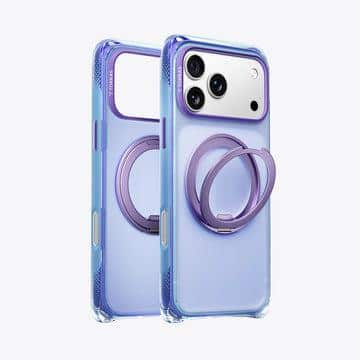
The lightweight construction addresses a common complaint among professionals who’ve tried stand-equipped cases in the past: bulk. Nobody wants their iPhone 17 Pro to feel like a brick in their pocket just to gain desk functionality. The Ostand Q3 Air manages to keep the profile slim while still delivering meaningful structural support in both portrait and landscape orientations. This dual-orientation capability matters more than many people initially realize. Portrait mode works well for one-on-one FaceTime conversations and quick check-ins, while landscape orientation is essential for group Zoom meetings where you need to see multiple participants and shared screens clearly.
What makes this case particularly effective for remote workers is how it integrates into your existing workflow without demanding any behavioral changes. You don’t need to remove it for wireless charging, attach separate accessories, or fumble with magnetic mounts. It works with MagSafe chargers, maintains full port and speaker access, and transitions from pocket to desk stand in a single motion. The materials used on the base contact points provide genuine grip on common desk surfaces—glass, wood, and laminate—eliminating the slow forward creep that plagues smoother cases during thirty-minute or hour-long calls. Compared to generic cases that treat video calls as an afterthought, the Ostand Q3 Air treats them as the primary use case they’ve become for today’s workforce.
Benefits of the Ostand Q3 Air for Daily Video Calls
The hands-free operation this case enables fundamentally changes how you show up on camera. With your iPhone 17 Pro positioned at a consistent, flattering angle, your framing stays professional throughout every meeting—no more unflattering low angles that look up your nose or unstable positions that shift when you reach for your coffee. Your hands remain free to take notes, pull up documents on a secondary screen, or gesture naturally while speaking, all of which contribute to more engaging and productive conversations. The durability of the stand mechanism also means it performs identically on call number one and call number one thousand, giving you confidence that your setup won’t degrade over months of daily use. For remote workers whose professional reputation depends partly on how polished they appear on screen, these benefits translate directly into stronger client relationships and more effective team collaboration.
Step-by-Step Guide to Optimizing Your iPhone 17 Pro Case for Desk Work
Transforming your video call experience doesn’t require an expensive overhaul of your entire home office—it starts with a systematic approach to how your iPhone 17 Pro sits on your desk. Follow these steps to move from an improvised setup to a genuinely professional one that supports you through every meeting.
First, assess your current case honestly. Set up a test video call and record yourself for five minutes while working normally. Watch the playback critically. Does your phone shift when you reach for something? Is the camera angle flattering, or are colleagues looking up at your ceiling or down at your chin? Note whether your audio sounds clear or slightly muffled, and check if your phone gets warm during longer sessions. These observations reveal exactly where your current case falls short and help you prioritize what matters most for your workflow.
Second, choose a case specifically engineered for desk-based use. Rather than settling for a generic protective shell and buying a separate stand, look for an integrated solution like the TORRAS Ostand Q3 Air that combines protection with functional positioning. An integrated stand eliminates the problem of forgetting accessories, losing small parts, or dealing with incompatible combinations. Ensure whatever case you select offers both portrait and landscape modes, maintains MagSafe compatibility, and keeps all ports accessible without removal.
Third, establish your optimal positioning before your next important call. Place your phone on your primary desk surface and adjust the stand angle until the camera sits at or slightly above eye level. This typically means propping the phone in portrait mode for one-on-one conversations and switching to landscape for group meetings. Pay attention to what appears behind you in the frame and ensure your lighting source faces you rather than sitting behind you. A stable case with reliable angles lets you set this once and forget it, rather than readjusting before every call.
Fourth, integrate the case into your daily desk routine so transitions feel seamless. Designate a specific spot on your desk where your phone always goes during work hours—ideally near your wireless charger so you can keep it topped up between meetings. Practice the motion of deploying the stand quickly so that when a spontaneous call comes in, you’re positioned professionally within seconds. Build the habit of checking your frame briefly in the self-view before each call begins. Over time, this routine becomes automatic, and the quality of your on-camera presence improves without conscious effort. Maintaining your setup is straightforward: periodically wipe down the base contact points to preserve grip, and ensure the stand mechanism stays free of debris that could affect its locking strength.
Practical Tips for Enhancing Stability During Long Calls
Even with an excellent stand case, a few additional measures can bulletproof your setup during marathon meeting days. Place a thin anti-slip pad or desk mat beneath your phone’s resting spot if your desk surface is particularly glossy. Adjust your desk or chair height so you naturally face the camera without hunching or craning—this reduces the temptation to reposition your phone mid-call. If you frequently gesture while speaking, keep your workspace clear within arm’s reach of your device so accidental bumps don’t become camera earthquakes. Pairing your stable iPhone 17 Pro case with Bluetooth earbuds also eliminates the risk of a headphone cable tugging your phone out of position during animated conversations.
Elevate Your Video Call Setup with the Right Case
Your iPhone 17 Pro case plays a far more significant role in your professional life than simple device protection. As video calls have become the backbone of modern work communication, the case you choose directly influences your stability, camera angles, audio clarity, and overall on-screen presence. Features like integrated multi-angle stands, non-slip base materials, heat dissipation, and unobstructed port access aren’t luxuries—they’re necessities for anyone who takes multiple calls daily and wants to project competence and reliability.
Solutions like the TORRAS Ostand Q3 Air demonstrate what’s possible when a case is designed around how professionals actually work rather than just how phones might fall. By combining lightweight construction with genuine desk functionality, MagSafe compatibility, and dependable grip across surfaces, it addresses the real frustrations remote workers face every day. If you’ve been tolerating a makeshift setup—leaning your phone against books, holding it in your hand, or dealing with gradual sliding—now is the time to evaluate whether your case is supporting your career or subtly working against it. As remote and hybrid work continues to evolve, investing in accessories specifically tailored to your daily communication needs isn’t just practical—it’s a competitive advantage that compounds with every call you take.

