


Google is quietly addressing the most annoying thing about Gemini’s Scheduled Actions. A new in-app editor allows users to edit the name, prompt, and run criteria for an existing action without needing to visit the web or wrestle with a crashy chat command. It’s a minor thing, but for people who’ve actually come to count on automations, it’s the difference between trying more ideas and giving up on the feature entirely.
Why in-app editing for Gemini Scheduled Actions matters
Scheduled Actions were made with recurring workflows in mind—imagine morning briefings that summarize calendar appointments, commute times, and top emails; end-of-day recaps that log tasks into a doc. Previously, making such adjustments meant troubleshooting with the assistant in a live chat (and hoping it didn’t misunderstand you) or detouring to an editor in a browser. Both approaches introduce more friction—and more peril—not least because one ill-understood phrase can overwrite just the instruction you wanted to clean up.
- Why in-app editing for Gemini Scheduled Actions matters
- What’s new inside the Gemini app’s beta editor release?
- Catching up to Alexa Routines and Apple Shortcuts in-app
- Availability and requirements for Gemini’s in-app editor
- Actual scenarios that are immensely better with editing
- The bottom line: in-app editing removes the biggest friction
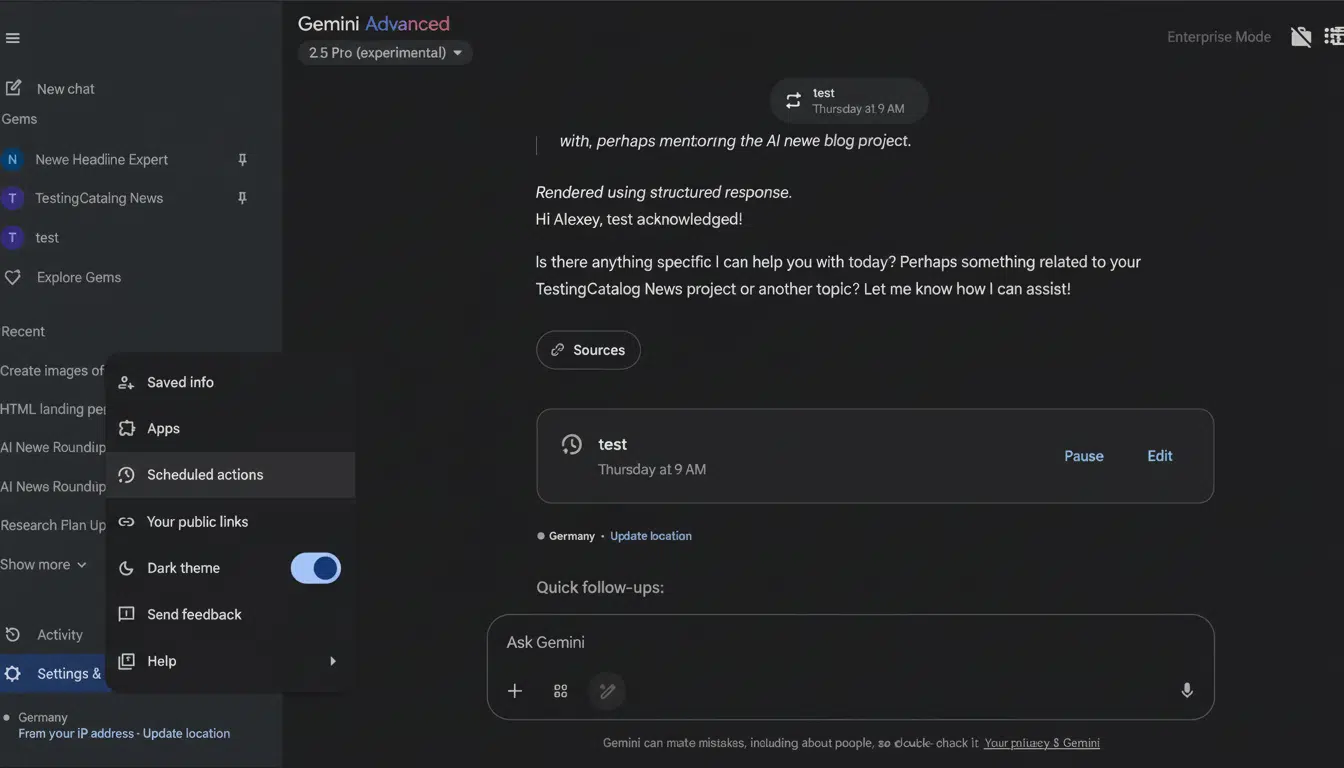
Usability research (e.g., Nielsen Norman Group) continues to prove that reduction of steps and ambiguity translates into higher task completion and retention. The idea here is that it’s all in the same place where you’re building and executing automations. It makes Scheduled Actions go from a “set once, dread changing” tool into what people will tune and iterate on over time.
What’s new inside the Gemini app’s beta editor release?
In a recent beta build of the Gemini app (version 16.38.62.sa in arm64 testing), the ellipsis on an added Scheduled Action now has—childhood dreams become reality—a tap-to-Edit option. Choosing it brings up a small window with fields for Name, Instructions, and Schedule. That is essentially feature parity with the web console, but embedded where it belongs—alongside the automation itself.
This makes fast iteration practical. You don’t have to scroll through months of history or wait 2 minutes for your launch configuration in order to decide that you want to widen a daily digest from “next three meetings” to “next five with Zoom links,” shift the run window from morning to midday, or rename an action so it’s easier to track down later. Now it’s a few taps, not a context switch. Power users with more than one action (news roundups, finance snapshots, CRM follow-ups) see the time savings snowball.
Catching up to Alexa Routines and Apple Shortcuts in-app

Those platforms proved that adoption is not only about what an automation can do, but also about how easy it is to change once real-world use cases expose edge cases. Gemini’s in-app editor is solving that last mile—where most automations either are polished into something indispensable or simply get turned off.
Crucially, Gemini’s focus is on natural-language instructions, not a visual block builder. For many users, polishing a sentence that explains to Gemini what to compile every day is quicker than grafting together multiple conditional tiles. The new editor retains that simplicity but offers structured control over when and how it runs.
Availability and requirements for Gemini’s in-app editor
Scheduled Actions are currently behind a paywall in Gemini, though AI Pro and Ultra subscribers can access them. If you already have the feature, the in-app editor will surface as the Gemini app update gradually rolls out more widely following beta testing. Like most other Gemini features, availability may differ by region and language, but the experience is clearly meant for phone-first use instead of being dependent on a desktop.
Users who are privacy-conscious will be happy that the editor makes it more straightforward to audit exactly what an action is going to do before it’s run. Here, fields that contain the instruction text and schedule help prevent the risk of a stray chat message mutating an automation under the hood—a frequent pain point with voice-driven assistants.
Actual scenarios that are immensely better with editing
- Daily briefs: Turn a morning summary into one that includes calendar locations, provide weather alerts for two cities, or drop in a stock ticker—all in a few seconds.
- Work check-ins: Tweak an afternoon action that consolidates unread starred emails and approaching deadlines into a single message, bumping its run time on busy afternoons without touching a browser.
- Smart home workflows: If you employ Gemini to fire off a lights-and-music scene plus a reminder, edits to the timing and wording no longer depend on you guessing and tweaking chat prompts. You can view and modify the conditions for triggering directly.
The bottom line: in-app editing removes the biggest friction
It’s the little interface decisions that so often reap outsized value, and this is one of them. By allowing people to edit Scheduled Actions right within the Gemini app, Google is eliminating automation’s single biggest obstacle: the fear of having to redo your work. It’s a quality-of-life upgrade that will delight existing users and provide newcomers with a more obvious route from first run to daily habit.
