


Gboard is preparing a new accessibility-friendly setting that lets emoji scale with text size, addressing a long-standing quirk in how the keyboard handles visual elements. Early evidence in a recent beta build points to a toggle that ties emoji size to the system font, making those tiny icons easier to see without changing the entire display.
What’s changing in Gboard’s approach to emoji sizing
On Android today, users can adjust two dials: display size and font size. Gboard has historically treated emoji like interface elements, enlarging them only when display size changes and ignoring font size tweaks. That meant crank up text for readability, and emoji in the picker stay small.
- What’s changing in Gboard’s approach to emoji sizing
- Why tying emoji size to system font settings matters
- How the new Gboard toggle scales emoji with font size
- Accessibility gains and design implications of larger emoji
- How this compares to other keyboards and what to watch next
- Bottom line: emoji that scale with text improve accessibility
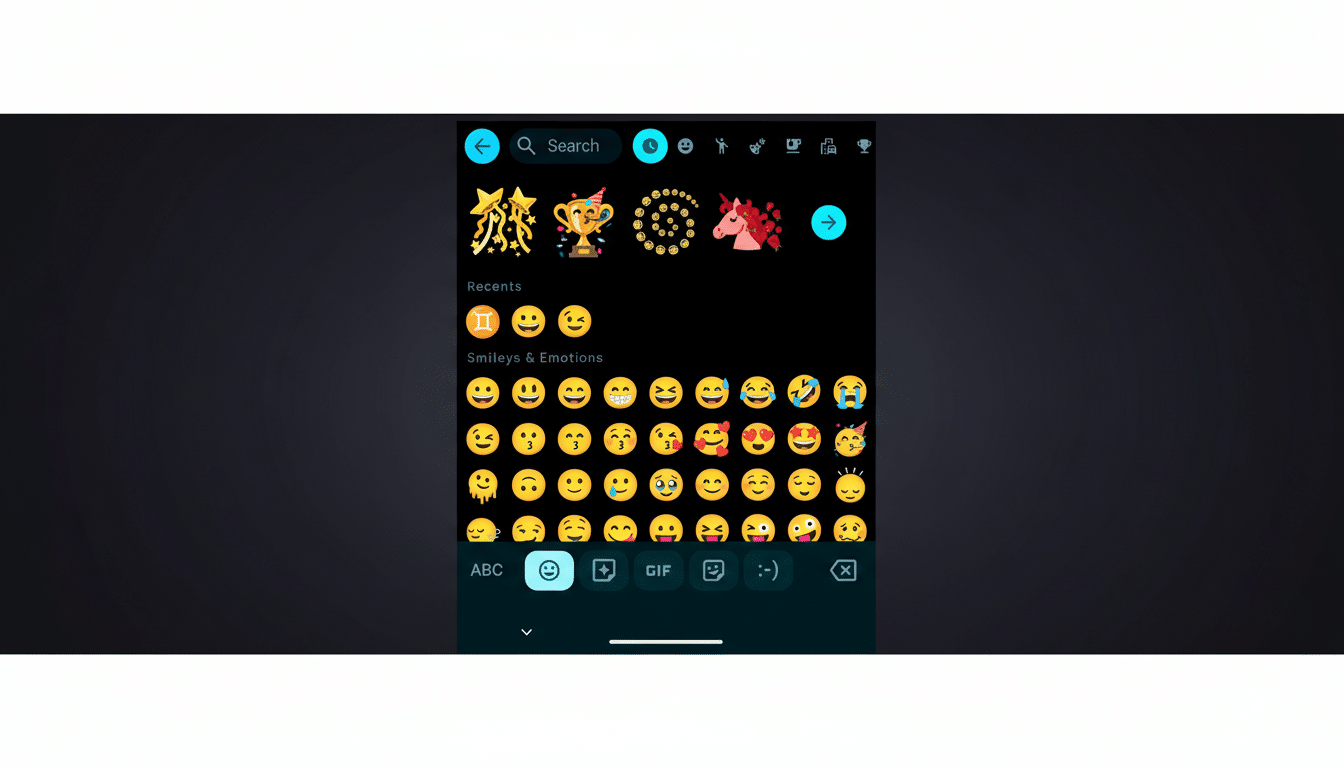
In the Gboard 16.7.4.861137547 beta (arm64-v8a), testers surfaced a hidden option that flips this behavior. With the toggle enabled, emoji within Gboard’s picker and suggestions grow alongside system font changes, keeping the scale of expressive icons in step with the text you’re reading and composing.
Why tying emoji size to system font settings matters
Emoji are not a novelty at the margins of messaging; they are core to how people communicate. The Unicode Consortium has long cited that roughly 92% of internet users employ emoji in digital conversations. In many chat apps, emoji often act as standalone replies or clarify tone in brief messages.
When those graphics are too small, nuance gets lost. Users with low vision, or anyone reading in bright light or on compact screens, can struggle to distinguish subtle details between similar emoji. Letting emoji scale with text acknowledges that these glyphs function more like language than simple icons.
How the new Gboard toggle scales emoji with font size
Based on current behavior, the new setting listens to Android’s system-wide font size preference. Increase the font size in system settings and Gboard will render larger emoji in its UI, even if the overall display size remains unchanged. The text around those emoji can remain constant if you keep display scaling at default, giving you a targeted boost without reshaping the rest of the interface.
There is one wrinkle: Gboard also offers an internal text size option in its own settings, and the beta build suggests that changing the in-app font alone does not affect emoji scaling. The feature appears to honor the system font control first, which is consistent with Android’s accessibility model but could surprise users who only adjust Gboard’s internal slider.
Accessibility gains and design implications of larger emoji
From an accessibility standpoint, this is a sensible refinement. Google’s Material Design guidance encourages apps to respect user font preferences. Extending that principle to emoji recognizes their role as meaningful content, not decorative chrome. Larger emoji can improve legibility, reduce misinterpretation, and lower fatigue during long conversations.
There are design considerations, too. As emoji scale, touch targets in the picker grid effectively get roomier, which can reduce mistaps without enlarging the entire UI. Developers may also appreciate the consistency: treating emoji as typographic elements aligns better with how modern text engines handle color fonts like Noto Color Emoji.
How this compares to other keyboards and what to watch next
Most mobile keyboards have historically tied emoji size to overall display scaling. A font-linked approach is more precise and respects that some users want larger text without oversized UI chrome. It’s a small change that could set a useful precedent for other input methods and messaging apps.
Because the option is buried in a beta and appears to be controlled by a server-side flag, rollout timing is unclear. Google often staggers these releases to a subset of users before wider availability. If you rely on the Play Store beta channel, you may see the toggle sooner; otherwise, expect it to surface once testing confirms consistent behavior across devices.
Bottom line: emoji that scale with text improve accessibility
Emoji are part of the alphabet of modern messaging. Letting them grow with text is a pragmatic fix that makes conversations clearer and keyboards more accessible. It’s not a headline feature on its own, but for millions who adjust font size daily, this could be one of those changes you notice immediately—and never want to give up.
