


Android’s next wave of sideloading safeguards is poised to change how power users install software — and it puts the humble Android Debug Bridge squarely back in the spotlight. With Google preparing an “advanced flow” that imposes a protective 24-hour waiting period when installing apps from unverified developers, ADB stands out as the direct route for immediate, user-controlled installs. For enthusiasts, developers, and even IT teams, it’s increasingly the last dependable lever for a free and open Android.
Why ADB Suddenly Matters for Sideloading and User Control
The change is simple but consequential: users attempting to sideload from unknown or unverified sources will face a one-time setup and a built-in delay, unless they enable USB debugging and install via ADB. That cool-off can be perfectly reasonable for safety, but it’s also a speed bump for legitimate workflows — pulling nightly emulator builds, testing internal enterprise tools, or deploying niche utilities that may never pass Google’s verification hoops. In those moments, ADB isn’t just convenient; it’s the failsafe that preserves user choice.
It also becomes an insurance policy against future tightening. If restrictions expand to cover more categories — say, unsigned utilities or small developer distributions — ADB can remain the mechanism that lets informed users decide what runs on their own hardware. That’s not a hypothetical edge case. Android powers over 3 billion active devices worldwide, and even slivers of the ecosystem represent millions of people with legitimate sideloading needs.
What ADB Actually Does for Power Users and Developers
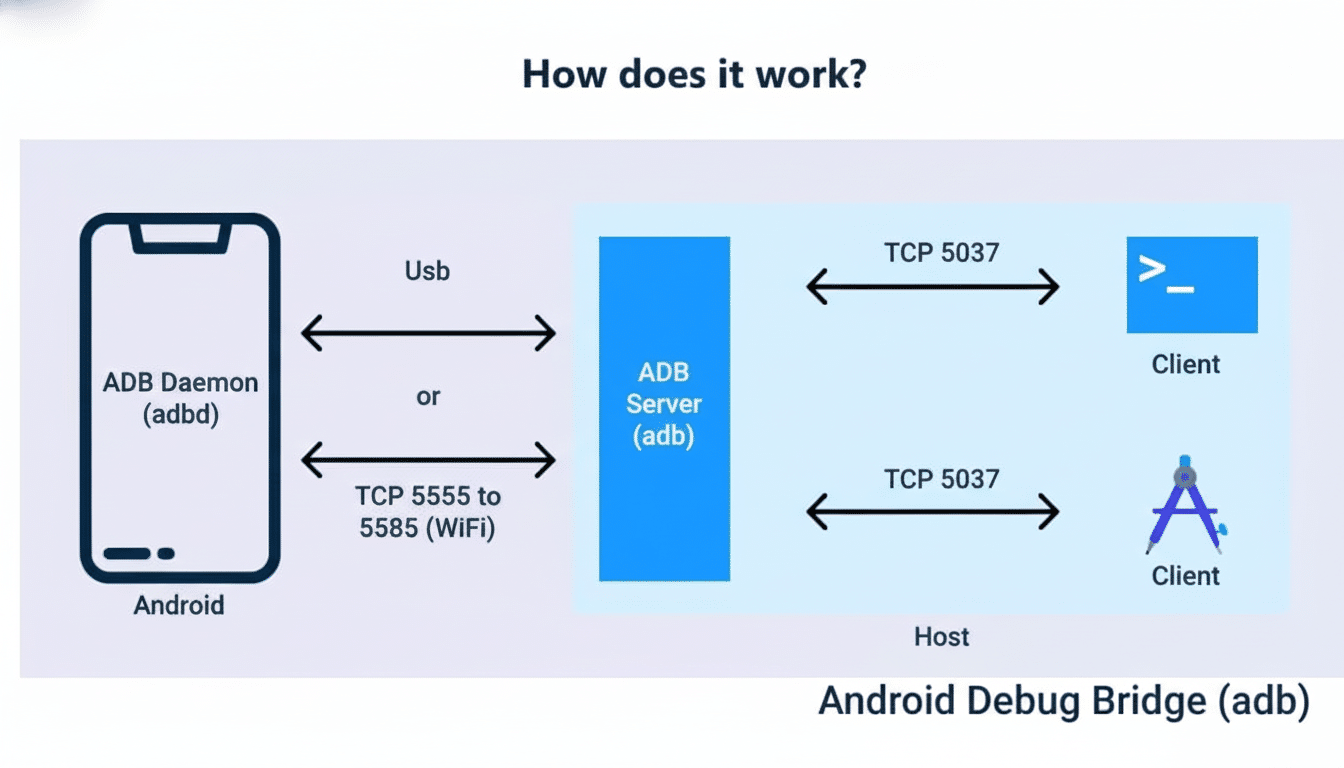
ADB is a command-line bridge between a computer and an Android device over USB or Wi-Fi. It’s foundational for developers and tinkerers alike: install and uninstall APKs, capture logs with logcat, issue shell commands, record the screen, transfer files, or sideload over-the-air packages. Paired with fastboot on unlocked devices, it also underpins custom ROM flashing and low-level recovery work — pillars of Android’s modding culture and a key reason alternative distributions still exist today.
Crucially, ADB’s power is gated by explicit user consent. USB debugging must be turned on, and pairing prompts require approving the host computer. It’s not a backdoor; it’s a carefully guarded front door for those who want to step outside the walled paths.
The Security Trade-off Behind New Sideloading Delays
Google’s move isn’t without merit. Play Protect and related policies have steadily reduced exposure to harmful apps on Play-only devices, and Google reported blocking 2.28 million policy-violating submissions in 2023 alone. The company’s security reviews, runtime permission controls, and scoped storage have made casual malware infections far less common than a decade ago. A 24-hour “think twice” timer for unverified sources is in line with that strategy.
But delays and warnings mainly work as behavioral nudges. Determined users will still install what they need — or what they think they need. As low-effort, AI-generated junkware proliferates and social engineering grows more sophisticated, the cat-and-mouse won’t end with another dialog box. Security researchers and digital rights advocates, including the Electronic Frontier Foundation, have long argued that user agency and transparency are as vital as technical guardrails. ADB embodies that balance: powerful, explicit, and opt-in.

A Test Case for Openness in Android’s Ecosystem
Android’s identity has always been a mix of openness and pragmatism. OEMs lock bootloaders to protect device integrity; enterprises manage fleets with strict policies; regulators push for competition and sideloading options. Against that backdrop, ADB is the connective tissue. It lets developers iterate quickly, QA teams instrument devices at scale, and enthusiasts install alternatives like community ROMs or app repositories without begging for permission.
Consider a few real-world scenarios.
- Independent developers ship nightly APKs to testers long before Play listing is ready.
- Carriers distribute maintenance tools that never touch consumer storefronts.
- Privacy-focused users run hardened Android forks and rely on ADB to apply updates or restore apps with verified signatures.
Remove ADB, and many of these workflows either vanish or migrate to opaque, OEM-locked channels. That’s not the Android people signed up for.
What to Watch Next as Google Refines Sideloading Rules
Google has to balance mass-market safety with a meaningful path for experts. The likely trajectory: more verification for unknown sources, stronger prompts, and better developer identity checks, while preserving ADB for those who knowingly opt in. Killing or crippling ADB would fracture the app ecosystem and development tooling — an unlikely move given its centrality to Android Studio workflows and cloud test labs.
For users, the takeaway is pragmatic. Learn the basics of ADB if you value autonomy. Verify APK provenance, compare checksums or signatures when possible, and keep Play Protect enabled even if you sideload. Organizations like NIST recommend structured app vetting and device management; those principles translate well to individual power users.
Android has matured with sensible guardrails, but ADB remains the escape hatch when you need to step outside curated lanes. As long as that bridge stands, Android can be both safer for the many and truly open for the few who take responsibility for what they install.

