


WhatsApp is introducing a new round of group chat features, meant to make it easier for people and their groups on the app to keep track of messages with several threads going at once, the company (which is owned by Facebook) announced in a blog post Thursday. Among its new tools are member tags, which allow users to add context for whoever they are in each group. The update also brings with it text stickers you can create on the fly, and event reminders, which automatically nudge invitees within a thread.
What’s New With WhatsApp Groups in This Update
Member tags allow you to grant users a second label that appears next to their name in a group with identification, letting everybody know who does what without having to change the display name of your global profile.
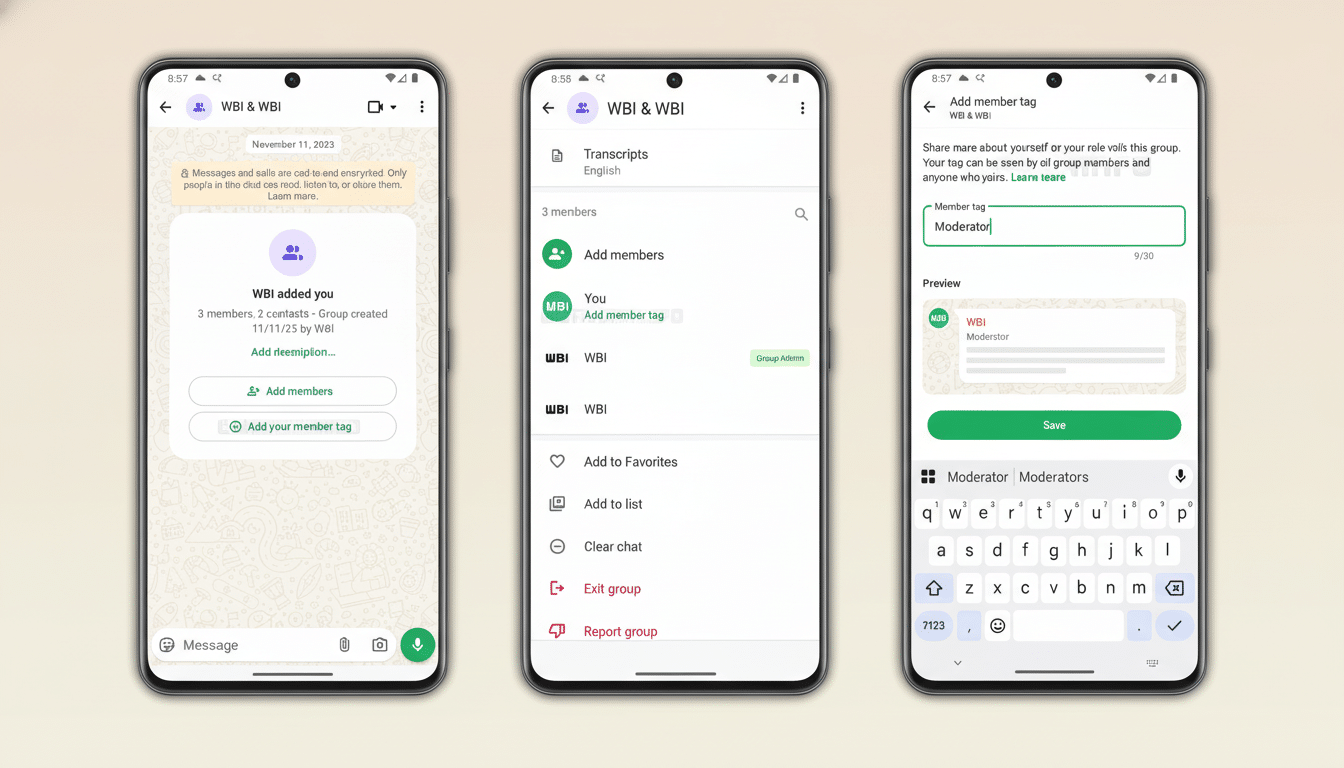
- “Anna’s Dad” in the school chat
- “Goalkeeper” in the weekend league
- “On-Call Nurse” in a shift handover group
The idea is simple: cut down confusion and speed up recognition in rapid-fire conversations.
Text stickers allow users to type anything and turn it into a sticker on the spot right from Sticker Search, and save them to their own pack without having to first send them. It’s a minor workflow tweak, but it pushes WhatsApp’s sticker ecosystem slightly closer to the creative freedom folks have come to expect from focused design and messaging applications.
Event reminders extend the platform’s group events feature by issuing notifications with custom messages to invitees once someone shares an event in a conversation. That means less manual follow-up for organizers, and fewer missed meetups, deadlines, or calls that are buried in messages.
Why Member Tags Matter for Clarity in Group Chats
Between groups, which can be as large as 1,024 participants, and Communities that house multiple related groups, context is everything. Labels that make clear who’s who slash response time and the number of misdirected pings — particularly in groups where family, volunteers, coaches, or vendors crisscross. Tags can put some of your most important contact info front and center (such as “Event Lead” or “Treasurer”) for your admins — without the added rigidity of roles or permissions.
The feature jibes with WhatsApp’s privacy-first posture as well. Instead of having job titles or phone names sprawled throughout the platform, tags are scoped to the group where they serve a purpose. In practice, that would mean identity could be strong without being over-shared — a useful distinction in cross-community collaborations, parent-teacher forums, and even neighborhood groups where not everyone knows each other offline.
How Stickers and Event Reminders Drive Participation
Stickers are one of the most powerful messaging engagement devices because they compress tone, humor, and sentiment into a tap. And by allowing users to create text stickers on the fly, it eliminates friction in expressive capabilities and makes it simpler to develop brand and inside-joke sticker packs for specific teams, clubs, or classes.

Event reminders target a classic group pain point: getting everyone on board doing the same thing. Rather than pinning the message, or posting repetitive follow-ups, organizers can trust the system to serve up an appropriate nudge at an appropriate time. For communities that rely on deadlines — study groups, sports teams, volunteer shifts — this can convert passive participation into active participation with less need for manual nudges.
WhatsApp’s Larger Push to Own Group Coordination
The update represents a multiyear sprint to turn WhatsApp into a full-featured hub for group coordination, not just one-to-one messaging. Newer features like file sharing up to 2GB, HD media, screen sharing, voice chats, and polls are still being added in the background, pulling WhatsApp closer to that of a light team workspace while maintaining its mobile-first aesthetic.
At a global scale, this positioning is important. WhatsApp has more than 2 billion users globally, Meta says, and in a variety of markets it is the go-to layer for community organizing, small-business management, and school correspondence. WhatsApp has been a leading app for discussing news in countries including Brazil and Indonesia, according to the Reuters Institute, reflecting its status as an everyday coordination tool alongside a social channel.
How WhatsApp’s Approach Stacks Up to Competitors
Member tags play into a concept that is a common one for Slack and Discord users, where display names (and sometimes roles) help to organize large communities. WhatsApp’s approach is deliberately lighter weight: there are no elaborate role hierarchies or permissions associated with labels — it’s just context that moves around with you inside of each group. Telegram, meanwhile, has focused on broad customizability and topic threads; WhatsApp has prioritized clarity and light overhead that works for billions of people using mobile networks with wildly differing bandwidth.
Availability Timeline and What to Watch Next on WhatsApp
The features are currently rolling out and will become available to WhatsApp users as updates occur in the app on iOS, Android, and desktop. Tags are optional and can be customized for each group. Text stickers reside in Sticker Search, while event reminders can be used when you create group events.
Expect WhatsApp to continue this pattern of iterating on group management and lightweight productivity. “With Communities hitting their stride and richer media capabilities in place, the next frontier is smarter organization — features that make it easier to find the right person, message or content,” he wrote in a post announcing the news on Medium; his note promised that whatever WhatsApp did would be designed “without duplicating an enterprise suite.” Today’s additions are an incremental move in that direction.
