


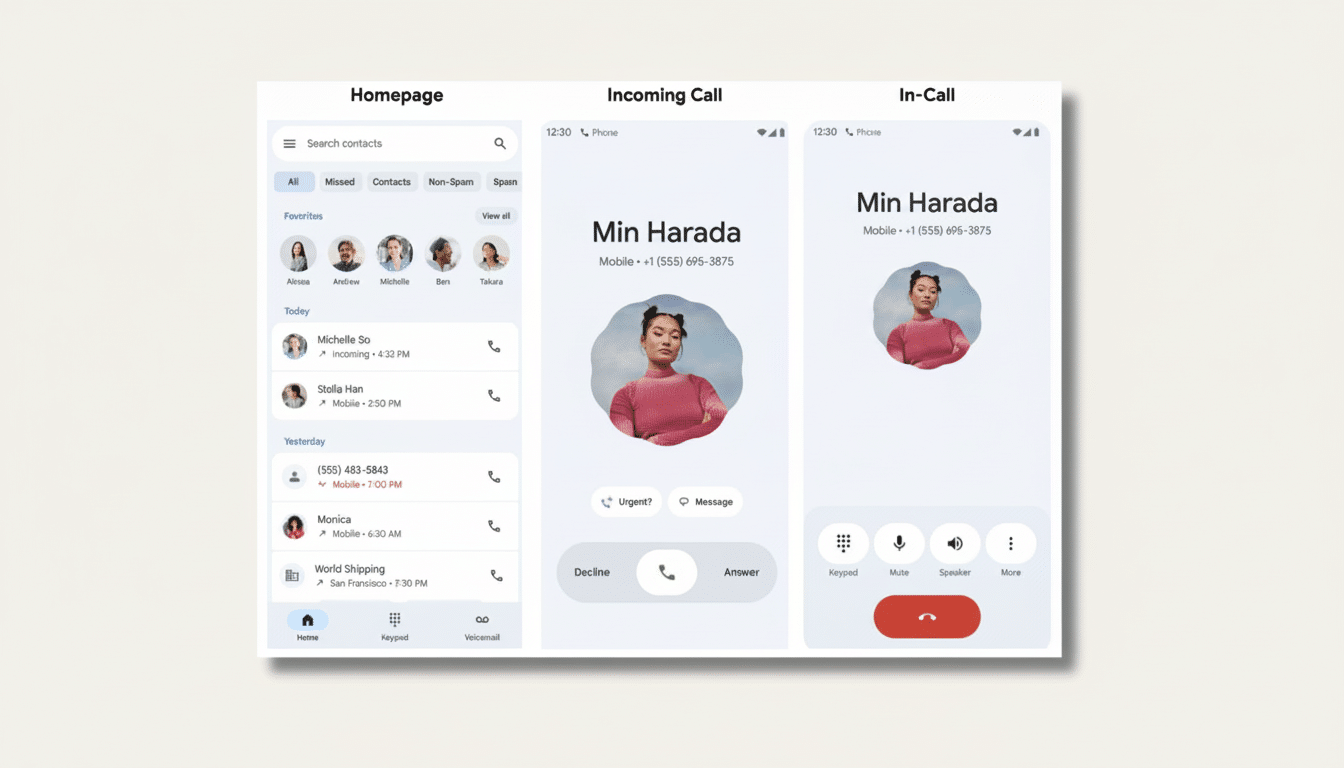
Google is testing a new approach to adding context to phone calls. A feature named Call Reason is rolling out in the Phone by Google app that allows you to mark an outgoing call to a saved contact as urgent, so the receiver knows it’s important before ignoring or answering it. The urgency badge also makes itself sticky in the call history, indicating it deserves a speedier callback.
It’s a minor tweak with big potential. Calls come over blank, and they are, quite understandably, easy to ignore. By providing callers with an easy way to express intent, Google hopes to cut down on missed time-sensitive calls without serving users more spam.

How Google’s Call Reason feature works for contacts
Inside the Phone by Google dialer, callers can flick “urgent” on and off before they place a call to someone already saved in their contacts. On the receiving end, that label shows up on the incoming screen right alongside the person or caller’s name. If the recipient can’t answer, the urgent marker is still conspicuously displayed in the caller log to encourage a faster return call. Note that, at this stage, Call Reason is only available for saved contacts — a limitation the company intentionally put in place so that scammers and robocallers can’t exploit the sense of urgency.
As with all new features, it’s part of a beta program, so the feature will come and go depending on your device and version of the app. Since the feature is part of the Google dialer, you and whoever you’re calling may require a more recent Phone by Google app for the badge to actually show up consistently. Code strings in recently published Android betas hint that the framework could accommodate finer reasons or richer visuals in the future, but Google hasn’t provided more information about customization options or a public timeline.
Why context on phone calls matters for urgent situations
Shoppers are wary of answering the phone. According to a Pew Research Center study, sixty-seven percent of Americans don’t pick up calls from unknown numbers. Meanwhile, robocalls are still a problem: The YouMail Robocall Index has been consistently estimating around 4–5 billion robocalls per month in the U.S., and Truecaller’s U.S. report tracked annual scam losses there as totaling tens of billions of dollars. The legitimate calls go to voicemail until you’re free, if they’re truly legitimate.
Emergency signaling could help separate the routine from the time-critical. Consider a family member who has two cars but is currently stranded because of a dead battery, a caregiver whose charge’s car is parked at the supermarket parking lot and the other car isn’t home, or a contractor waiting for your go-ahead before starting work. Today, those phone calls seem not so different from a casual check-in. A subtle context tag could prod recipients to respond or call back sooner when it actually counts.
How it compares to existing call trust and spam tools
Google has addressed call trust previously through Verified Calls for business, which shows a business name and reason when companies sign up and get verified. Call Reason takes that idea to personal calls with a narrower scope and emphasis on urgency. It would complement, rather than replace, existing anti-spam tools such as Google’s Call Screen for Pixel phones, carrier caller ID and other apps that offer spam call control services from firms like Hiya.
Meanwhile, on the Apple side, features such as Silence Unknown Callers and Live Voicemail place the burden of response on the person receiving the call. They cut down on interruptions and generate live transcripts, but they do not offer callers a chance to declare intent before their phone starts ringing. By declining, the recipient allows the caller to provide some context to an unanswered call. Call Reason addresses that with a system that allows control over what information is shared before getting answered.
Google’s decision to restrict the feature to saved contacts helps prevent abuse. Unregulated labels that any caller could adopt would be a boon to scammers. Still, users should proceed with caution: a malicious actor who has access to your contacts either by social engineering or account takeover could still attempt to game urgency. There will be design choices around visibility, consent, and auditing, as with any new signaling system.
What to watch next as Google tests and iterates features
If Google does expand Call Reason, there are some logical next moves. More nuanced responses than “urgent” might include uses like “time-sensitive delivery,” “meeting running late,” or “please call back.” Hooking into Do Not Disturb could enable calls from close contacts to ring while everything else stayed silent. An API might let apps — think ride-hailing, healthcare portals or schools — affix standardized reasons to calls placed on your behalf.
The balance to get right is also straightforward: enough expressiveness to be useful, enough friction in the process to deter spam. For now, Call Reason follows a conservative course — narrow in scope, clear in intent, requiring the least amount of effort for the user. It will, if it diminishes missed emergencies even marginally, feel like one of those features that should have been there all along.
