


Google Docs just gained a notably practical boost from Gemini, Google’s multimodal AI, with a new Audio Summaries feature that turns lengthy documents into quick, spoken briefings. It’s designed for those moments when you need the gist now, not after a 20-page read. Google says the capability is rolling out gradually to eligible accounts, so some users will see it before others.
What Audio Summaries Actually Do in Google Docs
Audio Summaries blend summarization and text-to-speech so you can press play and hear a concise overview of the document without consuming the whole thing. In Google Docs on the web, the option appears under Tools as “Audio” with a New label. Choose “Listen to document summary” to get a Gemini-generated briefing, or “Listen to this tab” if you want the full document read aloud instead.
- What Audio Summaries Actually Do in Google Docs
- Why This Matters for Productivity and Focus
- Who Gets It and How to Find It in Google Docs
- Accessibility and Inclusion Upside for Users
- How It Stacks Up to Rivals in Word and Notion
- Privacy and Admin Controls for Google Workspace Accounts
- Real-World Use Cases Across Teams and Roles
- What Comes Next for Audio Summaries in Docs
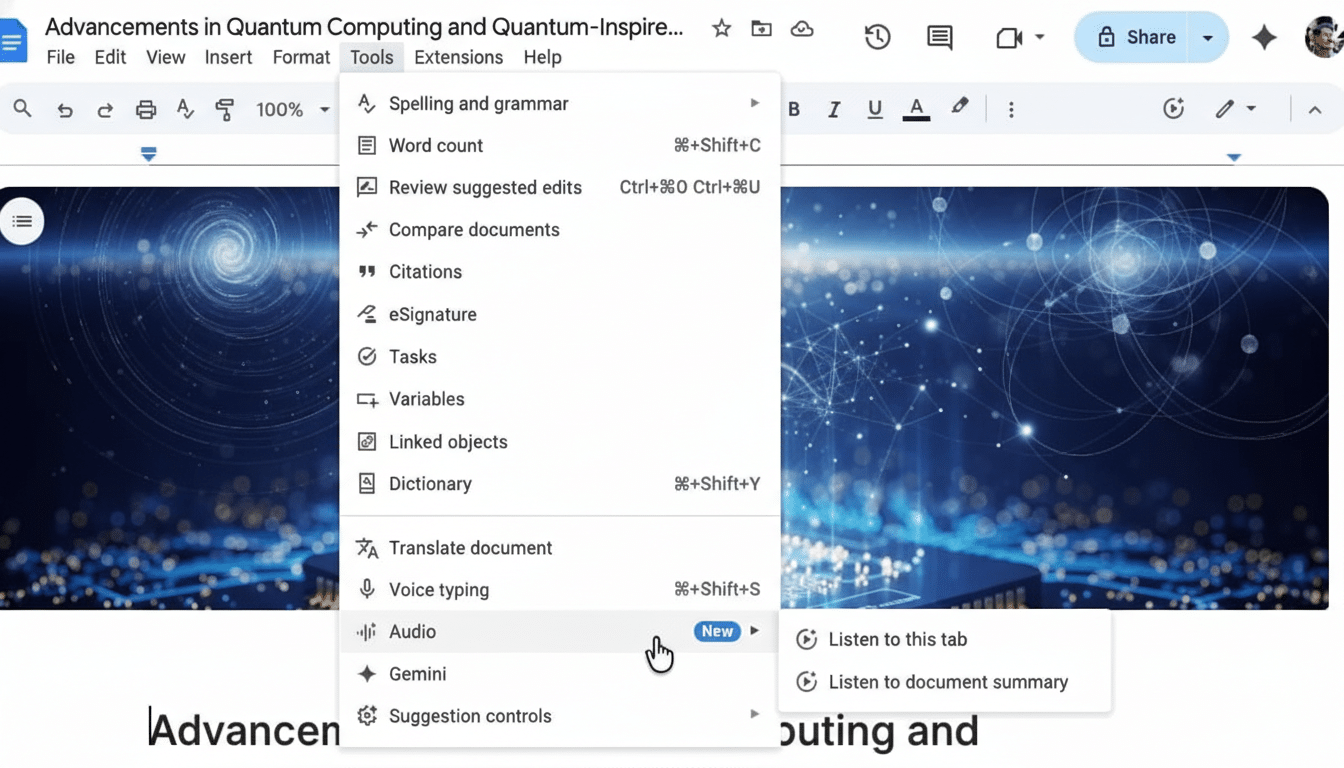
Controls let you switch between different voices—such as Narrator, Educator, or Teacher—and adjust playback speed to match how fast you want to digest the material. It’s a simple, low-friction way to triage dense reports, meeting notes, research drafts, or policy docs.
Why This Matters for Productivity and Focus
The majority of people skim instead of reading every word online, a pattern long documented by the Nielsen Norman Group. Audio summaries turn that skimming instinct into an active listening workflow: you can absorb a top-level outline on the go, then drill into the details only if they merit deeper time.
In practical terms, many knowledge workers already listen at 1.25x–2x speeds, which makes short work of routine updates and status docs. If a summary saves even a few minutes per file across a full workweek, the cumulative time reclaimed can be significant for large teams, especially across organizations operating at Google Workspace scale.
Who Gets It and How to Find It in Google Docs
Google is rolling the feature out in stages to eligible Google Workspace and Education customers with Gemini-enabled plans. As with most Workspace releases, it may surface first for some admin release tracks before wider availability. If it’s live on your account, open a document, head to Tools, select Audio, and pick your preferred listening option.
Google previously said Workspace serves more than 3 billion users globally, so a phased rollout is standard. Expect a staggered timeline as Google validates performance and scales capacity across regions and languages.
Accessibility and Inclusion Upside for Users
Providing content in multiple modalities is a longstanding best practice in digital accessibility, reflected in the W3C’s Web Content Accessibility Guidelines. Audio Summaries can help people who prefer listening, those with visual fatigue, or anyone who benefits from switching modalities to improve comprehension. It’s also useful for neurodiverse users who find spoken overviews a clearer on-ramp into complex material.
How It Stacks Up to Rivals in Word and Notion
Microsoft Word already offers Read Aloud and Copilot-powered text summaries, and note-taking platforms like Notion can generate quick summaries. What’s notable here is the hybrid approach inside Docs: AI generates the synopsis, then speaks it in one flow with selectable voices. It’s less about a new concept and more about streamlining a habit users already have—jumping between summary and full text—inside a single, familiar workspace.
Privacy and Admin Controls for Google Workspace Accounts
For enterprises, the natural question is data handling. Google’s Workspace commitments state customer content isn’t used to train general AI models without consent, and Gemini features inherit admin controls for enablement and access. Organizations should review existing data loss prevention, audit, and retention policies to ensure audio outputs align with compliance requirements.
Real-World Use Cases Across Teams and Roles
Project leads can preview weekly updates in minutes, flagging only the docs that need action. Sales teams can scan account plans before client calls while commuting. Educators can sample student drafts to prioritize feedback. Executives get rapid overviews of board materials and policy changes, reserving deep reads for the sections that matter most.
What Comes Next for Audio Summaries in Docs
Expect iterative improvements: broader language coverage, richer voice options, tighter integration with the Gemini sidebar, and potential mobile support. If Google extends the feature across other Workspace apps like Slides or Drive previews, quick audio briefings could become a default way to vet content before diving in.
The bottom line is simple: Docs now helps you decide faster what’s worth reading. For busy teams, that’s the kind of small, steady upgrade that compounds into real time savings.
