


Google is bringing real relief to the most tedious part of knowledge work: picking a time that actually works for everyone. A new Gemini-powered update in Google Calendar now suggests group-friendly meeting slots and even proposes reschedule times when multiple people decline, cutting the back-and-forth that clogs inboxes and slows projects.
Unlike the earlier Help Me Schedule assistant that lived in Gmail and centered on your own availability, this upgrade works natively inside Calendar. It weighs attendee calendars you have permission to view, checks working hours, and factors in conflicts—then surfaces options that suit the whole group, not just the organizer.
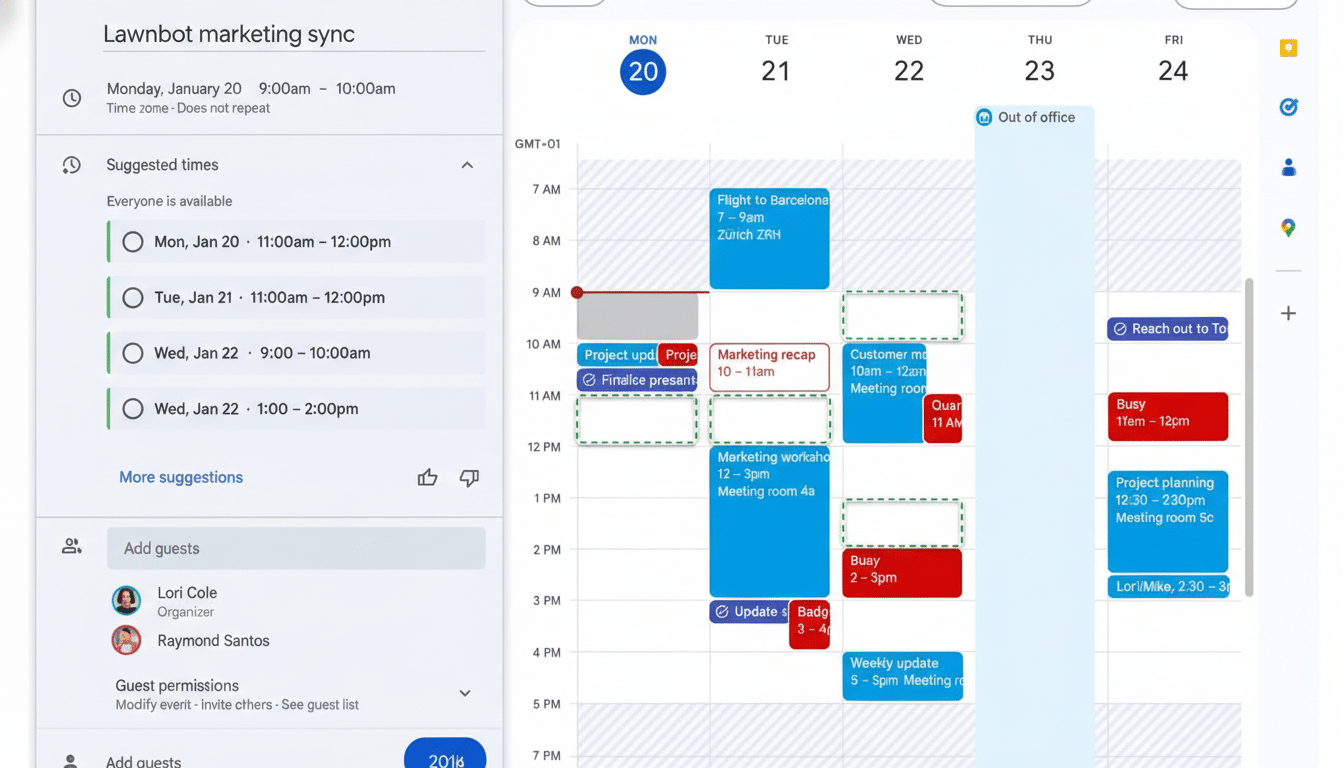
How the New Calendar Suggestions Work for Group Scheduling
When creating an event, organizers will see a Suggested times option. Behind the scenes, Gemini evaluates attendee availability, shared calendars, working hours, time zones, and known conflicts like out-of-office or focus time. The result is a ranked list of slots most likely to stick, presented right where you set the invite.
It’s a notable evolution from Calendar’s longstanding manual tools. Rather than scrolling through grids and eyeballing overlaps, the system does the reconciliation and prioritization for you. If you don’t have access to a participant’s calendar, it won’t guess; it simply optimizes around the data you can see, preserving existing privacy boundaries.
Consider a product review with teammates in New York, London, and Bengaluru. The feature will spotlight the limited windows that hit all three working-hour bands, filtering out late-night or early-morning options that often slip through human planning. That alone can prevent the “sorry, can’t do 10 p.m.” replies that trigger replanning cycles.
Rescheduling Without The Back And Forth
If several people decline an invite, Calendar now displays a banner proposing an alternative time when everyone appears free. One click updates the event for all attendees—no separate poll, no email thread, no spreadsheet of options. This is where the time savings add up.
The pain here is real: Doodle’s State of Meetings research has estimated professionals lose around 2 hours each week just coordinating schedules. Microsoft’s Work Trend Index has likewise flagged a sharp rise in meeting loads since 2020. AI-assisted rescheduling aims to recover those lost minutes by eliminating the slowest step—aligning calendars across teams and time zones.
Availability and Admin Controls for Workspace Customers
The feature is enabled by default for eligible Google Workspace customers, including Business Standard and Plus, Enterprise Standard and Plus, and users with the Google AI Pro for Education add-on. Organizations on Rapid Release see it first, followed by a gradual rollout to Scheduled Release domains over the subsequent weeks.
Admins retain the usual governance levers. Suggestions rely only on calendars and signals attendees have shared; if an organization restricts visibility to free/busy, the model respects that. Teams that formalize working hours, focus time, and out-of-office entries will see the best results, since the system gets clearer constraints to optimize against.
How It Stacks Up to Rivals in Scheduling and Calendars
Microsoft Outlook’s Scheduling Assistant and Scheduling Poll have long helped users converge on viable times, and standalone tools like Calendly and Doodle remain popular for external booking. Google’s advantage is native intelligence inside Calendar that eliminates context switching and, crucially, automates the follow-up when plans fall through.
This update also closes a gap between Google’s email-centric AI features and day-to-day calendar tasks. By keeping the workflow entirely in Calendar, organizers can move from “propose” to “confirm” in a single pane, which is where scheduling ultimately gets decided.
What Teams Should Do Now to Get the Best Calendar Results
To get the most from the new suggestions, ensure working hours and time zones are set correctly, keep recurring conflicts up to date, and mark out-of-office and focus time consistently. If your team uses secondary calendars (like project or room calendars), share them appropriately so the assistant can avoid resource collisions.
For high-stakes sessions, treat the AI’s picks as a starting point—scan for edge cases like travel days or external stakeholders you can’t see, then lock the slot. The goal isn’t to remove humans from scheduling, but to offload the tedious reconciliation so teams spend their energy on the meeting content, not the calendar math.
Bottom line: by turning calendar context into actionable, group-centered suggestions, Google is smoothing one of the most stubborn friction points in work. It won’t end meetings, but it may finally end the time sink of planning them.
