


An Azure environment workflow doesn’t spiral all at once. A few unauthorized access requests, a virtual machine that everyone forgot to switch off over the weekend, or a backup that was never restored. Each gap looks small on its own, but together they can disrupt the entire workflow and exceed the approved budget.
Spotting and addressing these gaps is a large part of an administrator’s responsibilities and is the kind of work that the Microsoft Azure Administrator AZ-104 certification is built around. This article explains six such common problems that an enterprise can run into and why they occur in the first place. It also covers the repercussions of these problems and identifies the Azure services that can help you manage your environment effectively.
- Why Are Azure Environments Becoming Harder to Manage?
- What Are the Common Azure Administration Challenges in an Enterprise?
- Problem 1: Access Sprawl
- Problem 2: Cost Overruns
- Problem 3: Untagged Resources
- Problem 4: Untested Backups
- Problem 5: Policy Drift
- Problem 6: Monitoring Gaps
- How One Problem Leads to Another: The Domino Effect
- An Azure Environment Audit Checklist
- Conclusion
- FAQs
Why Are Azure Environments Becoming Harder to Manage?
Hostinger reports that 280 million out of 359 million companies are integrating AI in at least one business function. Most of these AI workloads run on cloud platforms like Azure, so as adoption grows, cloud environments grow with it. Evidently, everyone is scaling, and a single subscription to Microsoft Azure or a handful of resources is not enough anymore. Azure operations at the enterprise level mean multiple subscriptions and teams focusing on their own projects rather than keeping the environment tidy as a whole. The gap is why roles like administrators are in demand.
Here is what makes management more difficult:
- Teams create resources quickly, but there is no one at the backend reviewing them.
- With multiple teams sharing an environment, everyone assumes that someone else will clean up, switch off machines, review access, and control cost for them.
- New AI workloads work alongside traditional applications, varying in access and networking, increasing the possibility of mixups.
- Projects end and roles change with time, but without regular auditing, the environment might get obsolete.
These problems don’t indicate that the enterprise workload is failing. They are operational roadblocks, and the reason companies depend on an Azure advisor and administrator.
What Are the Common Azure Administration Challenges in an Enterprise?
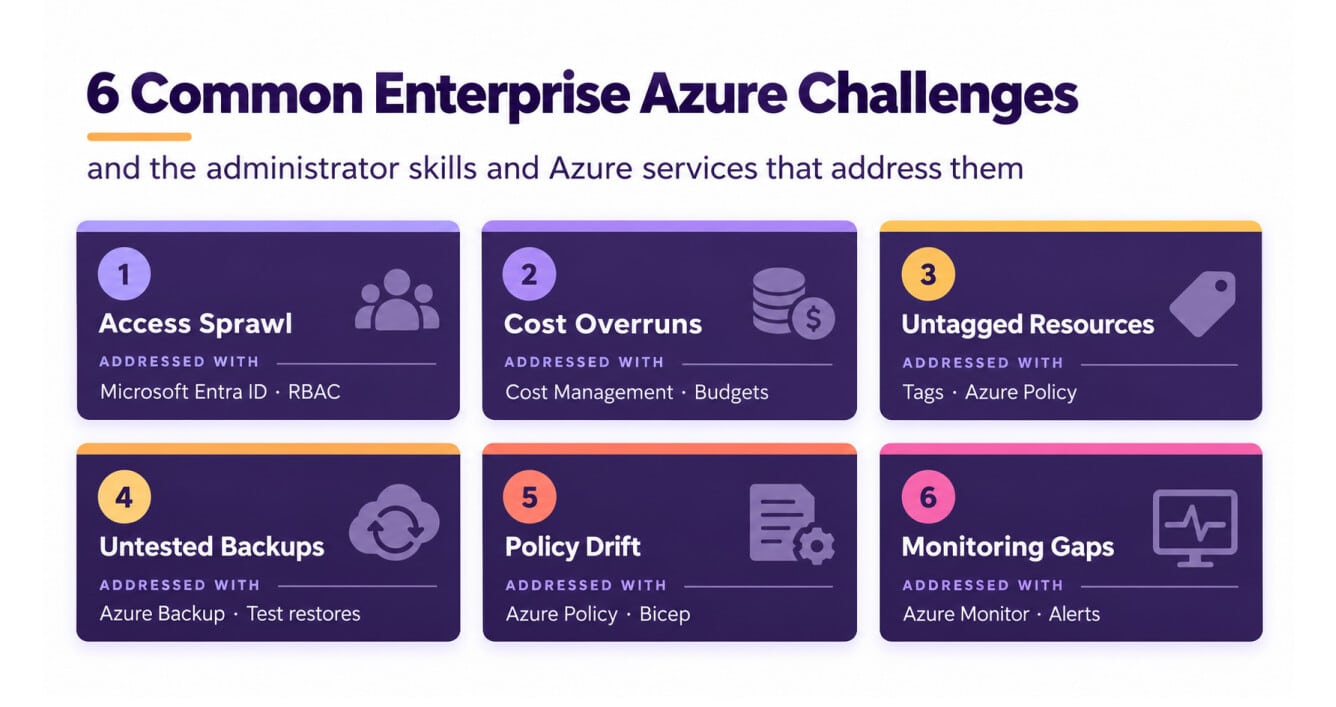
With the increasing workload and need for automation, companies struggle with regular review, cost control, access authority, and backup recovery. While addressing each problem, we will also discuss how Microsoft Azure Administrator AZ-104 skills solve them:
Problem 1: Access Sprawl
In an enterprise environment, a developer might receive temporary access to troubleshoot an issue, or a contractor might need permissions to complete a project. Over time, these permissions can remain active even after the work is finished. This gives users more access than their roles require, increasing the risk of unauthorised access or data exposure. It can also make audits harder because teams may no longer know why a particular user has access.
How to Address It?
Azure administrators manage identities through Microsoft Entra ID and control access to Azure resources using Role-Based Access Control (RBAC). They assign roles at the appropriate scope and regularly review access to ensure users have only the permissions they need. When temporary access is no longer required, it should be removed.
These skills align with the Manage Azure identities and governance domain of the AZ-104 exam, which covers identity management and access control.
Problem 2: Cost Overruns
Azure costs can increase when resources continue running or remain provisioned without being used effectively. A test virtual machine left running or an expensive GPU-enabled resource forgotten after an experiment can generate unexpected charges. These costs can reduce the budget available for other projects and make cloud spending harder to manage.
How to Address It?
Administrators use Azure Cost Management to analyse spending, set budgets, and configure alerts. They can also configure automatic shutdown for supported virtual machines and review underused resources to identify opportunities for savings. Azure Advisor provides recommendations for optimising costs, including identifying idle or underutilised resources.
Cost management is part of the Manage Azure identities and governance domain of AZ-104. The exam covers managing costs through alerts, budgets, and Azure Advisor recommendations.
Problem 3: Untagged Resources
Tags are key-value pairs that help organisations identify resources by attributes such as owner, department, environment, or project. However, tagging can be overlooked when teams create resources quickly. Without consistent tags, it becomes harder to allocate costs, identify resource owners, and determine which resources can safely be removed.
How to Address It?
Administrators define a tagging strategy that specifies required tags and acceptable values. They can then use Azure Policy to enforce tagging requirements, deny deployments that don’t meet specified rules, or apply tags through supported policy effects. Policies can also inherit tags from resource groups or subscriptions, with appropriate configuration and remediation for existing resources.
Tag management and Azure Policy are covered under the Manage Azure identities and governance domain of AZ-104.
Problem 4: Untested Backups
A successful backup job doesn’t automatically guarantee that data can be recovered when needed. If an organisation never tests restoration, it may discover too late that recovery takes longer than expected or that the restored data doesn’t meet business requirements. This can extend downtime and increase the impact of data loss.
How to Address It?
Administrators configure backup policies and use Azure Backup with the appropriate vault, such as a Recovery Services vault for supported workloads. They monitor backup jobs and perform periodic restore tests to verify that data can be recovered and that recovery procedures meet business requirements.
These skills align with the Monitor and maintain Azure resources domain of AZ-104, which includes creating vaults, configuring backup policies, performing backup and restore operations, and monitoring backup reports and alerts.
Problem 5: Policy Drift
Organisations establish standards for tags, allowed regions, and resource configurations. However, as environments grow, new deployments or configuration changes can cause resources to drift from those standards. Different subscriptions may end up following inconsistent practices, making compliance checks and troubleshooting more difficult.
How to Address It?
Administrators use Azure Policy to evaluate resources against organisational requirements and enforce supported rules. They can also use infrastructure as code, including ARM templates and Bicep, to deploy resources with consistent configurations. Azure Policy helps assess and enforce compliance, while ARM templates and Bicep help define and reproduce deployments.
These skills align with the Manage Azure identities and governance domain of AZ-104, which covers Azure Policy and governance.
Problem 6: Monitoring Gaps
Monitoring often becomes harder as an Azure environment grows. Teams might collect logs without configuring the right diagnostic settings, creating useful queries, or setting actionable alerts. As a result, performance issues and connectivity problems may go unnoticed until users report them.
How to Address It?
Administrators use Azure Monitor to track resource metrics, configure diagnostic settings, analyse logs, and create alert rules. Log Analytics provides a workspace for querying and analysing collected log data, while Kusto Query Language (KQL) helps investigate issues. For network connectivity diagnostics, administrators can use Azure Network Watcher and Connection Monitor.
These skills align with the Monitor and maintain Azure resources domain of AZ-104, which covers monitoring resources, querying logs, configuring alerts, and using Network Watcher.
How One Problem Leads to Another: The Domino Effect
The problems we have specified above generally co-exist in an Azure environment. A fault in one area can hide or complement the other over time.
- Untagged resources increase the cost overruns. If nobody knows who owns the resource, who will be responsible for shutting it down on time?
- Access sprawl increases the chances of policy drift. If more people have the authority to change the settings, there is a greater risk of workflow disruption.
- A drift in policy weakens the foundation. New resources will skip the process if there is no tagging or backup system in place.
- Untested Azure Site Recovery can quickly escalate a situation. The problem becomes more prominent if it becomes visible too late.
The Azure resource management requires the admin to consider governance, cost control, monitoring and backup as a single routine and not individual duties.
An Azure Environment Audit Checklist
Self-review your environment before addressing the Azure administration challenges so that you can handle them better:
| Requirement | Checklist |
|---|---|
| Access |
|
| Cost |
|
| Tagging |
|
| Policy and governance |
|
| Backup |
|
| Monitoring |
|
Conclusion
Most Azure enterprise challenges don’t stem from limitations in the technology. They emerge when routine practices like access reviews, cost analysis, resource tagging, and policy enforcement fall behind as the environment grows. The Azure cloud platform already provides the tools to manage these responsibilities, but administrators need the right skills and consistent processes to keep everything secure, compliant, and cost-efficient.
That’s why even the Microsoft Azure Administrator AZ-104 certification maps so closely to the actual task at hand. Its core domains align with the practical responsibilities of managing Azure environments, from identity and governance to monitoring and resource maintenance. Building these skills helps administrators move beyond resolving issues as they arise to preventing them before they affect the business.
If you’re ready to strengthen your Azure administration skills and tackle these challenges with confidence, start preparing with the AZ-104 course from Whizlabs.
FAQs
- What is the purpose of an AZ-104 certification in solving enterprise challenges?
The Microsoft Azure Administrator AZ-104 certification validates that you can manage identities and governance, storage, compute, networking, backup and monitoring. It shows that you understand how to prevent problems related to the Azure environment and keep it running efficiently.
- What is the difference between Azure Site Recovery and Azure Backup?
Azure Site Recovery repeats the workload to another location for backup in case the main site crashes. Meanwhile, Azure Backup keeps copies of your data so you have the information in case of accidental deletion or file corruption.
- What is the role of an Azure administrator in finding unused resources?
An admin uses Microsoft Cost Management and Azure Advisor to identify idle resources. They also use Azure Policy compliance reports to check if any resources do not have the required tags.
- What is the purpose of the Azure Automation Runbook?
An Azure Automation Runbook is a set of tasks that automates repetitive processes so that you can effectively manage Azure infrastructure and on-premises environments.
Author Bio:
Simran Sarin
A B2B content writer and researcher for Whizlabs, focused on producing in-depth articles about the current trending topics in the industry.

