With AI tools like EHunt AI, Etsy sellers can simplify product research, image creation, SEO optimization, and shop management. However, using AI without understanding its limitations or Etsy’s policies can put your shop at risk, potentially leading to listing removals or even shop suspension. In this post, we’ll explore eight common AI mistakes Etsy sellers should avoid and how to use AI more responsibly.

Letting AI Replace Your Creativity and Original Ideas
AI can help Etsy sellers generate product designs, but it should support creativity rather than replace it. Simply entering a few prompts to mass-produce designs or using popular AI-generated artwork without further customization can make your products look generic and similar to countless others.
More importantly, Etsy expects sellers to play an active creative role in their products. Designs generated entirely by AI with no meaningful human creative contribution may not meet Etsy’s Creativity Standards. Similar designs can also make it harder for your products to stand out and weaken your shop’s brand identity.
How to avoid this mistake:
- Define your product style, target audience, and creative direction before using AI.
- Use AI for brainstorming, exploring design ideas, and improving visuals rather than generating finished products without input.
- Add original ideas, personal touches, and meaningful modifications to AI-generated designs.
- Review your designs for potential copyright and trademark conflicts before publishing.
Ignoring Etsy’s AI Disclosure Requirements
Using AI to create products is allowed on Etsy, but sellers must be transparent about it. Failing to disclose AI-generated work or presenting it as entirely handmade can mislead buyers and violate Etsy’s policies, potentially resulting in listing removal or shop suspension.
How to avoid this mistake:
- Disclose AI-generated content in the listing description.
- Clearly explain your creative contribution and how AI was used.
- If AI is used to edit product images, consider mentioning it in the description.
- Select “Designed by” rather than “Created by” when choosing listing attributes
Using Misleading AI Product Images
AI can help Etsy sellers create more attractive product images, but excessive editing can be misleading. Changing a product’s original appearance, adding nonexistent details, or showing features buyers won’t actually receive can create false expectations and damage customer trust. It may also lead to complaints, refunds, and violations of Etsy’s image requirements.
How to avoid this mistake:
- Include at least one unedited photo showing the actual physical product in a real setting for most physical items.
- Use AI to improve backgrounds, lighting, or lifestyle scenes without changing the product’s real features.
- Make sure your main picture accurately represents what buyers will receive.
Selling AI-Generated Products Etsy Doesn’t Allow
Not all AI-generated products are suitable for Etsy. Selling AI-generated functional content, such as tutorials, recipes, sewing patterns, or assembly instructions, can be problematic if the content lacks human creative input or contains inaccurate information.
Standalone AI prompt bundles are also not allowed under Etsy’s current policies. Violations may result in listing removal or other account penalties.
How to avoid this mistake:
- Create and verify functional content yourself rather than relying entirely on AI.
- Use AI to brainstorm, edit, and organize content, but ensure the final work reflects your own creative input.
- Show the actual finished product or result in your listing images.
Trusting AI Product Research Without Market Validation
AI can help Etsy sellers discover product ideas and potential trends, but its recommendations don’t always reflect actual market demand. Relying solely on general AI tools or trend predictions without checking search volume, competition, pricing, and sales trends can lead to poor product choices and wasted resources.
How to avoid this mistake:
- Use AI to explore product ideas and potential niche markets.
- Verify demand with real Etsy market data before choosing a product.
- Analyze competitors’ sales performance, pricing, trends, and customer feedback.
- Evaluate market competition and profit potential before investing in product development.
If a tool could combine reliable Etsy data with powerful analytical capabilities, it would be incredibly valuable to sellers. EHunt AI is exactly that kind of tool.
EHunt AI combines powerful AI analysis with millions of Etsy product and shop records, including sales, favorites, reviews, and listing dates. It helps sellers evaluate product opportunities based on real market insights and reduce the cost of trial and error.
Copying AI-Generated SEO Without Optimization
AI can generate SEO titles, tags, and product descriptions quickly, but copying them without review can hurt your Etsy listings. Generic or irrelevant keywords, repetitive tags, and descriptions that lack product details may fail to match real buyer searches or communicate your product’s value.
How to avoid this mistake:
- Research keywords before generating listing SEO.
- Prioritize relevant keywords that match buyer search intent.
- Use AI to organize keywords and write natural, readable titles and descriptions.
- Include accurate product details such as materials, sizes, and customization options.
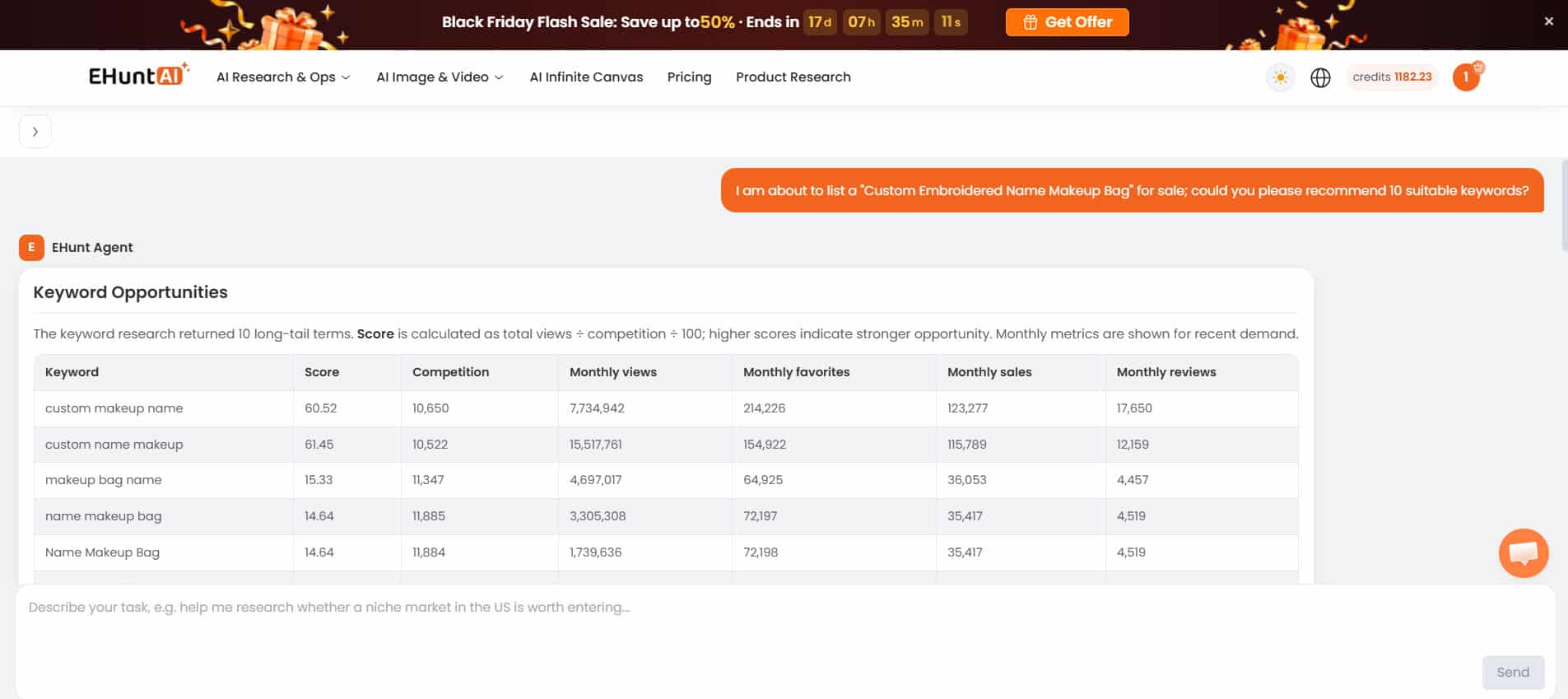
EHunt AI makes this process easier. It evaluates Etsy keywords based on recent views, sales, favorites, and reviews, then recommends relevant keywords for your products through one prompt.
You can also provide your selected keywords and product details to generate accurate, SEO-friendly listing copy. This helps you build listings around reliable search data rather than simply stuffing them with keywords.
Publishing AI Content Without Maintaining Your Brand Voice
Reusing similar AI-generated descriptions across multiple listings or sending automated replies without considering the context can weaken your brand identity and make customer interactions feel less personal.
How to avoid this mistake:
- Give AI clear brand guidelines, including your tone, style, and target audience.
- Customize each product description to highlight its unique features and selling points.
- Personalize replies to customer questions instead of relying on generic automated responses.
- Handle refunds, complaints, and custom orders with human judgment and care.
Using Too Many AI Tools Without a Clear Workflow
Using multiple AI tools doesn’t necessarily make your Etsy business more efficient. Switching between different platforms for product research, keyword analysis, SEO optimization, and image creation can lead to repetitive work, inconsistent results, and higher costs. Without a clear workflow, automation may create more work instead of saving time.
How to avoid this mistake:
- Identify which tasks actually need AI assistance before choosing tools.
- Prioritize platforms that combine multiple functions to reduce unnecessary tool switching.
- Keep human review in place to ensure AI-generated results meet your needs.
EHunt AI brings product research, keyword analysis, SEO listing generation, and product image and video creation together in one platform. Instead of learning and subscribing to multiple tools, Etsy sellers can manage more tasks in one place, saving both time and money while building a more efficient AI-powered workflow.
FAQs
Do Etsy Sellers Have to Disclose AI-Generated Content?
Yes. Etsy requires sellers to disclose AI use in the listing description when their designs and images are created using AI. Sellers should also accurately describe their creative contribution and how AI was involved in the process. This helps maintain transparency and ensures buyers understand how the product was made.
Can AI-Generated Products Get Removed from Etsy?
Yes. Etsy may remove AI-generated products that violate its policies, such as fully bot-generated content, AI-generated functional instructions, or products that infringe intellectual property rights. Sellers who repeatedly or seriously violate these rules may also face permanent shop suspension. However, AI-assisted creations with meaningful human input and proper disclosure are allowed.
What Is the Best AI Tool for Etsy Sellers?
EHunt AI is a great choice for Etsy sellers, combining AI-powered product research, competitor analysis, keyword research, SEO optimization, and product image and video creation. Unlike general AI tools, it is built specifically for Etsy, helping sellers make data-driven decisions and manage their shops more efficiently.
Can I Use ChatGPT to Write Etsy Titles, Tags, and Descriptions?
Yes. You can use ChatGPT to generate Etsy titles, tags, and descriptions, but it’s best to research keywords with a dedicated Etsy keyword tool like EHunt first. Then, provide those keywords and your product details to ChatGPT to create more relevant, SEO-friendly listings.
Conclusion
AI can help Etsy sellers save time and work more efficiently, but without creativity, market validation, and human review, it can also create unnecessary risks. Following Etsy’s AI policies and ensuring product information is accurate and transparent should always come before automation.
The best approach is to combine human creativity, reliable market data, and specialized AI tools. EHunt AI brings Etsy product research, SEO optimization, and product image creation together in one platform, helping Etsy sellers reduce tool costs, save time, and build a more efficient workflow.