


Samsung is testing a white balance slider inside its Camera app’s default photo mode, according to XDA-Developers.com, in an incremental improvement that should make it easier for Galaxy phone users to fix color casts without needing to enter pro settings. The control is showing up in the newest One UI 8.5 beta, reports prolific tipster Ice Universe, indicating Samsung’s efforts to make its core photo tools easier to get at.
What’s new in One UI 8.5 Camera: white balance slider
It tosses a dedicated white balance slider into your stock shooting interface—no Pro mode, no Expert RAW, just slide it before you tap the shutter. Early testers say the slider is visible, but not yet active—the kind of feature Samsung plants into betas ahead of launching to a larger audience. Even so, its placement is the headline: This is the first time Samsung has provided granular color temperature control in the everyday photo view, not buried in an advanced menu.
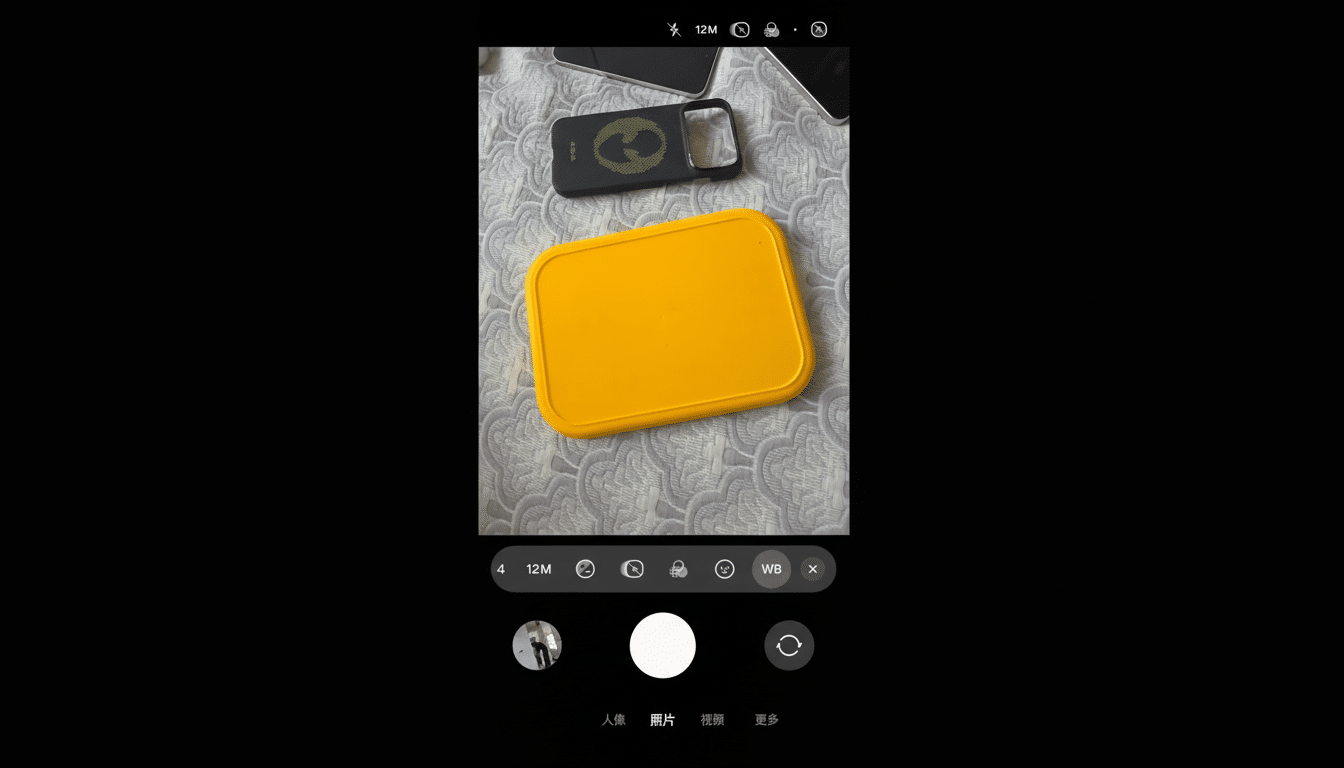
Ice Universe writes that the control may come in especially handy on the Galaxy S25 Ultra, which has sometimes had a hard time with warm or cool tints in problematic lighting. An easy slider likewise takes seconds to zero out those casts.
The importance of white balance control for photos
White balance is your camera’s indication of what “neutral” should look like. Get it wrong and indoor shots appear orange, snowy scenes take on a blue cast, and mixed lighting can create unflattering skin tones. Automatic white balance has gotten better, but it’s far from perfect—especially with tricky sources such as warm LEDs, neon signs, or scenes lit with a mix of window daylight and tungsten lamps.
Accuracy and stability of white balance remain core measures for overall image quality from lab tests. As DxOMark reports indicate, recent flagships such as Samsung models may drift under warm indoor or complex mixed scenes. A front-and-center slider allows users to push the color temperature a bit cooler or warmer to match the scene—often on a Kelvin-like scale (from around 2,500K for warm interiors up to 7,500K for cool shade).
How it compares with rivals like Google and Apple
Google’s newest Pixel phones provide easy-to-use white balance and color temperature adjustment from Pro-style controls, giving the ability to correct quickly without needing to do much manual setup. Apple’s default Camera app largely still trusts automatic processing, though Photographic Styles open up some of the warmth and tone tuning here. In the past, Samsung offered manual white balance only in its Pro and Expert RAW modes; moving it into standard Photo places Samsung more in line with user-friendly efforts we’ve seen on Pixels while still giving an image that computational look.
The move also reflects a larger trend: to put pro-grade tools just one tap away for mainstream users. Instead of making photographers pick between full manual or full auto, a single slider introduces a targeted intervention that addresses a common pain point.
What to expect next for Samsung’s white balance slider
Since the slider does not seem to work at the moment, it is probably a placeholder for an imminent update or a feature you can expect to see with the next Galaxy launch.
It could be delivered fully enabled when Samsung releases its next flagship wave, according to the tipster community. Samsung tends to do beta builds to help confirm placement and layout of interface elements before they actually solidify image processing.
Implementation details will matter. The best executions of this tool allow you to adjust color temperature and tint while also letting you see a live preview of what it does and have a quick way to reset the correction back to auto. Hopefully Samsung will bundle its slider with its scene detection so the camera can maintain clever auto behavior while respecting the user’s wishes.
Tips to use until the white balance feature lands
- If you need more control today, switch to Pro or Pro Video inside the Samsung Camera app or use the Expert RAW app, where white balance and Kelvin values are already adjustable.
- For daily shooting, tapping exposure on a neutral surface like a white shirt or gray card will help the phone’s auto white balance lock closer to reality.
Once the slider goes live in regular Photo mode, you’ll be treating your friends and family to fewer orange-lit dinners and more true-to-life portraits under mixed lights—all without compromising on the speed that makes smartphone photography awesome.
