


I spent a week working on the viral “never-ending” modular keyboard that debuted at CES, and the effect on my workflow wasn’t subtle. The Naya Connect — now live on Kickstarter — lets you extend, reconfigure, and remap your desk in seconds, and that fluidity translated into fewer mouse miles, faster task switching, and a more comfortable posture.
Naya, known for split and modular input gear, built the Connect as a lower-profile, more accessible sibling to its earlier power-user board. The premise is simple: snap on what you need, where you need it, and keep evolving the layout as your work changes.
- How the never-ending modular keyboard design works
- What changed in daily work during a week of testing
- Power and connectivity caveat for wireless modules
- Pricing and availability for Naya Connect modules
- Who should consider this modular low-profile keyboard
- Early verdict after a week with Naya Connect keyboard
How the never-ending modular keyboard design works
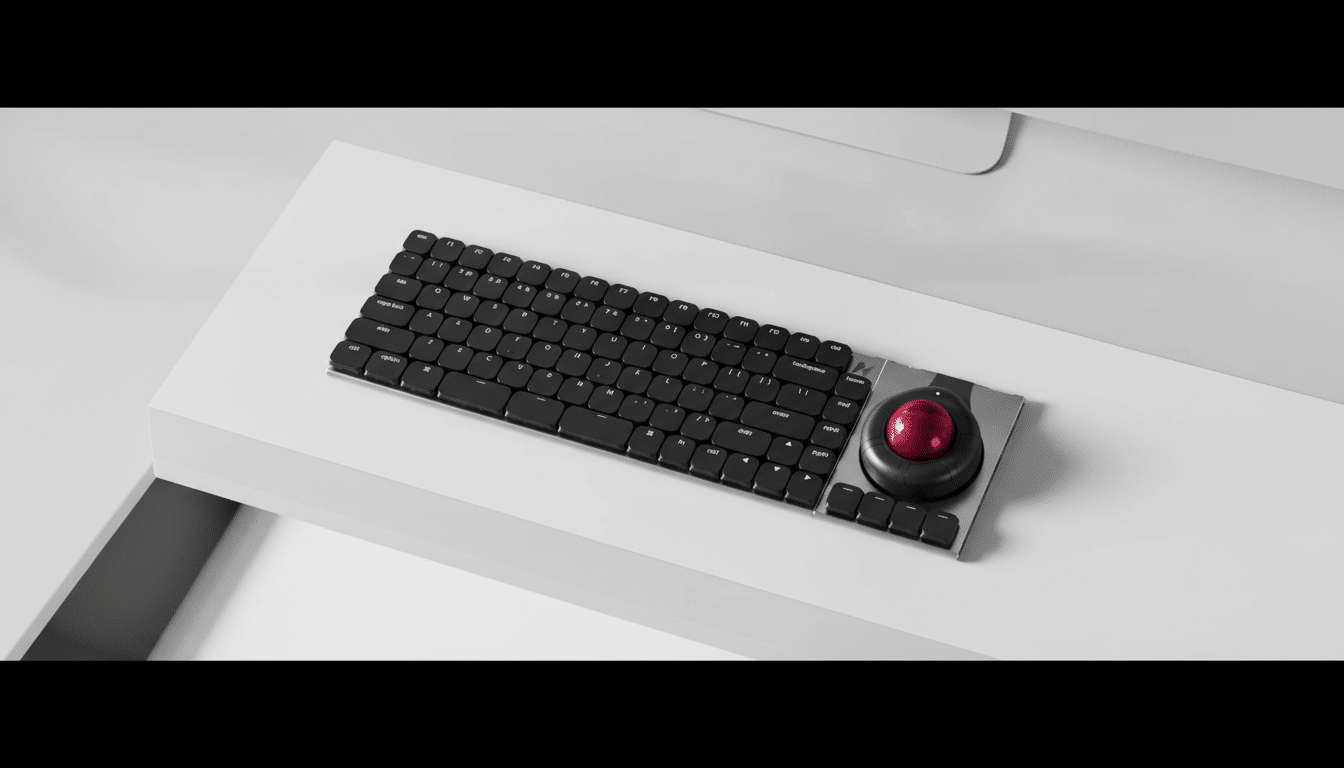
The keyboard’s aluminum unibody core anchors a chain of magnetically attached components. Connectors on both sides allow you to build left, right, or both — from a classic QWERTY with a left-side numpad to a right-side macro bar and beyond. The magnets align with reassuring precision, avoiding the wobble that plagues some modular rigs.
Key feel lands in the sweet spot between laptop responsiveness and mechanical tactility. The low-profile Kailh Choc V2 switches are fully mechanical and hot-swappable, so you can tailor travel and feedback without committing to one switch type. The flat, matte keycaps keep finger glide consistent during long coding or editing sessions.
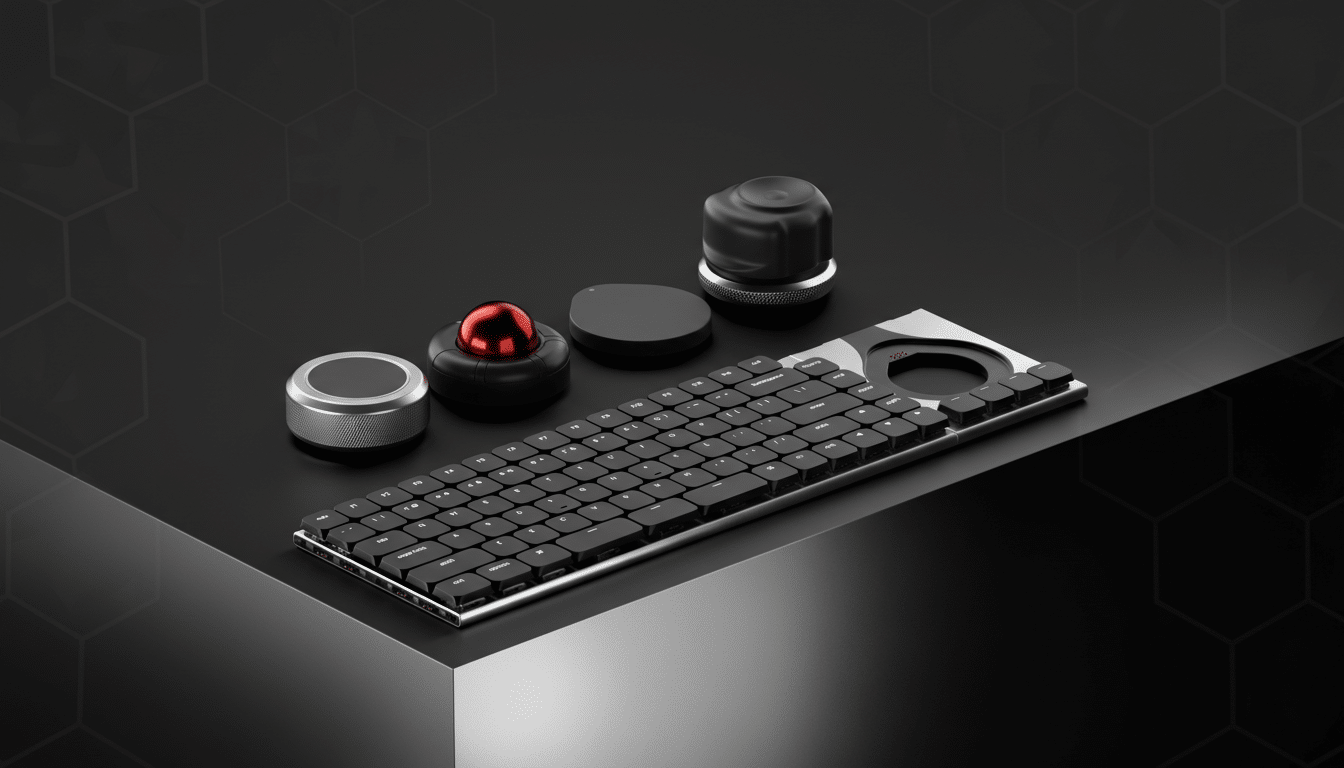
Beyond the main board, the ecosystem is the headline: a 24-key Multipad, a six-key expansion strip with pass-through pins for daisy-chaining, and compatibility with Naya’s modules including a trackball, touchpad, tune dial, and the “Float” module aimed at 3D workflows. It’s modular in the literal sense — and expandable in a way that feels endless.
What changed in daily work during a week of testing
My most productive layout placed the Multipad on the left for one-handed macros (build, test, window management) and a six-key strip on the right for frequent app-specific commands. That arrangement kept my hands parked and my eyes forward. Using keystroke-level modeling principles long cited in human–computer interaction research, shaving even 0.5 to 1.5 seconds from frequent actions compounds into noticeable gains across a workday.
In code, I bound lint, format, and run tasks to the left pad and reserved the right strip for AI prompt triggers and snippet insertion. In video editing, jog controls on the dial module plus cut/ripple macros on the Multipad reduced timeline hopping. In spreadsheets, designated navigation clusters and formula keys helped slice through monthly reports without reaching for the mouse.
Ergonomically, the ability to push the mouse further out and split auxiliary keys reduced awkward wrist angles. Guidance from Cornell University Ergonomics and the Human Factors and Ergonomics Society emphasizes minimizing ulnar deviation and repetitive reach; modular placement let me align components so my forearms stayed neutral, cutting the end-of-day ache that standard boards tend to trigger.
Power and connectivity caveat for wireless modules
There’s one important twist: the Connect relies on certain modules for wireless power. The Track and Touch modules house the internal batteries and supply power to the keyboard; without one of these attached, the board isn’t wireless. It’s a clever way to keep the main deck slim and light, but it means your preferred setup should factor in where the powered module lives.
Wired operation worked flawlessly in testing, and the magnetic interlocks never detached unintentionally during heavy typing or macro pounding. Still, if you expect a standalone Bluetooth board, understand that the Connect is designed as the hub of a larger, battery-enabled system.
Pricing and availability for Naya Connect modules
Early backers can secure the keyboard for $99, with an expected $189 retail price. The 24-key Multipad is slated at $69 and the six-key strip at $49, each also available individually. That positions the Connect aggressively against low-profile mechanicals from mainstream brands, while offering an expansion path those boards can’t match.
Naya’s previous modular keyboard launched through crowdfunding and later moved to direct sales, and the company says the same playbook applies here. If you prefer to skip campaigns, watch for a standard retail listing once funding targets are met.
Who should consider this modular low-profile keyboard
The Connect leans toward coders, business users, and creators who want to compress routine work into muscle memory. It’s understated — more studio than RGB battlestation — yet flexible enough for power users who live in complex apps. Gamers may appreciate the macros, but the subdued design and low-profile switches signal a productivity-first device.
Early verdict after a week with Naya Connect keyboard
What makes this keyboard feel “never-ending” isn’t just the ability to add more keys; it’s the permission to keep redesigning your workflow as your projects evolve. After a week, my hands moved less, my shortcuts felt natural, and the desk itself adapted to the day’s work. If you’ve been waiting for a modular board that blends serious ergonomics with real-world speed, the Naya Connect is the most convincing take yet.
