


Swamped by sprawling reports and meeting notes? Google is rolling out Gemini-powered audio summaries in Google Docs, a new feature that condenses lengthy files into a short, podcast-style briefing you can play right inside the editor—typically in under three minutes.
The tool arrives alongside Google’s existing read-aloud capability. The difference is focus: instead of narrating everything line by line, Gemini distills key points and themes into a concise track, helping you triage what deserves a deeper read and what can wait.
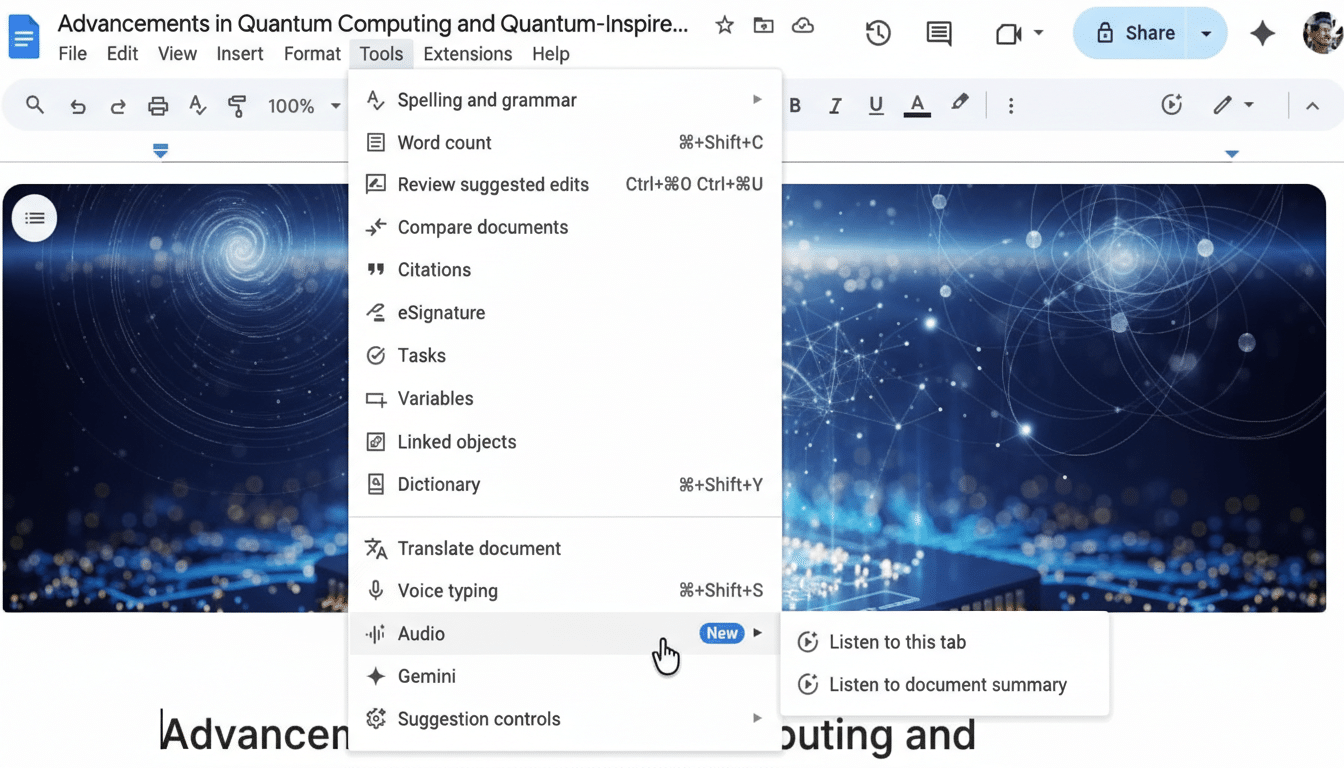
How Gemini Creates Audio Summaries From Your Docs
Once enabled, you’ll find it under Tools > Audio > Listen to document summary. Tap play, and a miniature control bar appears with pause, skip, scrub, and speed options. You can also choose a different voice for a more natural or more neutral readout, depending on your preference.
Google says the summaries are designed to be brief and conversational, focusing on the document’s key sections and takeaways. In practice, think of it as the equivalent of a colleague giving you the highlights before a meeting starts—useful for quick context, not a substitute for a full read of sensitive or complex material.
Who Gets It and How to Access the New Feature
The feature is available to customers on Google AI Pro or Ultra, as well as Business Standard or Plus and Enterprise Standard or Plus tiers. It’s also included with business and education Google AI add-ons. Google is staging the rollout now, with availability expected to reach eligible users by the end of the month.
If you’re in a managed Workspace domain, admins may need to enable the associated AI features. As with other Workspace capabilities, audio summaries live within Google’s security model, including encryption of data at rest and in transit, and organization-level controls.
Why Audio Summaries in Google Docs Can Matter
Audio is the most portable format for attention-strapped knowledge workers. Edison Research’s The Infinite Dial 2024 reports that 47% of Americans aged 12+ listen to podcasts monthly—evidence that on-the-go listening is now a mainstream habit. Bringing that behavior to work docs is a logical next step.
The time savings can be tangible. The average adult reads around 200–250 words per minute. A 3,000-word brief can take 12–15 minutes to digest, whereas a curated audio summary under three minutes can surface the gist in roughly one-fifth of the time. Multiply that by a day’s worth of reports and you begin to see the upside.
There’s also a cost-of-work angle: The McKinsey Global Institute has long estimated that employees spend a significant share of their week searching for information and sifting through content. Summaries don’t eliminate deep reading, but they can cut the “what is this and do I need it?” overhead that eats into focus time.
Best Uses and Practical Tips for Audio Summaries
Use audio summaries to prep on the move—walking to a meeting, commuting, or context-switching between projects. They’re especially handy for status docs, executive briefs, marketing plans, and meeting notes where the main outcomes matter most.
Pair them with Docs’ existing read-aloud if you need to dive further: start with the summary to confirm relevance, then switch to full narration or the text itself for sections that need careful attention.
Limits and Responsible Use of AI Audio Summaries
Summaries are an aid, not an authority. They can miss nuance, caveats, and data anomalies. For legal contracts, financial models, or compliance-heavy content, treat the audio as a heads-up and read the original in full before making decisions.
If you work with sensitive documents, confirm your organization’s AI settings and data retention policies. As with any generative feature, keep an eye out for occasional omissions or phrasing that softens uncertainty into false confidence—then verify with the source text.
How It Fits in the Broader AI-Driven Workspace Race
Rivals have offered text summaries and read-aloud for years, but turning a long document into a compact, natural-sounding audio briefing inside the editor is a notably practical twist. It reflects a broader trend: mainstream productivity suites are moving beyond chatbots into ambient tools that shave minutes off routine tasks without changing your workflow.
Expect rapid iteration from here. Logical next steps would include support across Slides and Sheets, mobile-friendly controls, multilingual voices, and adjustable summary lengths—say, 30 seconds for a quick scan or five minutes for a richer recap.
For now, Gemini’s audio summaries deliver what most people need at 9 a.m. on a busy Tuesday: just enough signal to decide what to read, what to skim, and what to skip—without staring at another wall of text.
