


Google’s planning a major redesign of the Google Home app this fall, and it’s putting its own Gemini AI assistant at the heart of how you control and automate your home.
The first evidence suggests that we should see a more organized layout, faster access to your favorites, and a “New Ask Home” experience that turns natural language into device actions.
- Gemini takes the lead inside the revamped Google Home app
- Cleaner device layouts and more intuitive automations
- Privacy and data practices move to center stage
- Why Google is rolling out this smart home redesign now
- Real-life benefits: from setup to daily routines
- Rollout timing and key changes to watch for this fall
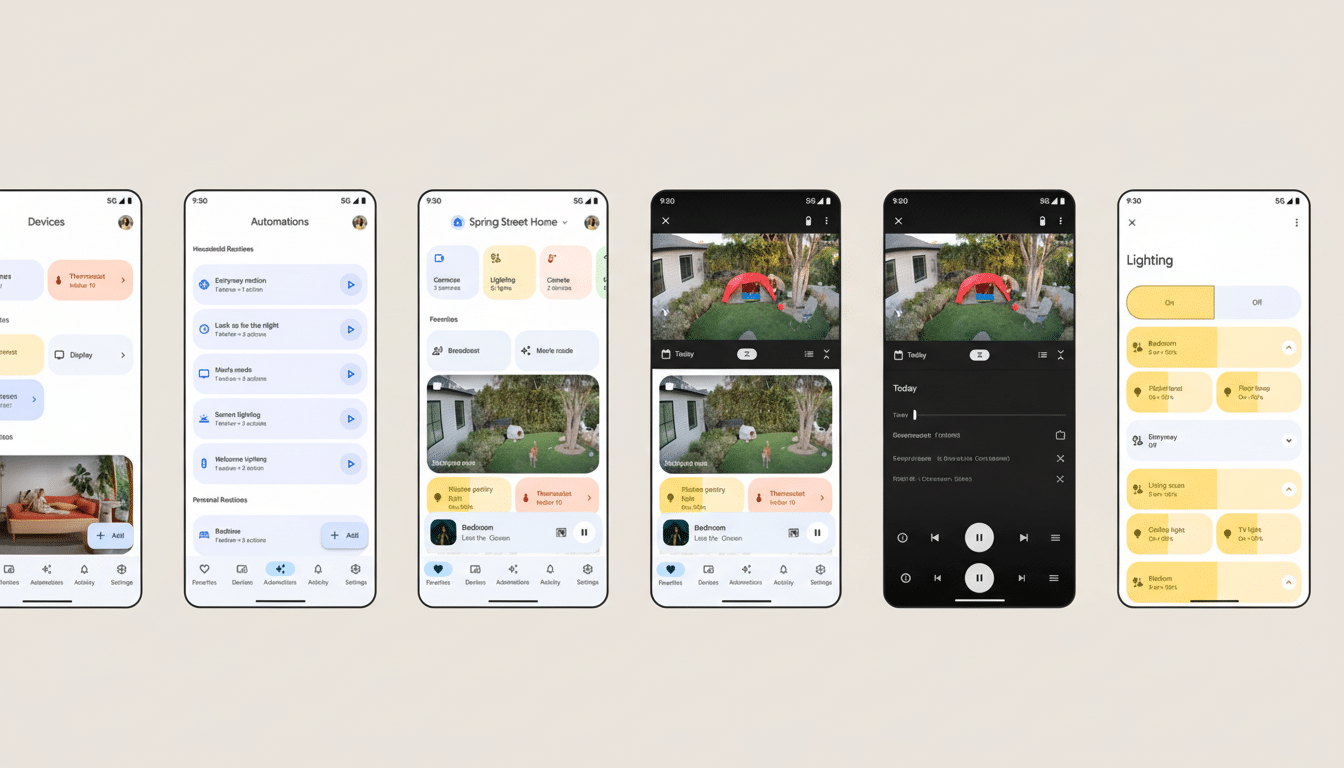
Gemini takes the lead inside the revamped Google Home app
As Android Authority reports, analysis points to an upcoming version of Google Home (v3.41.50.3) that boosts Gemini and Gemini Live over the older Google Assistant inside the app. The new “Ask Home” bar lets you type or speak commands like “dim the living room to 30%, set the thermostat to 70, and start Netflix,” then carries it out across compatible devices.
For months we’ve seen AI-assisted features teased for Home—stuff like daily recaps of what went down across your lights, locks, and cameras—as well as auto-generated event descriptions attached to security clips. The integration of Gemini into the app also indicates that those demos are graduating from lab concepts to everyday controls, providing fewer taps and more conversational steps for setting up routines.
Cleaner device layouts and more intuitive automations
The new “Favorites” dashboard rolls up the switches and sensors you use most, making it less of a hunting expedition to find frequently used controls.
New tiles showing video and thermostat data make it easier to take a quick peek at a camera feed or check the temperature in your room without drilling into nested menus.
Google is getting fussy about iconography and spacing across the app, which is significant in homes like mine with dozens of gadgets. Deloitte’s Connectivity & Mobile Trends report indicates that the typical U.S. household now controls 20-plus connected devices; an interface that eliminates steps and better explains device status could shave seconds from each of a user’s many routine tasks, which can accumulate fast.
For power users, the redesign marries nicely with Home’s beefy automations. If you have written Script Editor “if this, then that” logic—for instance, turning on porch lights and sending your phone an alert when your doorbell sees a person approach the house—Gemini’s natural-language layer should make designing or tweaking those flows less daunting.
Privacy and data practices move to center stage
The new app brings Gemini’s data-use practices out of the shadows a bit with more transparent disclosures around how it uses data in the smart home—what gets read; make and model details; and queries, along with device states and event summaries, that are processed. Google has stressed the safety controls around its AI system in public materials, and moving those explanations into the Home app is a process that will be necessary for trust when AI starts coordinating cameras, locks, and sensors.
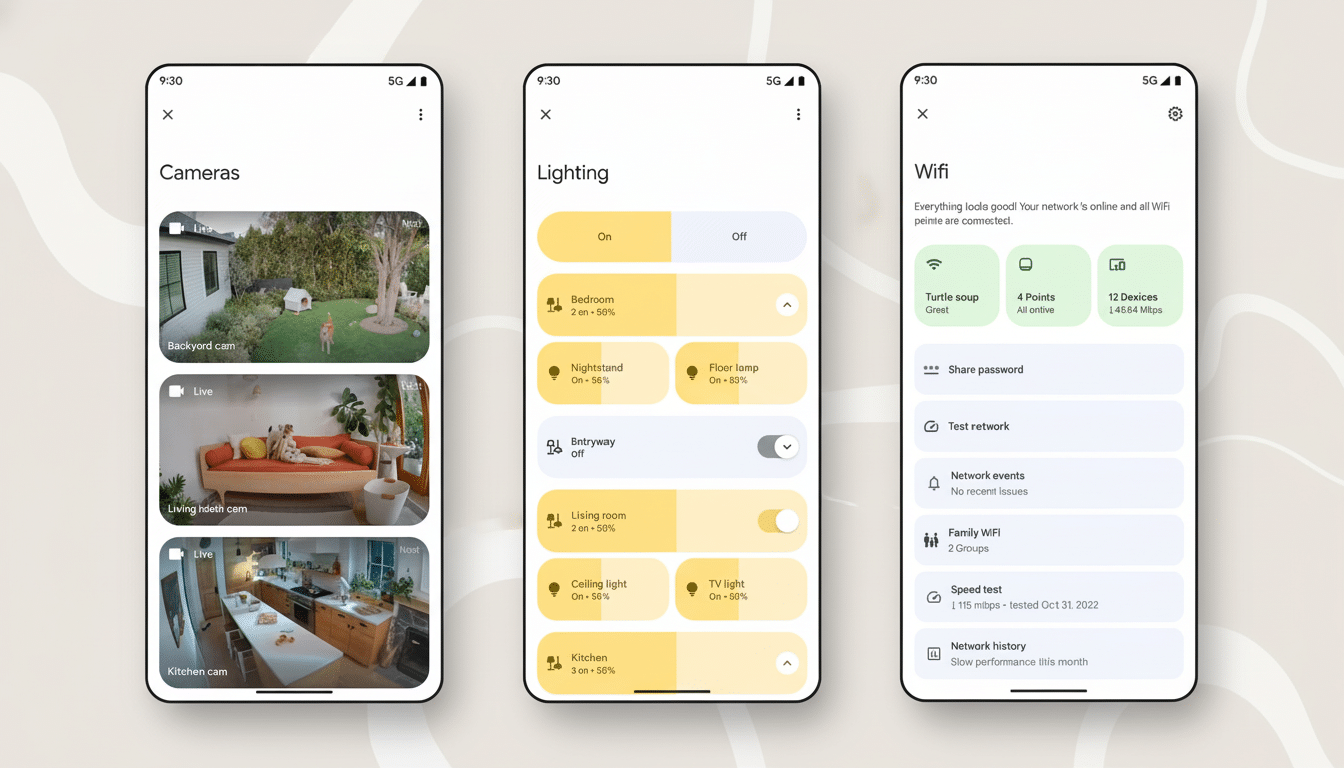
Look for big, obvious opt-ins and easy ways to see and delete exchanges. For households that would rather not have too many requests leave their home, there will be an important differentiator in on-device choices and fine-grained privacy settings—particularly as more assistants start employing generative models.
Why Google is rolling out this smart home redesign now
The interface overhaul comes as part of a larger push by Google in the home. Industry watchers expect new Nest hardware, such as a smart speaker with Gemini on board and a next-generation doorbell and updated cameras. Centralizing control and putting AI at the heart of the app paves the way for a portfolio where voice, text, and touch are all equally interchangeable ways to interact.
It also solidifies Google’s position as a Matter controller. And as the cross-brand standard becomes more widely adopted, a streamlined Home app will go a long way toward smoothing over the frustrations of mixing and matching gear from various manufacturers. That’s crucial for ecosystems jockeying against an Alexa app that has recently been adding generative capabilities and an Apple Home app refreshed for simplicity.
Real-life benefits: from setup to daily routines
Go figure, per usual: “Start movie night” to dim lights, close blinds, set the thermostat, and turn on the TV’s input. Before, you’d construct that routine tile by tile. Gemini is front and center, allowing you to describe a scene once and have the assistant piece together the actions before sticking it up in Favorites for one-tap access.
Or security: “When the back gate opens after sunset, turn on the patio lights and record for two minutes.” I think the natural-language version of that involves something like a conditional automation between sensors, lights, and cameras—the exact type of to-do that we can’t trust casual users with doing more than switching a couple of lights on or off.
Rollout timing and key changes to watch for this fall
The redesign will roll out incrementally this fall on Android and iOS, with versions introducing the new interface and Gemini-powered entry points. Look for these indicators that you have the latest build:
- The Ask Home bar
- Updated Favorites
- Updated tiles
- New privacy prompts
Taken together, the changes indicate that Google aims for Home to be less of a control panel and more of an assistant (literally a concierge)—one who understands simple language, observes your preferences, and manages all the increasing complexity of the modern smart home gracefully out of sight.
