


Google is massively upgrading its Home app, introducing Gemini AI into a much faster, cleaner control hub that consolidates Nest and third-party devices together. The refresh isn’t just paint and polish: Google claims that startup times are 70 percent faster, while crashes are down by 80 percent across the board, and that both reliability and memory use have been optimized overall. It’s a fix that is years overdue for a product that controls more than 800 million connected devices from over 50,000 manufacturers.
A Faster, Easier Control Center for Your Smart Home
The app is streamlined to three tabs — Home, Activity, and Automation — stripping away the tap maze that even longtime users have known too well.
- A Faster, Easier Control Center for Your Smart Home
- Gemini Is the House Brain for Notifications and Activity
- Automation Grows Up with Native Editors and Easy Routines
- What’s Free and What’s Premium in the New Google Home
- How Google Home 4.0 Stacks Up Against Alexa and Apple
- Rollout and Early Access for the Global Google Home 4.0 Update
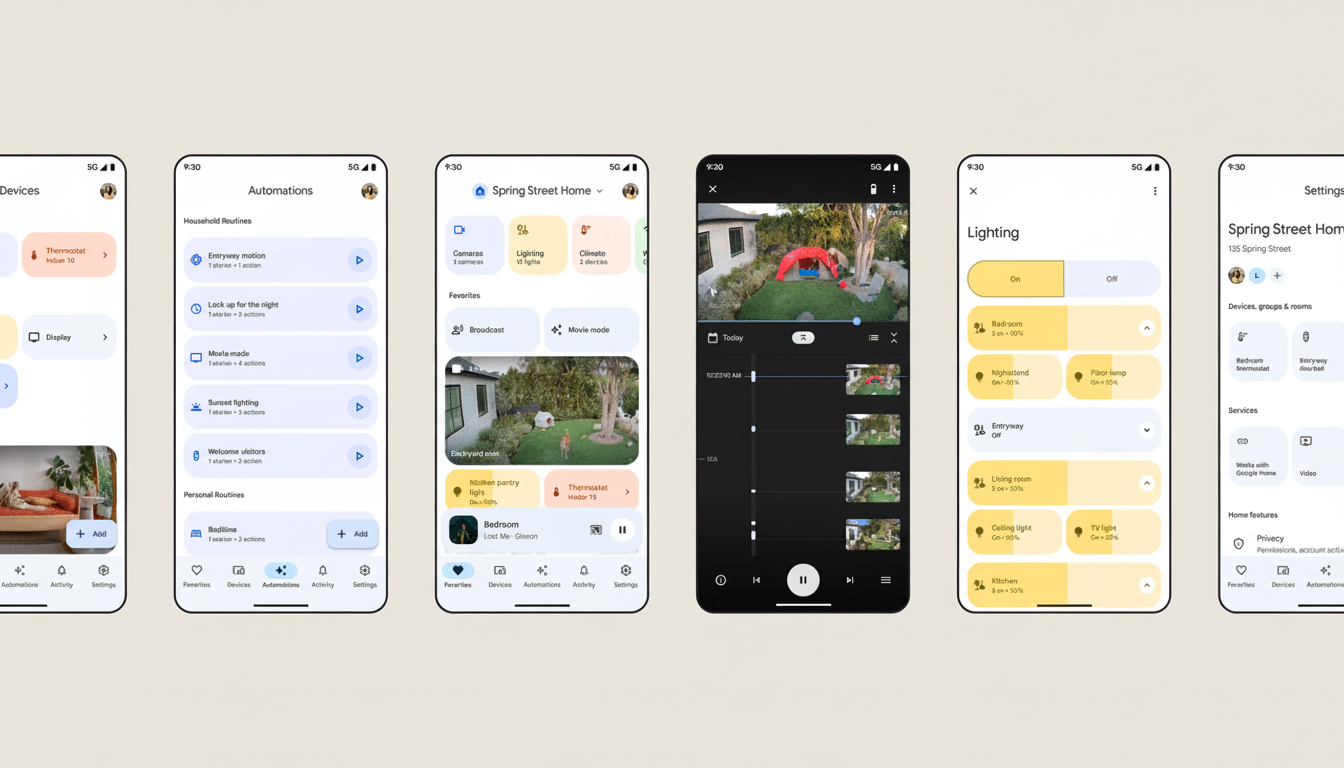
Gesture navigation increases speed:
- Swipe between all devices.
- Favorites are positioned at the bottom.
- Swiping replaces going back in dashboards.
- In camera view, use gestures to fast-forward or rewind during playback.
- Swipe down to play videos full-screen.
- Swipe up to exit looped playback.
- The video player now supports double-tap to rewind or fast-forward.
The standout of all the improvements is camera performance. Live views now load roughly 30 percent faster, while failures to play back are down by 40 percent, the company said. Tiles are now instant to render and timeline scrubbing is over six times faster than the previous frame rate, so you can easily find your audio moments with no hearing delay. Rich, interactive previews in notifications for iOS and Android provide a glance before you decide to open the app.
Google is also unifying the Nest experience after years of divided functionality. Nest thermostats also work with the Home app, dating back to Crystal Line from 2015, which include schedules and energy history, and all Nest owners can enjoy Hot Water Boost. It includes Nest cameras and doorbells — history migration and everything — as well as Nest Protect emergency alerts and passcode management for the Nest x Yale Lock. In other words, less reason to bounce around between apps.
Gemini Is the House Brain for Notifications and Activity
Gemini has been built into two places users will notice right away: notifications and the new Activity tab. Rather than having to interpret a generic “motion detected,” alerts will be able to describe what happened, and where, with that same context streaming into camera history through brief summaries beneath clips.
At the top of Activity is “Home Brief,” where an AI churns a day’s worth of device pings into a digestible recap. Think of it as a highlight reel for your home — did the garage open, who rang the doorbell, whether the lights in the living room were on longer than normal.
At the heart of the app, there is a new “Ask Home” prompt which allows you to ask Gemini questions in natural language. You can say, “When did the kids come home?” and get the appropriate door and camera events, request a certain clip, or give multi-device commands like “Dim the downstairs lights and set the thermostat to 70.” The system also suggests associated devices and automations as you type, meaning basic intents become more complex routines.
Automation Grows Up with Native Editors and Easy Routines
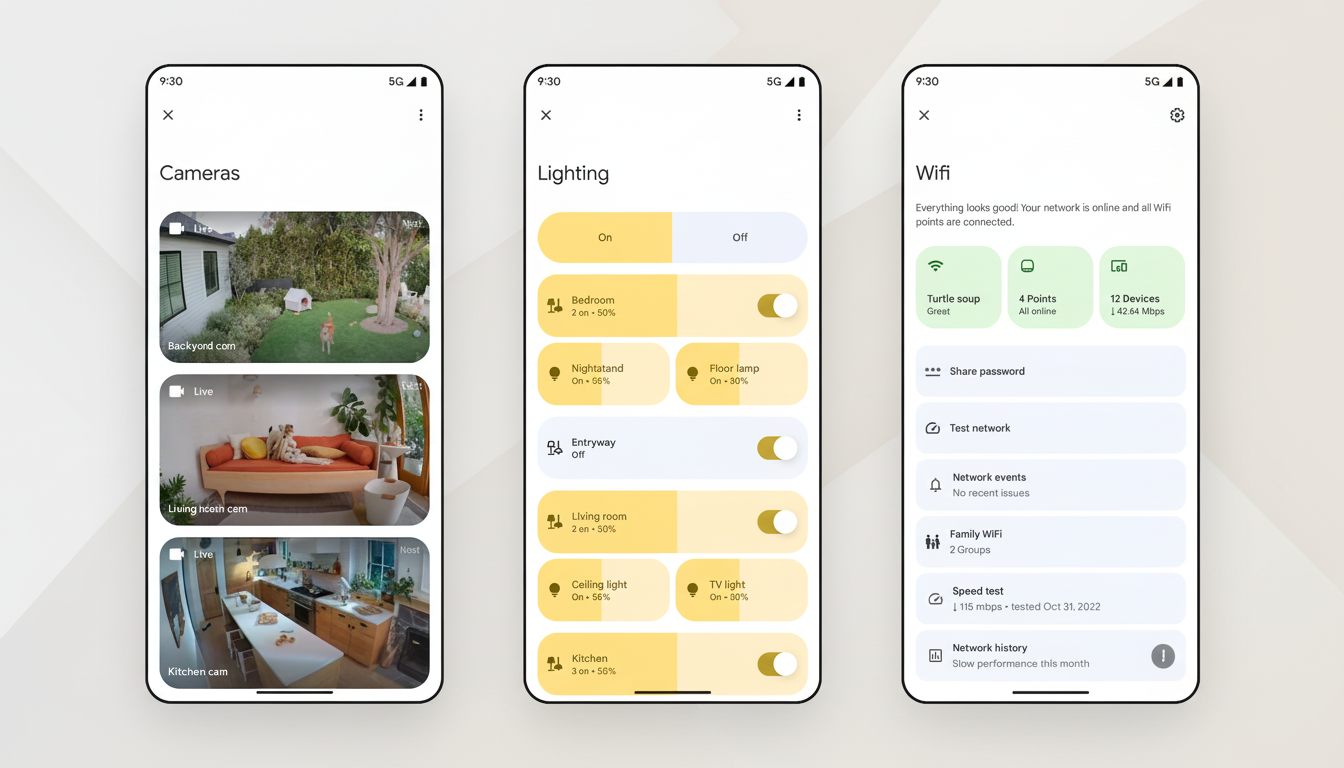
Automation is also now native on iOS and Android — no more clunky waiting for web views — and the editor introduces one-time and conditional options to give you more precision. A new carousel showcases everything scheduled to happen in the next few hours, cutting down on guesswork about what you can expect the home to do without your input.
With Gemini, routines can be created in plain English. Say, “If the nursery camera sees motion past 8 p.m., turn on the night light and alert me,” and it writes up the automation with triggers and actions already filled in. That helps break down the barrier for households that never played advanced rules because they seemed too technical.
What’s Free and What’s Premium in the New Google Home
Upgrades in the core components — speed, stability, the three-tab layout, improved camera playback, and richer notifications — are thrown in for free.
A few AI features, meanwhile, remain exclusive for Google Home Premium. The subscription, which begins at $10 per month, is also included with Google AI Pro and Ultra plans, and it will get you features like Home Brief, Ask Home, and natural-language automation creation.
How Google Home 4.0 Stacks Up Against Alexa and Apple
The shift establishes Google on equal footing with the competition. Amazon’s Alexa app has come to rely on Routines and Hunches in order to make suggestions and automate, while Apple’s Home app emphasizes simplicity and on-device privacy through its HomeKit Secure Video feature. By adding performance enhancements and context-aware summaries, Google hopes to cut down on the “alert fatigue” that clogs up busy smart homes.
The update also lands as the Matter standard from the Connectivity Standards Alliance continues to unify how devices onboard across systems. A more responsive Home app will also be beneficial for multi-brand households, especially since Gemini can answer practical questions about energy use — like how long the A/C ran last week — or find a specific moment without scrubbing through hours of footage.
Rollout and Early Access for the Global Google Home 4.0 Update
The global rollout of Google Home 4.0 is progressive. Those who can’t wait can open the Home app, tap your profile icon, select Home Settings, and sign up for Early Access. Like any major platform update, capabilities are likely to grow as Google improves its models and provides device-specific fit and finish.
