


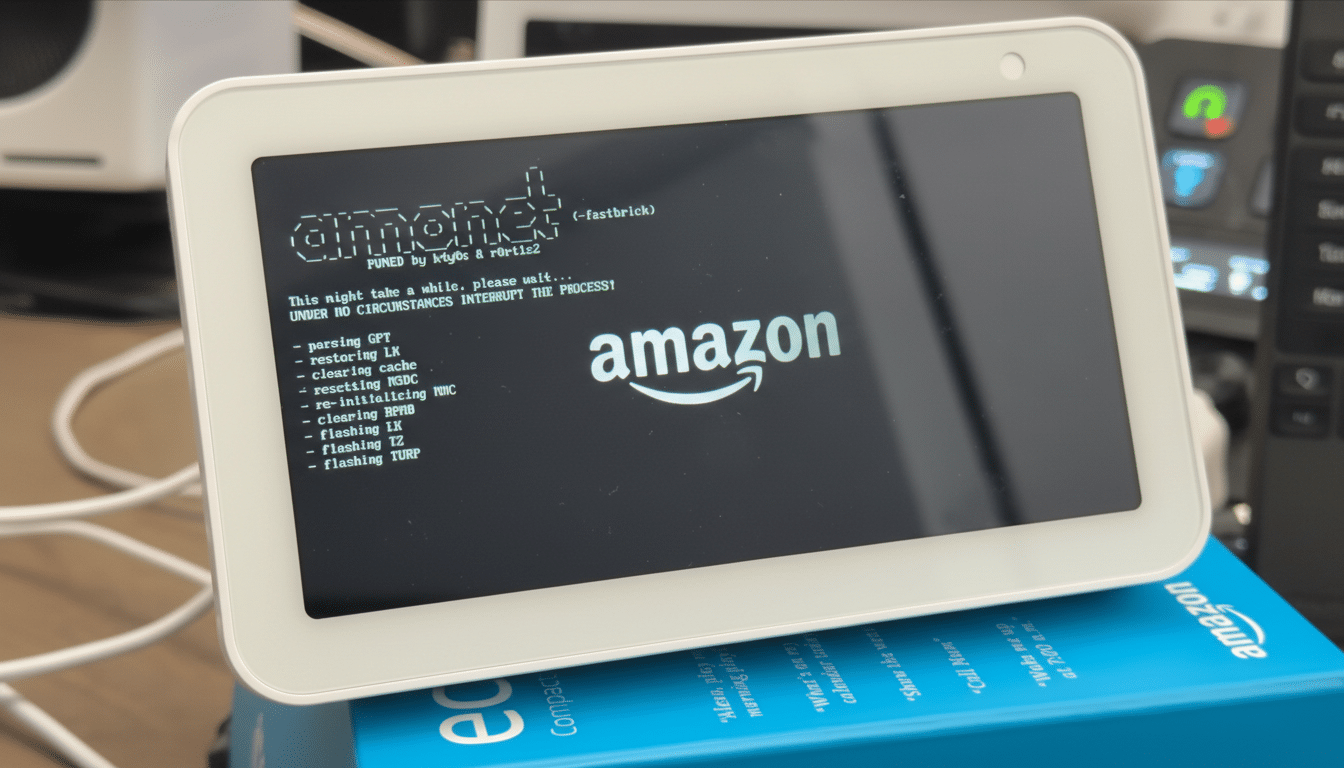
I turned an aging Echo Show 5 from a dust-collecting smart display into a surprisingly capable Android mini-tablet. The catalyst was a new jailbreak leveraging a BootROM flaw in older MediaTek chips, which opens the door to unlocking the bootloader and installing LineageOS. The result isn’t just a novelty. It meaningfully expands what the device can do, while trimming the ads and clutter that increasingly crept into the stock experience.
Why Android Breathes New Life Into Echo Show
Under the plastic shell, the second-gen Echo Show 5 is more Android tablet than niche gadget. It runs on MediaTek’s MT8163—the same family of chip used in budget tablets—and pairs it with 1GB of RAM. On paper, that’s modest. In practice, a clean LineageOS build without Google Play Services proved lean enough to feel snappy. Navigating the UI was faster than on Fire OS, which is a heavier, Amazon-centric Android fork.
With Android on board, the device stopped being a billboard for shopping prompts and became something I actually wanted on my desk. A minimalist clock app replaced the carousel of promos. Music apps like Spotify and Plexamp ran smoothly, and an open-source YouTube client delivered a better experience than the stock browser. It’s the kind of functional upgrade that makes a $20 marketplace find feel like a smart, sustainable buy.
What Works And What You Lose On This Setup
The LineageOS build for the Echo Show 5 brought up the essentials: touchscreen, Wi-Fi, speakers, and even the far-field microphones, which means voice features are on the table if you install compatible assistants. One notable omission is the front camera, which didn’t initialize in my tests. If video calls are critical, keep the stock software.
More importantly, Alexa is gone. Amazon’s assistant isn’t available for Android on this hardware, and there’s no sanctioned path to bring it back. Those invested in Alexa routines, Drop In, or multi-room audio should stay put. If you’ve always found Alexa more intrusive than helpful, though, Android is liberating. You gain access to countless apps via APKs or alternative stores like F-Droid, plus the freedom to choose privacy-friendly tools that don’t funnel everything through a single ecosystem.
Performance Surprises On Limited Hardware
Conventional wisdom says 1GB of RAM is a non-starter. That’s true if you load up Google’s full app suite. But with a lightweight launcher and a focus on single-purpose tasks—music control, dashboards, smart home widgets—the Echo Show 5 feels responsive. On a fresh LineageOS install, background load was modest, and basic apps launched faster than they did on Fire OS. The device shines as a glanceable clock, a kitchen music hub, or a bedside information panel.
I also explored “second screen” style roles. Using macro panels and remote-control apps, the Echo Show became a handy desk companion for triggering shortcuts or monitoring system stats. It’s not a replacement for a real monitor, but it’s far more useful than the stock idle-loop suggested.
How The Jailbreak Works Without Going Too Deep
Researchers discovered a BootROM exploit affecting certain MediaTek-based devices. Because it lives in read-only silicon, it can’t be patched by a routine update. In broad strokes, the process unlocks the bootloader, installs a custom recovery, and then flashes LineageOS. Communities like XDA Developers and independent GitHub maintainers have documented the approach for hobbyists. It’s not a one-click mod, but it’s far from rocket science if you’re comfortable with Android tinkering.
There are caveats. Any modification risks bricking the device. You should make a full backup of the stock system if returning to Fire OS is important. Expect quirks, and understand you’re venturing outside Amazon’s support boundaries.
Privacy And Experience Gains From Android
Over the past year, users have reported more aggressive full-screen promos on Echo Show models. Moving to Android cuts those interruptions and hands control back to the owner. With open-source apps, you can minimize tracking and tune the device to a single job—be it a kitchen assistant, a podcast player, or a home dashboard—without the noise.
This aligns with a broader shift toward device longevity. Analyst firms like Canalys have noted steady growth in the smart display category, with tens of millions in use worldwide. Many of those screens will age out of official support long before their hardware fails. Projects like LineageOS, backed by a mature community and regular security patches, keep serviceable hardware useful and out of drawers.
Who Should Do This And Who Should Skip It
If you rely on Alexa-specific features, this isn’t for you. If you want a quiet, capable screen that respects your choices and runs the apps you pick, Android transforms the Echo Show 5. The hardware finds a second life, the interface gets faster, and you set the agenda. For a device many people bought on sale and later sidelined, that’s a practical win.
