


OpenAI has rolled out ChatGPT Go in the US, a lighter paid tier that sits between the free version and the company’s Plus and Pro subscriptions. After a four-month pilot in India, Go arrives at $8 per month and targets people who want more than the free tier offers without committing to the higher-cost plans.
What ChatGPT Go Offers Beyond the Free Plan
Go includes all the essentials from the free plan, then layers on unlimited chats with GPT-5.2 Instant, more image generation and file uploads, a larger context window to sustain longer conversations, and extended access to advanced data analysis. It also unlocks extra tools such as projects, tasks, and custom GPTs, which can streamline recurring workflows or team coordination.
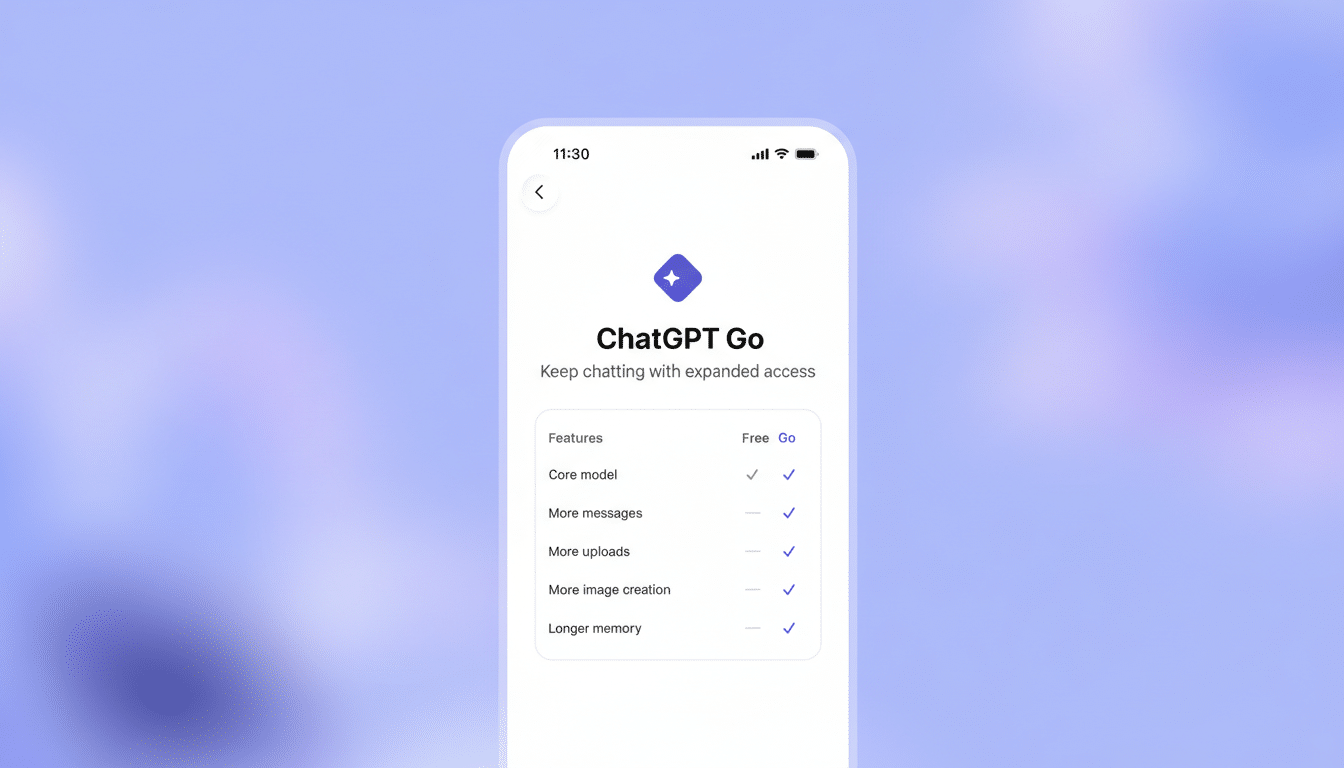
OpenAI notes that usage limits are higher than the free tier for core chat and tools, but they can fluctuate based on system load and abuse protections. In practice, that means Go users should experience fewer “capacity” interruptions and longer productive sessions, though headroom isn’t “unlimited” in the strictest sense.
How ChatGPT Go Compares to Plus and Pro Plans
At $8, Go undercuts Plus by 60% and is 96% cheaper than Pro, but it’s designed for different needs. Go is ideal for everyday productivity: summarizing PDFs, drafting emails, turning notes into slides, analyzing spreadsheets with advanced tools, or creating a handful of images for a social post or classroom project.
ChatGPT Plus, at $20 a month, is the step up for heavier and more complex work. It provides access to Sora for video generation, legacy models for continuity, and higher overall throughput that benefits daily power users who push longer, more demanding sessions. If you regularly run multi-step prompts, handle larger datasets, or need media generation beyond images, Plus is the safer bet.
ChatGPT Pro, at $200, targets “AI power users pushing the limits of advanced intelligence.” It includes GPT-5.2 Pro, maximum memory and context, and early previews of the newest features. Think researchers iterating on long technical documents, developers prototyping agentic workflows, or analysts running repeated, large-batch data explorations with minimal interruption.
Real-World Use Cases for ChatGPT Go Subscribers
A student might lean on Go to generate study guides, annotate lecture notes, and analyze CSV files—without hitting free-tier ceilings mid-session. A solo marketer could draft landing-page copy, produce a few product images, and iterate on A/B headline tests in one sitting. For a creator producing videos with Sora or a researcher running dozens of long, tool-augmented chats every day, Plus—or more likely Pro—will be the better fit.
In market context, Go’s $8 price point is notably lower than many rival “advanced” consumer tiers: services such as Gemini Advanced and Claude Pro typically sit near the $20 range. Analysts at firms like Forrester have argued that lowering entry prices expands the total addressable market for premium AI features, and Go appears aligned with that playbook.
Pricing and Usage Limits for Go, Plus, and Pro at a Glance
The lineup now spans free, Go ($8), Plus ($20), and Pro ($200), all billed monthly. OpenAI maintains flexible usage ceilings across paid tiers that can vary by demand and policy safeguards. The practical takeaway: Go gives you “more and longer” than free; Plus increases capacity and enables Sora and additional models; Pro maximizes headroom and gets you early feature access.
- Go ($8/month): Unlimited GPT-5.2 Instant chats, more image generation and file uploads, larger context window, extended advanced data analysis, and tools like projects, tasks, and custom GPTs.
- Plus ($20/month): Access to Sora for video generation, legacy models for continuity, and higher throughput for demanding daily use.
- Pro ($200/month): GPT-5.2 Pro, maximum memory and context, and early previews of the newest features.
For budget planning, Go’s 60% discount relative to Plus will appeal to students, freelancers, and casual creators who need reliability and a wider toolset without full-blown power-user throughput. Teams that live in ChatGPT all day or require advanced media and analysis will recover the extra cost of Plus or Pro through time saved.
How to Get Started with ChatGPT Go in the United States
Existing users can log in on the ChatGPT website, click the profile icon, choose Upgrade Plan, and select Try Go. Setup takes minutes, and you can move between tiers later if your workload changes.
Bottom Line: Is ChatGPT Go the Right Plan for You?
ChatGPT Go brings a lower-cost on-ramp for US users who have outgrown the free tier but don’t need maximum capacity. If your daily tasks revolve around writing, brainstorming, lightweight data work, and modest image generation, Go is the sweet spot. If you routinely push longer sessions, rely on Sora, or need priority access and the largest context, Plus or Pro will deliver the consistency—and headroom—you’re paying for.
