


WordPress.com is rolling out a built-in AI Assistant designed to understand a site’s structure and content, then act on plain-language requests to edit pages, restyle themes, and create or modify images. The move brings generative AI directly into the editor, reducing the need for plugins or copy‑paste workflows and signaling a push to make professional publishing faster and more approachable.
What the AI Assistant Can Do Inside Your WordPress Site
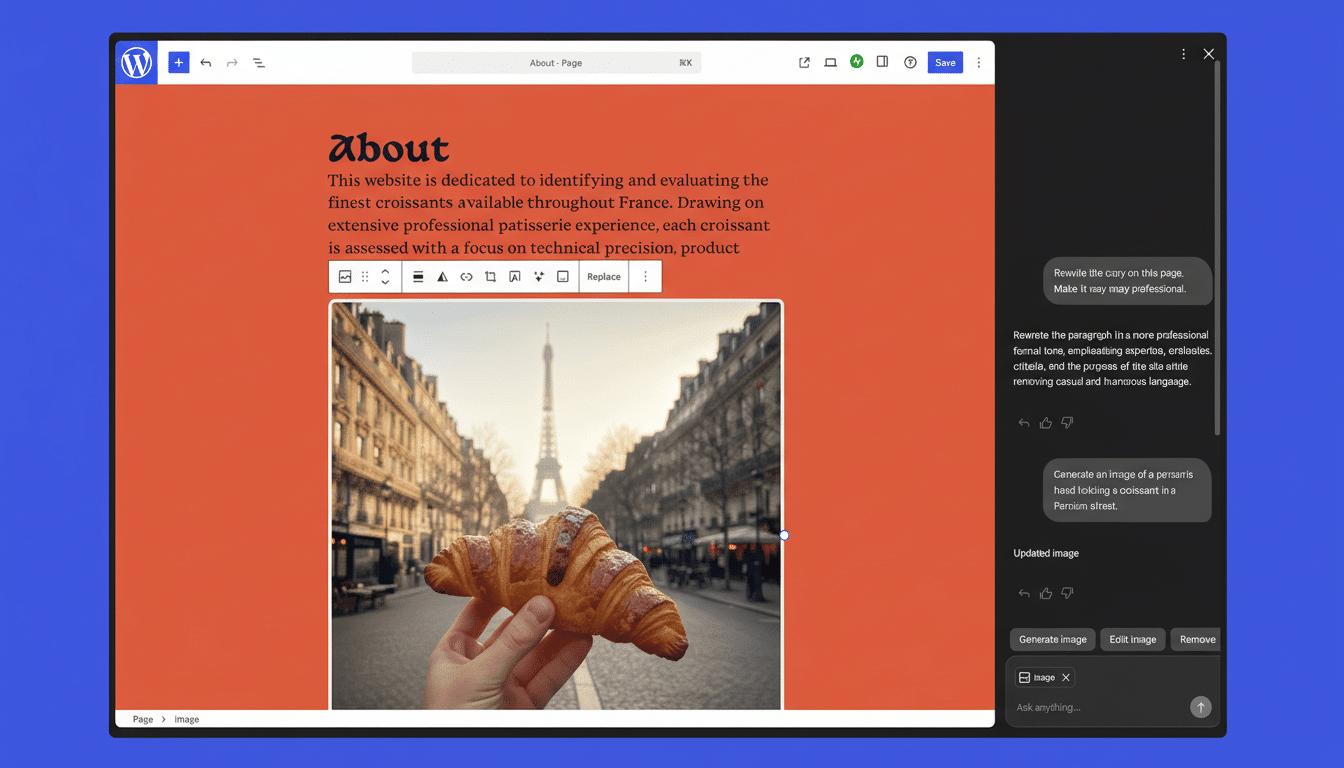
Instead of digging through menus, site owners can type instructions like “open up the spacing in this hero,” “switch to a brighter, punchier color palette,” or “show clean, minimalist font options,” and see the changes applied in context. The assistant can also scaffold structure with commands such as “add a contact page” or “insert a testimonials block below this section.”
- What the AI Assistant Can Do Inside Your WordPress Site
- Writing Help and Collaboration Features for Teams
- Built-In Image Generation and Editing with Gemini
- Availability and Setup for WordPress.com AI Assistant
- Why This Matters For A Large Slice Of The Web
- Early Use Cases and Sensible Guardrails for Publishers
The feature is purpose-built for the block editor: it works with block themes and respects patterns and styles. Sites running classic themes won’t see the assistant in the editor, underscoring Automattic’s continued bet on the modern block architecture.
Writing Help and Collaboration Features for Teams
Beyond layout and style, the assistant can rewrite copy for tone and clarity, generate alternative headlines, translate sections, and suggest grammar fixes. In the block notes experience introduced in WordPress 6.9, collaborators can summon it with @ai to brainstorm options or request background context. Responses can include citations and reference details, which helps teams verify claims before publishing.
As with any generative system, editors should review outputs for accuracy and voice. Industry guidance from organizations like the Associated Press recommends human oversight on facts, quotes, and sensitive topics; the new tools make iteration faster but do not replace editorial judgment.
Built-In Image Generation and Editing with Gemini
Visuals get a notable upgrade, too. A new Generate Image button in the Media Library taps Google’s Gemini models to produce images from text prompts or to transform existing assets. Users can specify details like aspect ratio, composition, and style, making it easier to create on‑brand headers, thumbnails, or illustrations without leaving the editor.
For teams juggling content calendars, this can compress multi‑step workflows—briefing a designer, waiting on drafts—into a quick prompt-and-review loop. It won’t replace bespoke creative work, but it fills gaps where speed and consistency matter most.
Availability and Setup for WordPress.com AI Assistant
The AI Assistant is opt‑in. Users can enable it from the Sites list by selecting their site, opening Settings, navigating to AI tools, and toggling Enable AI Assistant. Customers who purchase a site through the AI website builder will have the assistant turned on by default. If a site runs a classic theme, switching to a compatible block theme is required to access the feature in the editor.
Why This Matters For A Large Slice Of The Web
WordPress underpins a huge part of the internet—W3Techs estimates it powers more than 43% of all websites—so embedding AI directly into its publishing workflow could shift how a broad swath of creators work. Competitors have moved in the same direction: Wix launched an AI Site Generator, Squarespace added AI copy tools, and Shopify expanded its Magic features. WordPress.com’s approach leans on its block system to apply changes in a structured, theme‑aware way.
The timing tracks with broader enterprise adoption. Gartner projects the vast majority of organizations will integrate generative AI into their products or processes in the near term, and McKinsey estimates generative AI could contribute up to $4.4 trillion in annual economic value as it scales. For solo creators and small businesses, the practical benefit is simpler: fewer clicks, clearer guidance, and faster iteration from idea to publish.
Early Use Cases and Sensible Guardrails for Publishers
Expect early adopters to use the assistant to unify brand styles across pages, localize landing pages in multiple languages, and prototype layouts before handing work to designers. Newsrooms and nonprofits may lean on translation and headline suggestions while keeping humans in the loop for fact‑checking and approvals, in line with recommendations from groups like the Newsroom AI Ethics Consortium.
The bottom line: by combining site‑aware editing, collaborative writing tools, and image generation under one roof, WordPress.com is reducing friction in everyday publishing. If the assistant’s outputs remain transparent and editable—and teams keep editorial standards front and center—it could become a default part of how millions build and maintain their sites.
