


It just got easier to keep tabs on hundreds of names in a busy WhatsApp group.
Now it’s introducing Member Tags: a lightweight label that sits beneath your display name in the confines of one specific group, radically simplifying who to tap on without scrolling user profiles or asking follow-up questions.
- What Member Tags Do in WhatsApp Group Conversations
- How to Add or Edit a Member Tag in a WhatsApp Group
- Why This Feature Matters for Large and Busy Groups
- Best practices and real-world examples for clear tags
- Privacy and safety considerations when using Member Tags
- Related WhatsApp group updates rolling out alongside
- The bottom line on WhatsApp’s new Member Tags feature
What Member Tags Do in WhatsApp Group Conversations
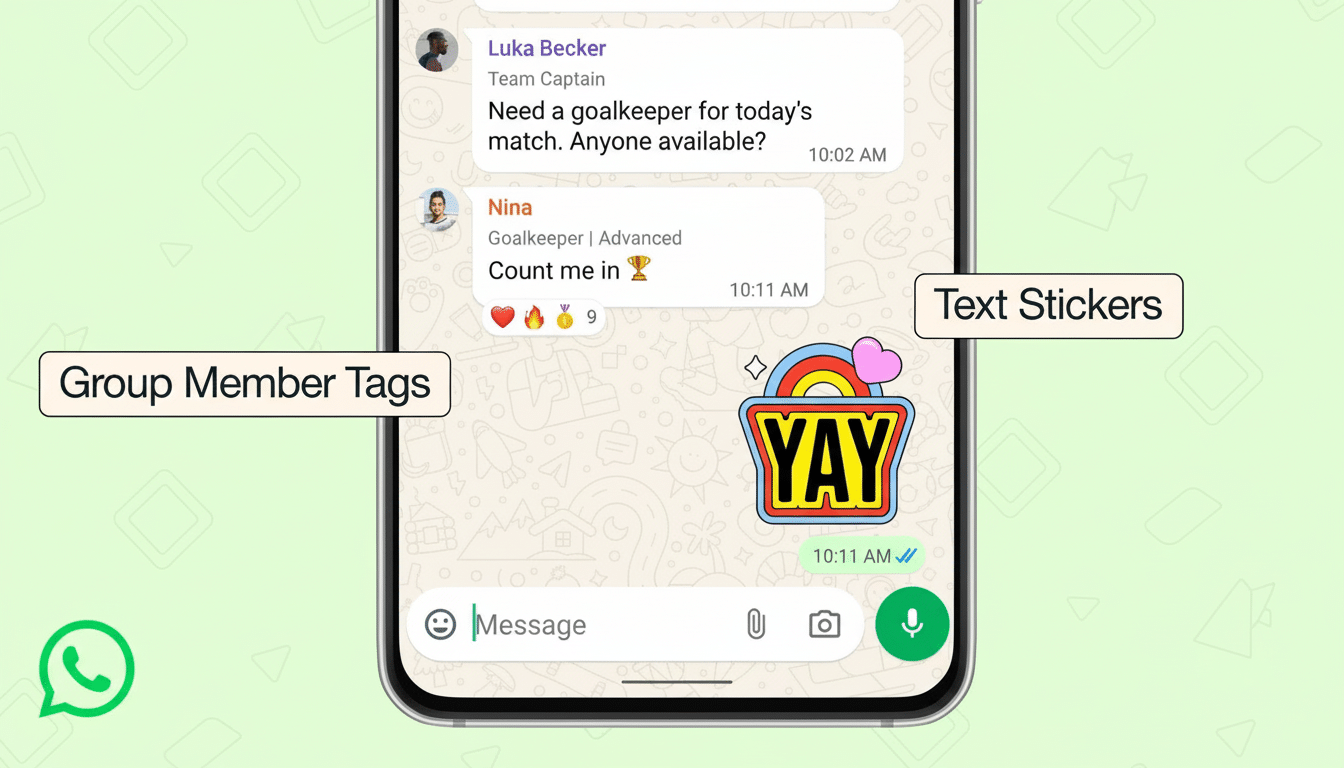
Member Tags allow you to include a short role or descriptor that displays below your name in messages for that group. Think “Ava’s Dad,” “Building 4B Rep,” or “U12 Coach.” The tag is capped at 30 characters, and text and punctuation are allowed — but bear in mind everyone sees it, including all new people who join. Emoji aren’t supported. The tag sticks underneath all your messages until you remove it or swap it out — and importantly, you can have a different tag for every group that you’re in.
You only see your tag when other people use one; you don’t see it under your own messages. It’s meant to provide context at a glance — something that can be especially crucial in groups where contacts overlap, names are similar, or where people don’t talk that much but still need to be easily identified.
How to Add or Edit a Member Tag in a WhatsApp Group
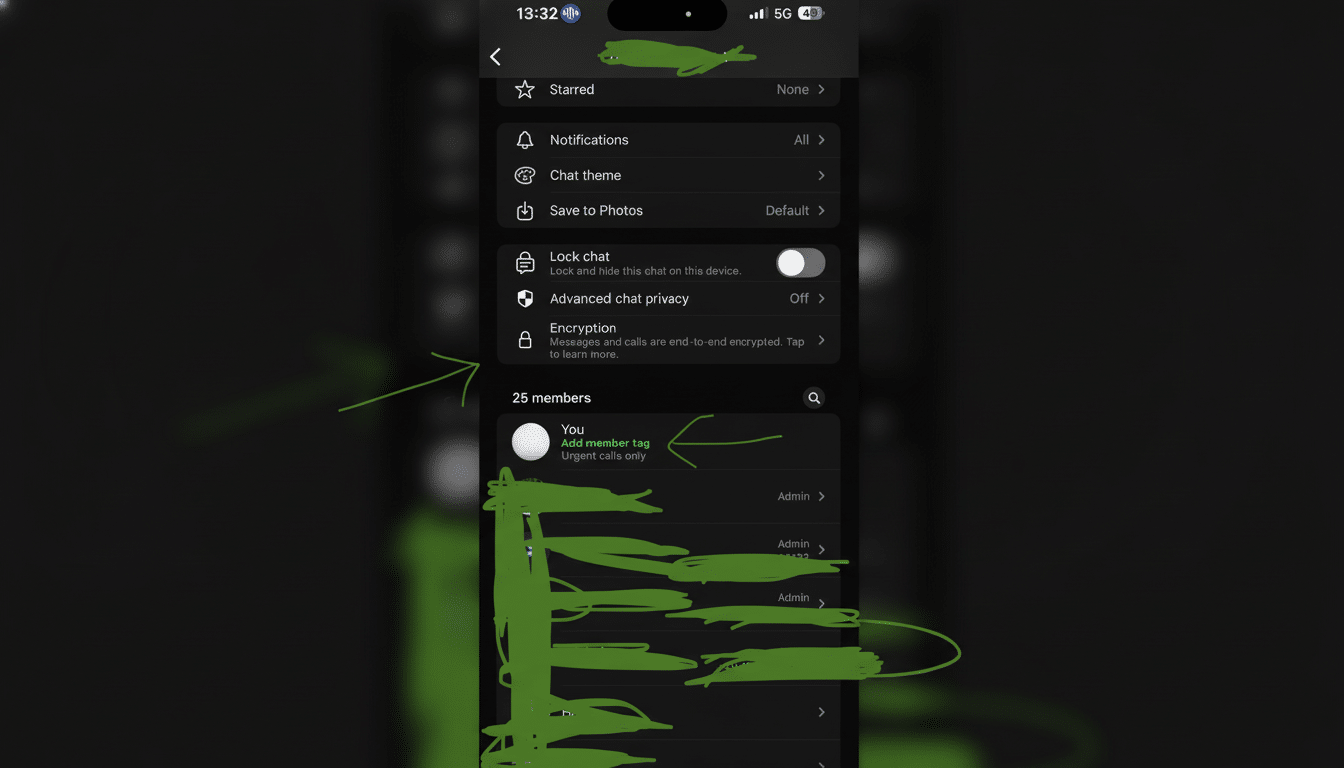
Open the group chat, tap the group name at the top, and scroll to Members. There will be an option that says Add member tag. There, enter your short title — WhatsApp recommends that you share what role you hold in the company, group, or organization where this message thread takes place (or perhaps just how people know you) — and save. You can edit or delete it at any time, and placing a tag on the group won’t impact other groups.
Admins do not assign any tags: they are set by individuals. That helps make the feature convenient, speedy, and in line with WhatsApp’s philosophy concerning user-managed identity in its chats.
Why This Feature Matters for Large and Busy Groups
WhatsApp groups can accommodate up to 1,024 members, and the app is as much a default coordination tool for schools, local communities, sports teams, and event planning around the world. WhatsApp’s worldwide audience, which Datareportal estimated at more than 2.7 billion users, means any modest upgrade in group clarity can have an outsized effect. In practice, Member Tags reduce the effort required to parse long threads by providing instant context about the sender.
This brings WhatsApp closer in role-based clarity to something that users of Slack and Discord might recognize, where job titles or roles help organize the conversation. But unlike office tools, WhatsApp is still personal-first: tags are simple, optional, and per-group, so a user can be “Treasurer” in one place and “Team Physio” in another without having to change their profile name across the platform.
Best practices and real-world examples for clear tags
Short, clear, and specific tags are best. For a school chat, better to say “Leo’s Mum” or “Year 4 Rep” than “Parent.” In a condominium group, “Block C 2nd Floor” or “Maintenance Lead” serve to route inquiries. Sports teams pick up “Goalkeeper,” “Assistant Coach,” or “Fixtures Sec.” If your organization has conventions — such as including department or shift — detail them in the group description so that everyone follows the same pattern.
Remember that tags are self-declared. They are helpful for context, not verification. For more sensitive activity — fundraising, ticketing, or requests for access — admins should continue to depend on existing checks including verified contact cards, known phone numbers, and admin-only announcements.
Privacy and safety considerations when using Member Tags
Member Tags do not affect WhatsApp’s end-to-end encryption model; messages and metadata protections remain the same. Avoid sharing extensive personal data in tags that are visible to anyone who joins the group (full names of children or your address). For professional entities, select descriptors for tags that describe what they do without disclosing sensitive information.
When it comes to noise reduction, tags are your friend. Admins can suggest a common format — for example, role followed by area or team — to help keep tags uniform and limit noise. If you’re worried about impersonation in a large, open group, pair tags with admin-only approvals for new users or activate controls that restrict who can change the group info.
Related WhatsApp group updates rolling out alongside
With Member Tags, WhatsApp is also debuting text stickers that automatically convert short lines of text into formatted stickers for a swift identifier, such as “Sold Out” or “Meeting Moved.” You can also add reminders to group events that will send everyone a notice in advance. And while these are stylish, coordinated touches, it’s the identity clarity that Member Tags unlock, which is perhaps most likely to smooth over any friction in cluttered, dynamic chats.
The bottom line on WhatsApp’s new Member Tags feature
Member Tags are a simple, intelligent solution to a messaging problem that affects everyone: understanding who is talking and why what they’re saying matters in the context of a thread. They can make confusing context literal, in a single line of text. You can also expect schools, clubs, and local groups to adopt them in bulk for themselves — and for admins to lay tags into the kind of basic functionality that would make arriving in a chat feel just plain rude.
