


Many production decisions are cheap to change on paper and expensive to discover on set. Previsualization exists to move those decisions earlier, when a bad camera path or an awkward transition costs nothing but a re-render. AI video makes this stage faster, provided the output is treated as a planning reference and not as a promise of what a real shoot will look like.
That distinction is the whole discipline. A generated previs is a conversation piece, a way to get a director, cinematographer, and editor looking at the same intended sequence before a crew and a location budget are committed. Treated as a guarantee, it misleads; treated as a communication tool, it can save a production its most expensive hours.
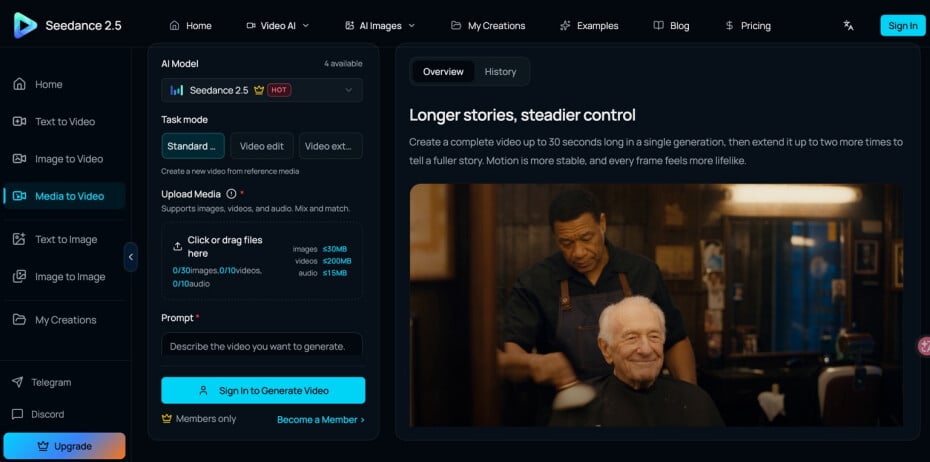
For that purpose, Seedance 2.5 is worth considering when a team wants to test a sequence before committing a crew, actors, or locations.
Start every test shot with a question
A previs shot should answer something specific. Is the camera meant to reveal the location gradually? Does the actor need to cross the frame before the cut? Should the product stay visible while the camera moves? Write the objective before generating, then describe the subject, environment, action, framing, and camera behaviour.
That creates a clear link between your written shot list and the visual test, so when a result fails you can tell whether the problem was the concept, the prompt, or the feasibility of the physical shot. A previs shot without a question behind it is just a pretty clip; a previs shot with a question is a decision waiting to be made, which is the only reason to build one.
Test sequences, not single frames
One attractive frame can hide problems that only appear in motion. For previs, build the important beats in order and watch how the subject enters, where the camera travels, and how the scene ends. If the project cuts to another location, test that relationship too, because transitions between shots are where a lot of on-set confusion actually lives.
The aim is not automatic cinematography; it is exposing the decisions that still need discussion. A rough but coherent sequence tells a production team more about timing than a polished still ever will, because timing is precisely the thing a still cannot show. Watching a sequence play, even an imperfect one, surfaces pacing problems while they are still free to fix.
Compare camera approaches deliberately
Previs is especially good for weighing alternatives. A moment might play as a static composition, a slow push, a tracking shot, or a wider reveal. Generate controlled versions while keeping the story beat constant, then compare them for clarity and feasibility rather than picking the most spectacular option by reflex.
The most elaborate move is rarely the most effective one, particularly when the real crew has limited equipment. A tracking shot that looks stunning in a generated draft may be impossible with the gear and the schedule you actually have. Comparing options in previs lets a team choose the move it can genuinely execute, which is worth more than the move it can only admire.
Translate the test into a shoot plan
Once a direction is agreed, convert the useful observations into ordinary production documents. Record shot size, camera direction, subject movement, location needs, lighting ideas, and any special equipment the concept implies. Mark clearly which elements were only conceptual and which are expected to be reproduced on set.
A generated crane move might suggest a gimbal or a dolly, but the real team still chooses the practical method. Previs earns its keep when it improves those decisions rather than becoming another isolated file nobody opens again. The bridge between the visual test and the shoot is a written plan; without it, the insight from the previs evaporates on the way to the set.
Keep references and continuity straight
When you generate revised versions, reuse the same approved references for the elements that must stay stable, and check screen direction, prop positions, and lighting each time you change a shot. Small inconsistencies introduced during previs have a way of surviving into the shot list if nobody catches them early.
A short continuity note attached to the previs prevents those small mismatches from surviving into the actual shoot. It is unglamorous documentation, but it is the difference between a plan the crew can trust and a set of nearly-matching clips that raise more questions than they answer on the day.
Know the limits of a generated previs
A generated previsualization is a planning aid, not a rehearsal of physics. It can suggest a camera move or a blocking idea, but it will not tell you whether a real dolly fits the location or whether the light will behave the way the draft implies. Treating it as gospel is how a team plans a shot that cannot actually be executed.
The healthy way to use it is to extract the decisions it clarifies and discard the details it cannot promise. Ask what the previs genuinely resolved: the shot order, the rough pacing, the general staging, and carry only those forward into the plan.
Everything about real optics, weight, and time still belongs to the people who will stand on the set with the actual equipment. A previs that a team reads with that understanding sharpens their planning; one they mistake for a guarantee sets an expectation the shoot day cannot meet.
Why Seedance 2.5 works for previsualization
Image: Seedance 2.5 interface highlighting longer storytelling and up-to-30-second video generation — courtesy of the official website (https://seedance2-5.com/).
Seedance 2.5 suits previsualization because its capabilities line up with what this stage actually needs. Its up-to-30-second generation is long enough to hold a full beat in one coherent test, its multimodal references keep a location or subject consistent between versions, and its scene and camera control let you plan a specific move rather than accept whatever the model invents.
That combination is what makes a generated previs useful as a planning reference: you can test pacing and continuity, compare a slow push against a tracking shot, and keep the same approved references across revisions, all before a crew or a location is committed. It remains a communication tool, not a promise of the final shoot, but a controllable one.
The takeaway
Define the shot’s purpose, test the sequence in motion, compare options honestly, and hand the crew a plan rather than a guess. Each step keeps previsualization anchored to its real job, which is helping people agree on a sequence before it becomes expensive to change.
Used as a communication tool, previsualization keeps a production from spending its most expensive hours discovering problems that a quick draft could have surfaced first. The generator accelerates the exploration; the planning discipline is what turns that exploration into a shoot that runs on schedule. Handled that way, Seedance 2.5 is a practical previsualization aid, letting a team agree on a sequence before it becomes expensive to change.

