


Samsung is previewing a playful but surprisingly sophisticated Galaxy AI feature for the upcoming Galaxy S26 series that converts real photos into instant, animated-style sticker packs. In a short teaser, a single tap isolates a subject—think your dog, a sneaker, or a latte—and Galaxy AI spins up multiple stickers with different poses and expressions, no manual cropping or lassoing required.
What the Galaxy S26 Teaser Video Actually Shows
The clip hints at an end-to-end workflow: pick a photo, let the phone auto-detect the subject, and within seconds you have a sticker set ready to drop into messages, social posts, or notes. The notable leap isn’t just background removal. The tool appears to generate new variations—smiles, winks, head tilts—rather than simply cutting out what’s already there. That shifts the experience from static cutouts to dynamic, expressive assets you can use anywhere.
- What the Galaxy S26 Teaser Video Actually Shows
- Why This Playful Feature Matters Far Beyond Simple Fun
- How This Galaxy AI Sticker Generator Likely Works
- How It Stacks Up to Rivals from Apple and Google
- Privacy, Power, and Guardrails for Generative Stickers
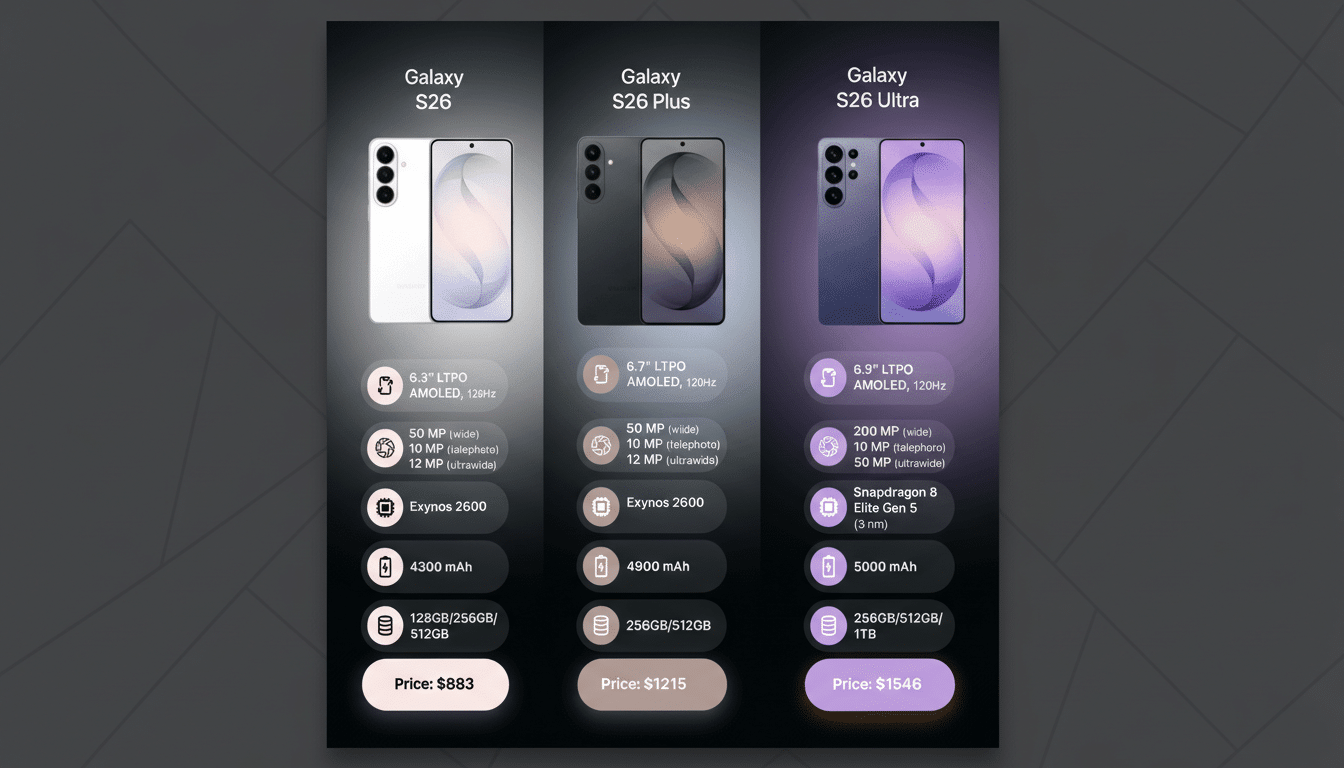
- A Glimpse of the S26 Camera Roadmap and AI Features
Samsung already offers a manual sticker editor in One UI that lets you trace subjects and save them for later. The difference here is automation and creativity: Galaxy AI handles segmentation and then synthesizes fresh visuals, minimizing the taps between inspiration and sharing.
Why This Playful Feature Matters Far Beyond Simple Fun
Stickers are an everyday language across WhatsApp, Telegram, iMessage, and LINE. Personalizing them with your own photos can boost engagement and save time, whether you’re reacting in a chat, building a story, or assembling a quick product mockup for work. LINE’s rise on paid sticker packs shows how sticky this format can be, and creators routinely sell packs across platforms—evidence that custom, high-quality stickers carry real value.
This is also a signal of where Samsung wants Galaxy AI to live: not as a novelty in a demo reel, but as a practical layer across capture, edit, and share. Earlier Galaxy AI features like Generative Edit and real-time language assistance on the S24 series showed the foundation. The S26 teaser pushes that foundation into creative generation, where the phone helps you make, not just modify.
How This Galaxy AI Sticker Generator Likely Works
Under the hood, expect a mix of subject segmentation, matting, and inpainting combined with pose and expression transfer—techniques common in modern vision models. The device probably identifies key landmarks (eyes, mouth, limbs), then uses a generative model to render plausible variations while preserving your subject’s identity and style.
The question is where that computation runs. With the latest phone NPUs growing faster each year—MLCommons’ Mobile benchmarks show steady gains in on-device inference—basic extraction and touch-ups are a lock for local processing. More complex generation may lean on cloud models, similar to how some current Galaxy AI features offer a hybrid approach with user controls for network usage and data handling.
How It Stacks Up to Rivals from Apple and Google
Apple’s Live Stickers can lift a subject cleanly from photos and add effects, but they don’t invent new poses. Google’s Gboard MinIs and Snapchat’s Bitmoji generate avatar-style stickers, yet they’re cartoon abstractions, not faithful derivatives of your actual photo. Samsung’s angle appears to blend the best of both: the authenticity of your real image with the range and flair of generative art.
If the S26 can deliver this quickly and reliably on-device—or with low-latency cloud support—it could become the default way many users react in chats. The convenience delta is meaningful: fewer steps than exporting to a third-party app, better quality than crude cutouts, and more personal than generic emoji.
Privacy, Power, and Guardrails for Generative Stickers
Any feature that fabricates new facial expressions raises questions about consent, labeling, and storage. Samsung has previously added “AI edited” badges in the Gallery to flag altered images, and it will be important to see similar transparency here. Expect familiar privacy toggles around on-device processing and cloud use, in line with what the company introduced on recent flagships.
Power is the other side of the coin. Sticker generation touches multiple stages—detection, synthesis, and export—which can tax CPUs, GPUs, and NPUs. Efficiency gains in next-gen chipsets from Qualcomm and Samsung’s own silicon will be crucial to keep generation snappy without draining the battery.
A Glimpse of the S26 Camera Roadmap and AI Features
Beyond stickers, Samsung has hinted at broader upgrades in computational photography, including improved low-light video. If the company is comfortable showcasing generative creativity this early, expect deeper integration across the camera stack—scene-aware capture, semantic edits, and share-ready outputs tailored for social formats could be on deck.
The bottom line: turning a snapshot into a fully formed sticker pack in seconds sounds whimsical, but it’s also a practical time-saver that reflects where mobile creation is headed. If executed well, this Galaxy S26 feature might become one of those everyday tools you end up using far more than you’d ever expect.
