


Roku’s latest software update adds a deceptively simple tool that fixes one of streaming’s biggest headaches. The new Subscriptions hub, part of Roku OS 15.1, pulls together everything you pay for and what you’re watching across apps into one place, so finding something new—or picking up where you left off—takes seconds instead of minutes.
It even recognizes services you didn’t purchase through Roku, reducing the app-hopping that turns casual browsing into a chore. For heavy streamers, this is the rare update that immediately changes daily usage.
- How the Subscriptions Hub Works Across Your Apps
- Where to Find the Subscriptions Hub on Your Roku Device
- Why This Solves A Real Discovery Problem
- What You Can Do Faster With Roku’s Subscriptions Hub
- How It Compares to Rivals from Apple, Google, and Amazon
- Tips, caveats, and privacy settings to tailor your experience
How the Subscriptions Hub Works Across Your Apps
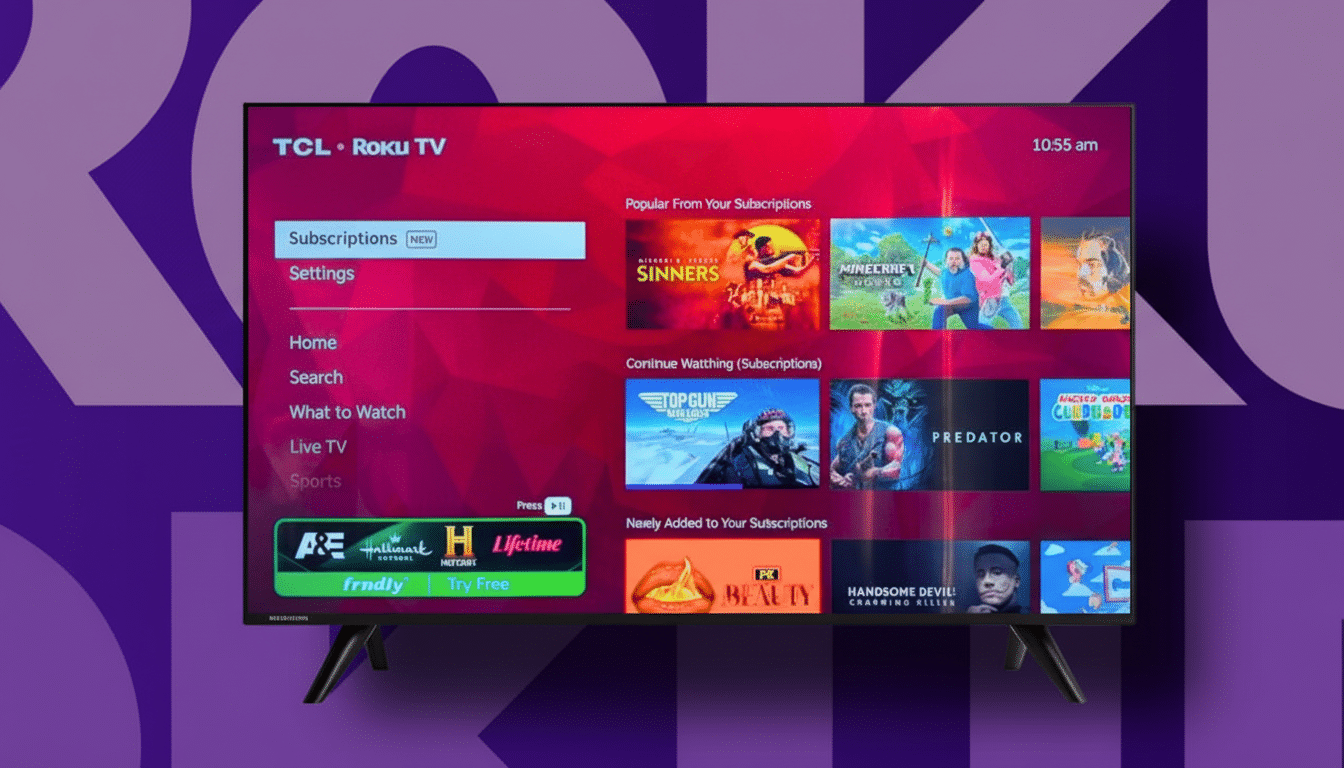
Open Subscriptions and you’ll see a unified snapshot of your services, current shows, and what’s newly available. Roku aggregates rows like New on Your Services, Popular and Trending, and Continue Watching across participating apps, then deep-links you directly to the right episode or film inside each service.
Because it’s account-aware, the hub focuses on what you can actually watch without upsells or dead ends. If you’re signed in to Netflix, Hulu?aid=a-d64cwes9″ target=”_blank” rel=”noopener noreferrer”>Disney+, Max, Paramount+, Hulu, or Peacock—and many others—those catalogs fuel the recommendations and the “resume” queue, even when the subscription was set up outside Roku.
The practical win is fewer clicks. Instead of checking each app’s “new” row, the hub consolidates that sweep into a single view. If you’ve started multiple series across different services, the cross-app Continue Watching row eliminates the scavenger hunt.
Where to Find the Subscriptions Hub on Your Roku Device
Look for Subscriptions in the left-side navigation, just above Settings. If you don’t see it yet, your device may still be in the phased rollout. You can manually check for Roku OS 15.1 by going to Settings, then System, then System Update, and selecting Check Now.
For best results, ensure you’re signed in to each streaming app you use. If a service is missing from the hub, open that app once to refresh your credentials and library. The more services you have installed and authenticated, the richer the hub becomes.
Why This Solves A Real Discovery Problem
Discovery friction is measurable. Deloitte’s Digital Media Trends research has consistently found that U.S. households maintain roughly four to five streaming subscriptions, leading to decision fatigue. Nielsen’s State of Play reports that viewers routinely spend around 10 minutes per session just searching for something to watch—time that often ends in settling or giving up.
Centralizing what’s new and what’s next across your paid services reduces that wasted time and surfaces value you might otherwise miss. In a market where churn is high, firms like Antenna have tracked consumers hopping between services more frequently; tools that highlight fresh content in your existing lineup can curb that impulse.
What You Can Do Faster With Roku’s Subscriptions Hub
Scan new arrivals across all your subscriptions at once and jump straight to a title without opening separate apps. See what’s trending on each service when you want a crowd favorite without consulting charts or social feeds. And resume any show from a single Continue Watching row that spans your whole library.
In practice, that means last night’s drama on Max, a half-finished documentary on Netflix, and a new episode on Hulu all sit side by side. One click opens the right app and picks up your progress automatically.
How It Compares to Rivals from Apple, Google, and Amazon
Apple’s TV app and Google TV’s For You tab attempt similar aggregation with Up Next queues and cross-service recommendations. Roku’s take stands out by living in the main left rail, focusing tightly on services you already pay for, and working even when billing happens elsewhere. Amazon’s Fire TV offers a Continue Watching row, but Roku’s dedicated Subscriptions hub gives that functionality a clearer, less ad-heavy home.
The result feels less like a storefront and more like a control panel for the subscriptions you already own—an important distinction when users prefer discovery features that respect their existing choices.
Tips, caveats, and privacy settings to tailor your experience
Support varies by provider, so a few services may not populate Continue Watching or trending rows immediately. Opening an app after the update can refresh its data. If deep links launch to the wrong profile, check profiles inside the streaming app and re-select your default.
Roku personalizes recommendations using viewing activity from your installed apps. If you prefer less data sharing, review Settings and Privacy options to tailor how your device uses viewing information. You’ll still see the Subscriptions hub, but personalization may be reduced.
Small update, big impact: by eliminating the repetitive navigation that bogs down streaming, Roku’s Subscriptions hub turns content discovery into a quick scan. For anyone juggling multiple services, it’s the smartest quality-of-life upgrade Roku has shipped in a while.
