


I watched Nvidia’s new Pulsar implementation running on a 27-inch, 1440p esports monitor, and the takeaway is obvious: most casual players won’t notice it at a quick glance; competitive ones will. Pulsar folds strobing image clarity into variable refresh rate (VRR) without the normally associated flicker penalty for an impressively, subjectively, much-higher-refresh display—right up to a “1,000Hz-equivalent” sensation under ideal conditions.
What Nvidia Pulsar Actually Does to Improve Motion Clarity
Traditional VRR syncs the panel’s refresh to move in lockstep with the GPU’s output, which also slays nasty tearing and reduces judder, but doesn’t specifically address sample-and-hold blur—the actual smearing you see when your eyes track moving objects. Older strobed-backlighting modes like ULMB 2 help, making persistence shorter and improving clarity, but always at the cost of a fixed rate and flickering being visible if the frame pacing fluctuates.
- What Nvidia Pulsar Actually Does to Improve Motion Clarity
- Hands-On With a 360Hz ROG Panel: First Impressions of Pulsar
- Measured Impact on Motion Clarity and Click-to-Pixel Latency
- Who Will Notice Nvidia Pulsar, and Why It Matters for Esports
- Hardware Support, Certification, and System Requirements
- Bottom Line: Why Pulsar Could Become the Default for Pros
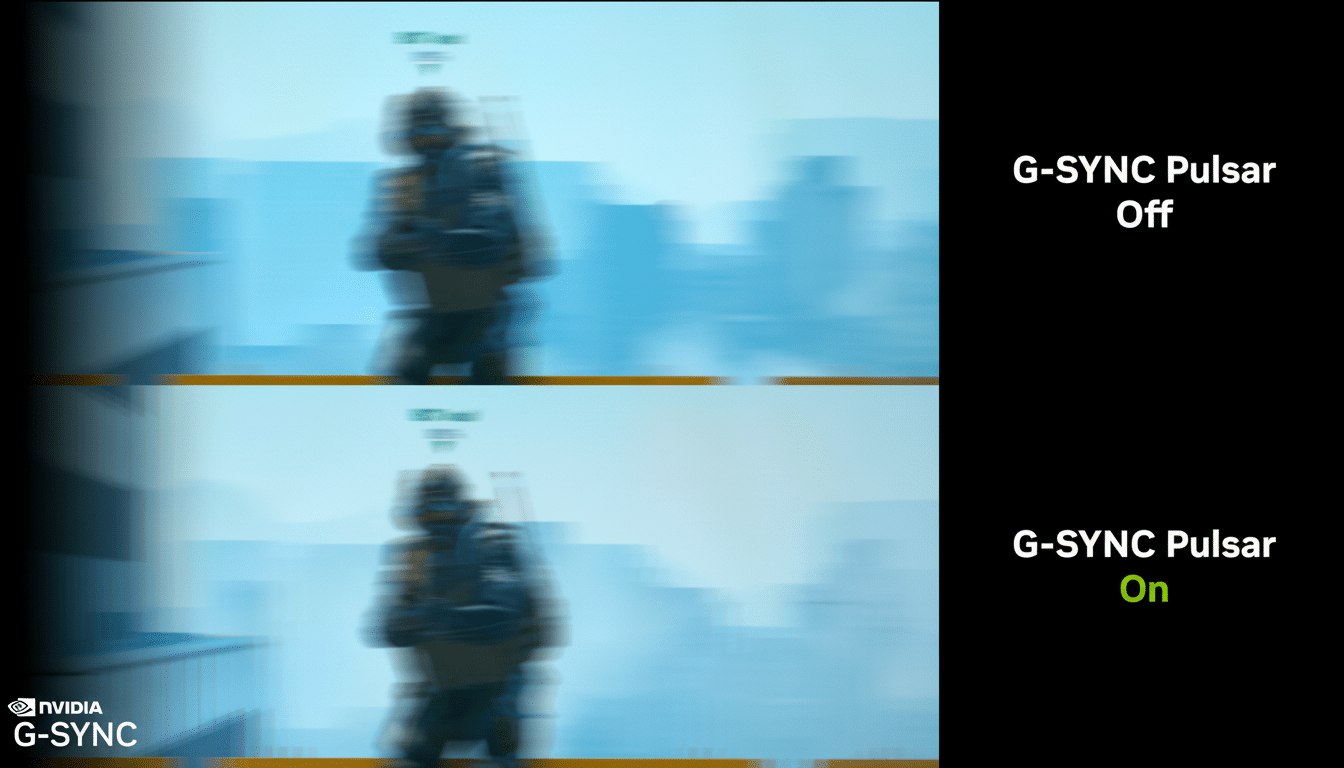
Pulsar takes on this task in three stages. The first, Rolling Scan, “lights” the display with a wandering window at high brightness for only about 25% of the frame duration; leaving moving objects visible for a fraction of their frames effectively reduces perceived blur by some 75%. If it’s all pushing right to the limit at 250 fps—due to that trivially shortened exposure—it will feel like your sample-and-hold panel is running at a minimum 1,000Hz rate.
Second, a Compensation Pulse gently re-saturates sections to push any flicker artifacts outside the range of perception for most people. Third, G-Sync Variable Overdrive times the voltage drive and pulse behavior to the incoming frame timing, allowing the strobe to track VRR without overshoot or coronas that are present when overdrive is not correctly matched to the next frame.
Hands-On With a 360Hz ROG Panel: First Impressions of Pulsar
I played Pulsar on an elite 1440p 360Hz Asus ROG panel paired with a GeForce RTX 5090 in a high-end Ryzen desktop—way more than enough power to maintain very high frame rates. Turning Pulsar on from the on-screen display resulted in an instant increase in perceived brightness; it’s obviously driving the backlight harder for each pulse to make up for fewer duty cycles. There is one vital control to tinker with: Pulsar Low FPS, which determines how low the frame rate (anything between about 75–120 fps) can dip before Pulsar disengages to prevent objectionable flicker.
In a city-builder such as Anno 117, the effect was most noticeable when panning across rain-slick streets: small text and fine geometry remained legible while in motion.
In the Marvel Rivals practice range, sidestepping past signs meant edges remained readable in a manner that standard VRR does not provide. The bots and UI elements in Overwatch 2 had more integrity during flicks and high-speed tracking. It isn’t a night-and-day difference—more like between “good” and “cleaner than you’d think at this speed.”
A handful of fellow press who A/B’d the toggle didn’t pick up on it right away, and that falls in line with Nvidia’s own high-speed demo footage. But once you do know what to look for—text as it moves, the stability of a crosshair under microcorrection, aliasing halos around fast-moving targets—the improvement seems predictable enough.

Measured Impact on Motion Clarity and Click-to-Pixel Latency
With Nvidia’s Latency and Display Analysis Tool (LDAT) and that program’s Textured Stripe test pattern, the reduction in motion smear was substantial. The striped bars and scrolling text—often melded at speed—still remained separate with Pulsar in play, proving that it didn’t make the display slower to respond. In a Counter-Strike 2 drill, end-to-end click-to-pixel latency averaged in the low single digits—give or take 7–8 ms over a sample of 100 shots—bordering on top-tier esports hardware. No measurable input lag was added by Pulsar compared with plain old VRR on this setup, which is a key point.
That agrees with what display engineers would claim—reduce the visible window per frame and maintain overdrive matched to the next refresh and you get clarity gains pretty much without needing to touch the input chain. Blur Busters and other motion-test communities have been documenting how lowered persistence equals better tracking accuracy; Pulsar achieves it under VRR.
Who Will Notice Nvidia Pulsar, and Why It Matters for Esports
If you play story-based games at 60–120Hz and don’t often pan quickly, this is a mild improvement. But for aim trainers and high-skill shooters, it matters. Sharper motion can hold the target more “solid” against strafes and flicks, reduce the mental tax of parsing moving UI details, and cut out potential distractions in case of overshoot. Factor in the option to maintain VRR (no more choosing between smooth frame pacing and strobe clarity), and it becomes a compelling default for competitive use.
Esports orgs fixate on small gains—mouse feet, desk height, monitor height. A couple of extra pixels of readability on a 180-degree flick can make the difference between hits if it comes down to legibility. That’s the niche Pulsar serves.
Hardware Support, Certification, and System Requirements
Pulsar will be coming soon as part of an initial push of 27-inch 1440p 360Hz monitors from well-known gaming brands like Asus ROG, Acer Predator, MSI, and AOC. Pricing is expected to range from around $599–$649 depending on the model. You’re going to need a Pulsar-certified high-refresh-rate monitor and a recent GeForce GPU with G-Sync capabilities. Pulsar works in addition to HDR, and its Low FPS threshold allows you to determine the point where it gracefully hands off to standard VRR so you don’t get flicker on large frame-time swings.
Worth mentioning: strobing modes typically dim the image, with Pulsar’s boosted backlight during pulses brightening up luminance. HDR tone mapping is still reliant on the peak output of the panel and how aggressive ABL is, so calibrate accordingly.
Bottom Line: Why Pulsar Could Become the Default for Pros
It’s not that Pulsar wants to wow you; it’s more interested in honing the edges of high-level play. It combines VRR’s smoothness with strobe-level clarity, and although most will not see it right away, an esports pro sure as heck would. If your rig can sustain 240–360fps at 1440p, this is the cleanest motion I’ve ever seen on a consumer gaming monitor—and it’s likely to become the new yardstick for competitive rigs.
