


Virtual private networks are having a moment. Surveys from research firms such as GWI suggest roughly one-third of global internet users now switch on a VPN each month, a figure that has trended upward as people navigate public Wi‑Fi, regional content blocks, and tightening online controls. If you’re new to VPNs in 2026, here’s what matters—and what doesn’t.
A VPN is best viewed as a secure transit service for your traffic, not a magic invisibility cloak. It can shield your connection from eavesdroppers and mask your IP address. It cannot erase bad passwords, stop phishing, or hide behavior you voluntarily hand to apps and platforms.
- What a VPN Actually Does to Protect Your Privacy
- What a VPN Cannot Do and Common Misconceptions
- Speed, Security, and VPN Protocols to Know in 2026
- Features That Matter Before You Subscribe
- Pricing, Free Tiers, and How to Evaluate Trust
- Setup and Smarter Use Tips for New VPN Users
- The Legal and Policy Landscape for VPN Users
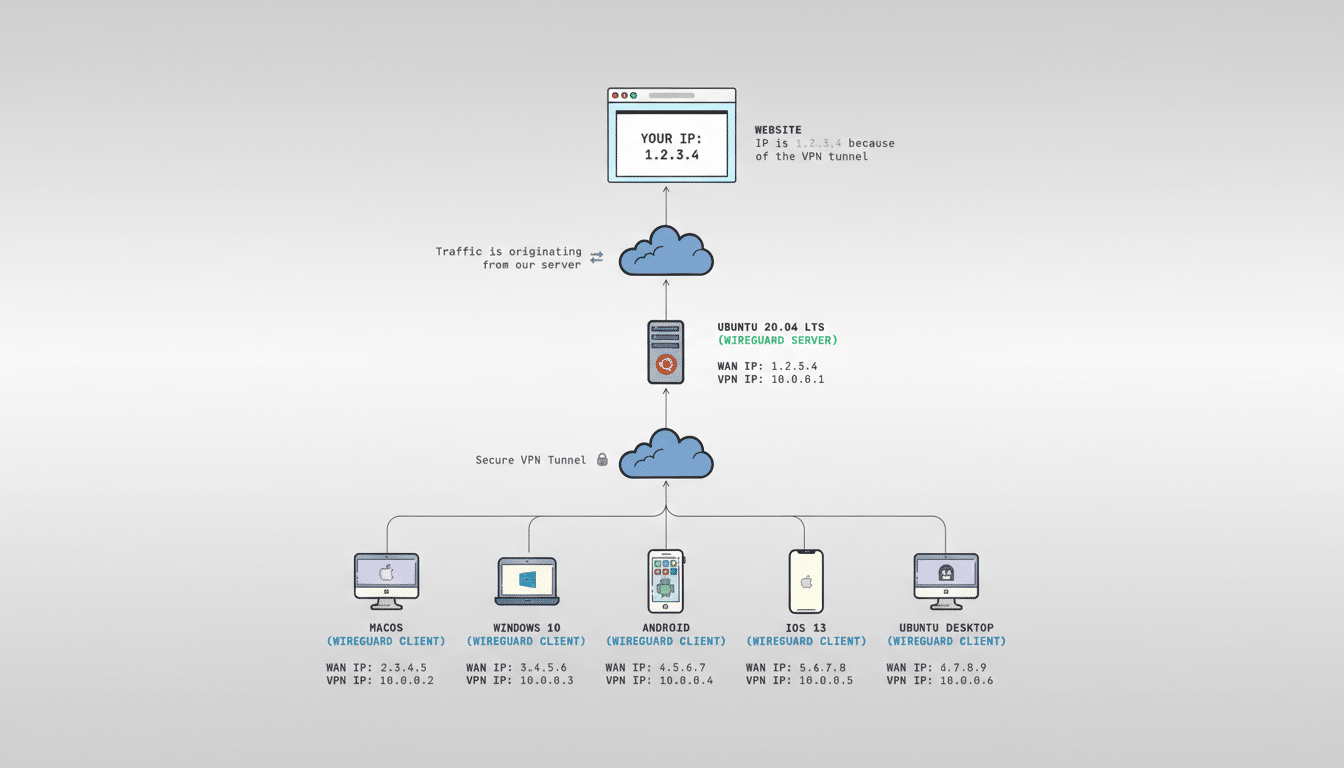
What a VPN Actually Does to Protect Your Privacy
When you connect to a VPN, your device creates an encrypted tunnel to a provider’s server. Websites and services then see the VPN server’s IP address, not yours. This helps protect you on untrusted networks and reduces the profiling that comes from IP-based tracking.
Modern VPNs typically rely on WireGuard, OpenVPN, or IKEv2/IPsec. WireGuard, based on the Noise cryptographic framework, is prized for speed and simplicity. OpenVPN and IKEv2 remain staples for reliability and enterprise compatibility. Under the hood, you’ll often see AES-GCM or ChaCha20-Poly1305 encryption—both considered strong by standards bodies and academics.
New in 2026: several providers are piloting post-quantum–ready key exchanges, pairing classical algorithms with NIST’s selected candidates like Kyber to future-proof session setup. Cloud providers and browser vendors have already trialed post-quantum TLS, and VPNs are following that path.
What a VPN Cannot Do and Common Misconceptions
A VPN won’t make you anonymous to platforms you log into, nor will it block cookies, browser fingerprinting, or malicious attachments. It also doesn’t grant immunity from laws. Many services advertise “no logs,” but treat this as a claim to verify: look for independent audits and clear explanations of what operational data is retained, if any.
Reputable providers increasingly run diskless or RAM‑only servers so data can’t persist across reboots, and they publish third‑party assessments from firms such as Deloitte, PwC, or Cure53. Transparency reports and security research write‑ups are green flags; vague marketing is not.
Speed, Security, and VPN Protocols to Know in 2026
With today’s fiber and 5G, a well-tuned WireGuard connection often delivers near-native speeds, while OpenVPN tends to be slower but broadly compatible. Expect the biggest performance factor to be geography: the closer the server, the lower the latency. If your home internet is multi‑gig, the VPN’s backbone and peering matter more than raw protocol choice.
Some networks and campuses try to detect and block VPN traffic. Obfuscation modes—essentially disguising VPN packets as ordinary HTTPS—can help. Look for labels like “stealth,” “obfuscated,” or “camouflage,” which typically wrap or tweak traffic to evade basic blocks.

Features That Matter Before You Subscribe
Non‑negotiables: a reliable kill switch that cuts internet access if the VPN drops, robust DNS and IPv6 leak protection, and apps with auto‑connect on untrusted Wi‑Fi. Split tunneling (choose which apps go through the VPN), multihop routes, and tracker‑blocking DNS are useful extras for power users.
On the trust side, prioritize providers with independent security audits, open-source clients, and regular transparency reports. If you travel, confirm there are nearby servers in regions you frequent. If you need to bypass filtering, ensure obfuscation is available on desktop and mobile.
Pricing, Free Tiers, and How to Evaluate Trust
Most mainstream services cost roughly $2–$4 per month on multi‑year plans, or $10–$15 on a monthly plan. Money‑back windows usually span 30–45 days. Watch for device limits; many accounts allow 5–10 simultaneous connections, but some are unlimited.
Be cautious with “free” VPNs. Academic work led by CSIRO and others has documented aggressive tracking, weak encryption, and risky permissions in many no‑cost mobile VPN apps. If you must start free, choose a limited tier from a provider with audited no‑logs claims and a clear funding model, not an unknown app with ad‑supported revenue and no security disclosure.
Setup and Smarter Use Tips for New VPN Users
Setup is straightforward: install the app, sign in, enable the kill switch, and set auto‑connect on Wi‑Fi you don’t control (cafés, airports, hotels). For speed, pick the nearest server; for location‑specific tasks, select the country you need. Use split tunneling if a work app misbehaves behind the VPN, and keep two‑factor authentication on your VPN account.
If a site blocks logins while you’re on a VPN, try another server or disable the VPN briefly, then re‑enable it. For reliability on video calls and gaming, prioritize nearby servers and lighter protocols; if latency still hurts, consider pausing the VPN and resuming afterward.
The Legal and Policy Landscape for VPN Users
Using a VPN is legal in most countries, but not all. Freedom House continues to document increased censorship and connectivity controls, and some governments restrict or penalize VPN use. India’s 2022 data‑retention rules prompted several providers to remove local servers rather than log users, and similar debates persist elsewhere. Also remember that streaming platforms may block VPN IPs per their terms.
The bottom line: in 2026, a reputable VPN remains one of the simplest upgrades to your digital hygiene. Choose a provider that proves—rather than proclaims—its security, configure core protections like the kill switch and auto‑connect, and treat the VPN as a strong privacy layer alongside good passwords, updates, and cautious browsing.
