


Motion-activated cameras are the intelligent solution, conserving energy and storage while ensuring you never miss a moment. They are perfect for surveillance, security, and real-time alerts.
In this article, we will talk about motion-activated cameras. We will explain how they work, their different types, and how to choose them.
- How Does a Motion-Activated Camera Work?
- Types of Motion-Activated Cameras
- Indoor/Outdoor Motion-Activated Camera
- Motion-activated Wildlife/Trail Camera
- Motion-Activated Doorbell Camera
- How to Choose a Motion-Activated Security Camera
- Smart Detection & Alerts
- Power & Connectivity Options
- Video Quality & Night Vision
- Field of View
- Storage & Data Management
- Advanced Features
- Best Motion-Activated Security Camera Recommendation
- Common Applications of Motion-Activated Cameras
- FAQs
- Final Words
How Does a Motion-Activated Camera Work?
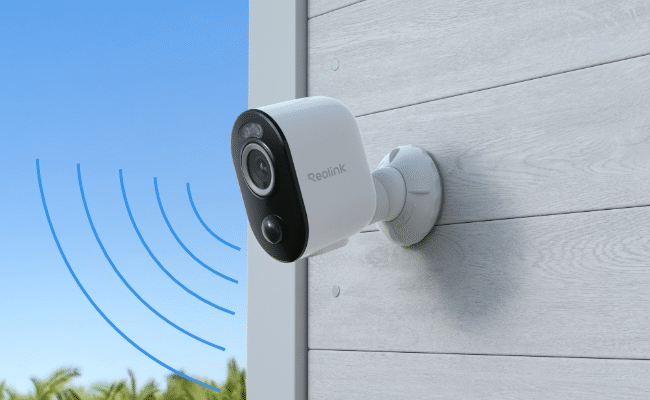
A motion-activated camera is designed to remain in a low-power standby mode until it detects movement, at which point it triggers recording and sends an alert. This smart functionality is powered by one or more motion detection technologies working in concert.
The most common technology is the Passive Infrared (PIR) sensor. It detects changes in infrared radiation (heat) within its field of view, such as a person or animal moving across a background. Pixel-based analysis is another method, where the camera’s software analyzes the video feed for changes in clusters of pixels.
More advanced systems may use radar sensors for precise distance measurement or AI-powered person/vehicle detection to filter out irrelevant motion like swaying trees or pets. Once a valid motion is confirmed, the camera activates, starts recording the event to its storage (SD card, NVR, or cloud), and sends a real-time push notification to your smartphone.
Types of Motion-Activated Cameras
Indoor/Outdoor Motion-Activated Camera
These are the general-purpose cameras for household and office use. Indoor models are ideal for monitoring events and taking care of kids, the elderly, and pets. They are often compact and could have special features like privacy modes, preset points, etc. Outdoor cameras are made for protecting the property perimeter and deterring intruders. They are built with weatherproof (IP) ratings to withstand rain, dust, and temperature extremes, making them ideal for monitoring porches, driveways, and backyards.
Motion-activated Wildlife/Trail Camera
Motion-activated wildlife and trail cameras are designed to monitor and detect motion in remote locations. They have advanced detection with quick triggers to detect even fast-moving animals. They are meant to cover every animal activity. Some cameras can even distinguish between animal species and send accurate alerts. Moreover, they are typically camouflaged and use no-glow or low-glow infrared LEDs to capture animals without disturbing them.
Motion-Activated Doorbell Camera
Motion-activated doorbell cameras are meant to detect any person around the door and answer it remotely. It integrates a wide-angle lens, PIR motion sensor, two-way audio, and a doorbell button into one device. It activates when someone approaches your door, allowing you to see, hear, and speak to visitors from anywhere via your phone. You receive real-time alerts on your connected devices.
How to Choose a Motion-Activated Security Camera
Navigating the market for a motion-activated camera requires a clear understanding of your own needs and the features that address them.
Smart Detection & Alerts
Basic motion sensors trigger for any movement. Look for cameras with AI-powered detection that can distinguish between people, vehicles, and animals. This drastically reduces false alerts from leaves or shadows, so you only get notified about what truly matters.
Power & Connectivity Options
Consider how you’ll power the camera (outlet, battery, solar, or Power over Ethernet) and how it connects to your network (Wi-Fi or Ethernet). Wired PoE cameras offer the most reliable, continuous power and data connection, while battery/solar models provide ultimate installation flexibility.
Video Quality & Night Vision
For clear identification, 2K or 4K resolution is recommended. Equally important is night vision capability. Choose between traditional infrared (IR) night vision, which provides clear black-and-white images, or color night vision, which uses a spotlight or advanced sensor technology to deliver full-color video in darkness.
Field of View
The field of view (FOV) determines how much area the camera can see. A wide-angle lens (e.g., 120°+) is great for covering a broad driveway or backyard. For monitoring specific, distant points like a gate or package drop-off, a camera with optical zoom or a dual-lens system is superior.
Storage & Data Management
Decide where you want your footage stored. Local storage on a microSD card or Network Video Recorder (NVR) keeps data in your possession. Cloud storage offers remote access and backup, but usually involves a subscription fee. Some systems offer a hybrid of both.
Advanced Features
Consider extras like a built-in siren, two-way audio, customizable activity zones (where you define areas for the camera to monitor or ignore), and compatibility with smart home platforms like Google Home or Amazon Alexa for enhanced automation.
Best Motion-Activated Security Camera Recommendation
Reolink Altas PT Ultra
Altas PT Ultra is a 4K 8MP wireless pan-and-tilt solar/battery camera. It smartly detects objects and instantly records when motion is detected. Its standout feature is 360° Automatic Tracking, which follows subjects seamlessly. It starts recording 10 seconds before motion detection to ensure every event detail. It delivers stunning 4K Color Night Vision, powered by integrated spotlights. For ultimate convenience, it includes a solar panel for perpetual power and connects via fast, stable dual-band Wi-Fi 6.
Reolink TrackMix PoE
For professional-grade, proactive monitoring and 24/7 recording, the Trackmix PoE is a perfect solution. It is a 4K Dual-Lens PoE PTZ Camera with Auto Tracking and employs a sophisticated dual-lens system. It provides a Wide-Angle view for context and a Telephoto Lens for sharp detail, enabling Dual View, Dual Tracking on a single screen. It records in 4K 8MP Ultra HD and is powered by a single PoE cable, ensuring unwavering reliability for critical security points.
Common Applications of Motion-Activated Cameras
- Security & Surveillance: The primary use is for home and business security—deterring porch pirates, monitoring perimeters, and securing warehouses after hours.
- Monitoring & Care: Families use them to check on children, elderly relatives, or pets during the day, receiving alerts for movement or unusual activity.
- Wildlife Observation: Researchers and hobbyists use trail cameras to discreetly document animal behavior, population, and movement patterns in natural habitats without human interference.
FAQs
Are motion sensor cameras always recording?
No, most standard motion-activated cameras are not always recording. They remain on standby and only begin recording when motion is detected. However, many models, especially those connected to an NVR and PoE, offer the option for 24/7 continuous recording if desired.
Do motion detection cameras need Wi-Fi?
Not all of them. While most consumer-grade smart cameras use Wi-Fi to send alerts and enable remote viewing, many types do not require it. Wildlife cameras store footage locally on SD cards and use a cellular network. PoE security cameras transmit data via Ethernet cable, and some basic models record directly to local storage without any network connection at all.
Why use a motion-activated camera?
They provide efficient, intelligent monitoring. By recording only when necessary, they save significant storage space and battery life. More importantly, they deliver instant alerts about relevant activity, allowing for a quick response to potential security incidents.
Final Words
Investing in a motion-activated camera means choosing smarter security. It not only saves storage and power but also ensures optimal security. We have explained how they work and their common types. We have also shared the factors you need to consider while buying them. They are excellent for home and office security, be it indoors and outdoors.
