


If your email inboX is lighting up with Instagram password reset requests you didn’t ask for, well, you’re not alone. A worldwide series of messages unnerved users and caused rumors about a huge hack. Instagram claims that is not what occurred: It says the spike was caused by abuse of its reset process, rather than a data breach.
What Really Led to the Password Reset Email Flood
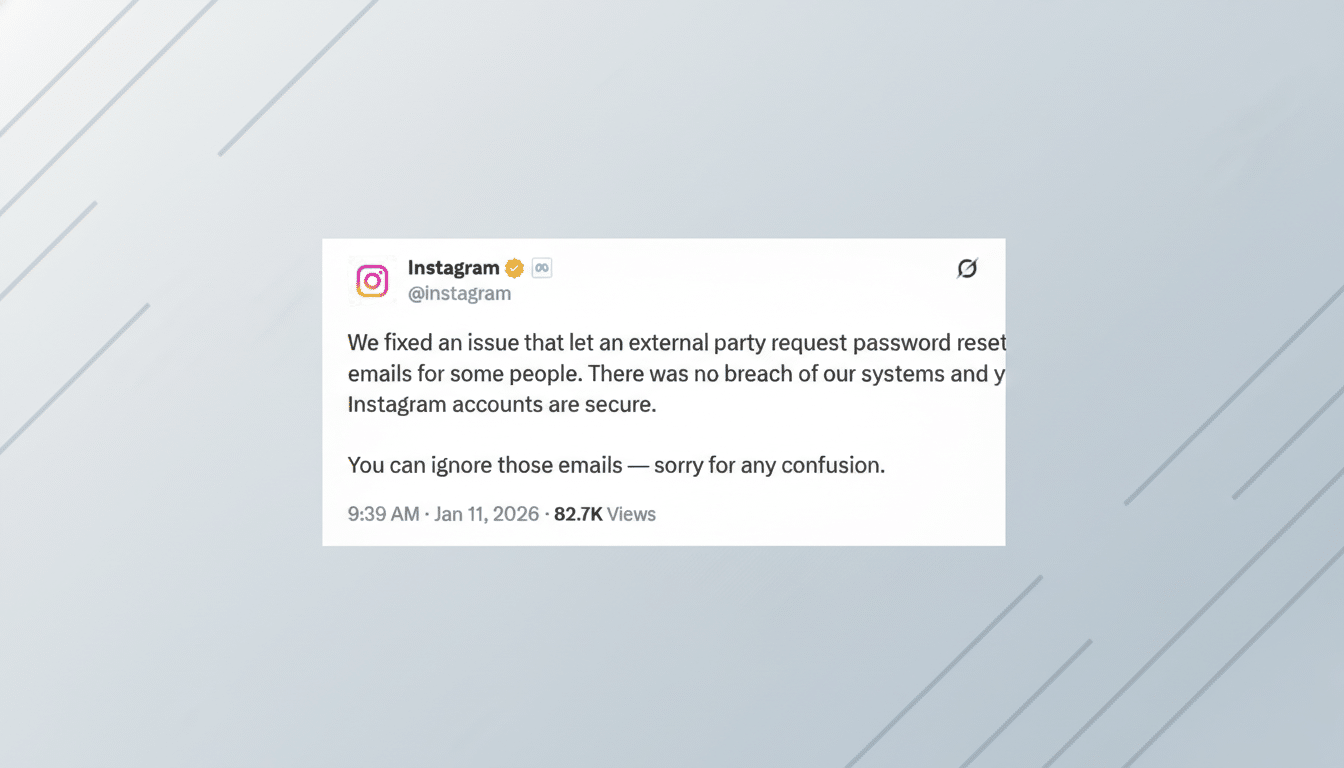
Instagram said in a statement posted on X that it had addressed the bug that allowed a third party to send password reset emails for some accounts. In practice, someone found a way to spam the “forgot password” flow without gaining access to accounts or stealing credentials.
- What Really Led to the Password Reset Email Flood
- No Data Breach Evidence Despite Reset Email Surge
- Why Attackers Abuse Password Reset Workflows Like This
- How to Respond Safely Without Fueling the Phishing
- How to Tell Fake Instagram Emails from the Real Ones
- The Bigger Security Context for This Reset Email Event
Email is designed to be automated: Submit a username, phone or email to the reset form and the platform sends you an email. When an attacker automates that process, on a large scale, you can be deluged with what appear to be legitimate-looking emails — and even if no login was successful, it can feel like getting owned.
No Data Breach Evidence Despite Reset Email Surge
The panic intensified after a report spread that data from 17.5 million Instagram accounts was being sold on the dark web. (In an email, Instagram maintained that there was no breach, and there has been no public evidence that fresh platform-sourced data was exfiltrated.) Listings for breaches often reuse old or disassociated data to generate attention.
For a proper breach, you’d want signs including forced logouts, widespread password resets or confirmation from multiple threat intelligence teams. None of that has surfaced. Instead, this appears to be a form of reset abuse — annoying, confusing, but a different type of risk.
Why Attackers Abuse Password Reset Workflows Like This
There are a few motives. For starters, account enumeration: spamming resets can show if an email address or username is present on Instagram by observing which requests succeed. Second, distraction: With inboxes jammed, targeted phishing that follows can try to nudge people into clicking on a fake “secure your account” link.
It’s also a piece of credential stuffing efforts. If attackers check reused passwords elsewhere and set off resets here, they might shove worried users into precipitous actions — like entering codes for the bad guys on a phishing site — without ever actually leaking Instagram credentials.
How to Respond Safely Without Fueling the Phishing
Don’t use links in unsolicited emails. If you did not request a reset, go directly to the Instagram app and examine the Security settings. You can check inside the app as well: Instagram has an “Emails from Instagram” section that you can find under your account Settings should you want to see whether a message actually originated from the company.
Review Login Activity and Devices. If you see locations or hardware that aren’t yours, log them out and immediately change your password in the app. Enter a strong, unique password you don’t use elsewhere.
Enable two-factor authentication with an authenticator app, not SMS, in order to resist SIM-swap and phishing threats. Instagram has also started rolling out passkeys in several regions, which eliminate passwords altogether and can help blunt credential theft.
If you did click an email link, consider it a potential phish: change your password from the app, revoke unfamiliar sessions and rotate any email account passwords associated with your login.
You might also want to enable security alerts from your email provider.
How to Tell Fake Instagram Emails from the Real Ones
Authentic Instagram emails typically come from sender addresses on the instagram.com domain, which you can cross-check under Security in the app. Phishing messages frequently rely on lookalike domains, strange grammar, urgent countdowns or requests for codes and full credentials.
And remember: Instagram is never going to request your password or 2FA codes over email or direct message. If in doubt, disregard the email and initiate action only within the app.
The Bigger Security Context for This Reset Email Event
What’s interesting is that this particular incident makes it clear how in some cases attackers are using legitimate features as a weapon, even though no breach occurred here. Rate limiting, CAPTCHAs and abuse detection are useful but no system is infallible. The F.B.I.’s Internet Crime Complaint Center logged over 800,000 complaints in its latest annual review, with reported losses topping $12 billion — evidence that opportunistic moves continue to pay off.
User behavior is the other part of the equation. Google and the Harris Poll found that 65% of people reuse passwords across sites, which magnifies the impact of any credential leak. Specialized passwords, 2FA, and a healthy dose of cynicism when asked about things out of the blue are still your friends.
The bottom line: those password reset emails came from reset abuse, not a verified Instagram hack. Relax, check inside the app and tighten your security settings — no panic clicks necessary.
