


Google is introducing a small but meaningful tweak to its Gemini assistant: an Answer now button that lets users skip the model’s deep reasoning process and jump straight to a concise response. The feature appears when you’re using Gemini’s Pro or Thinking models and is designed for those moments when you just want a quick fact, not a multi-step analysis.
What the Answer Now button actually does in Gemini
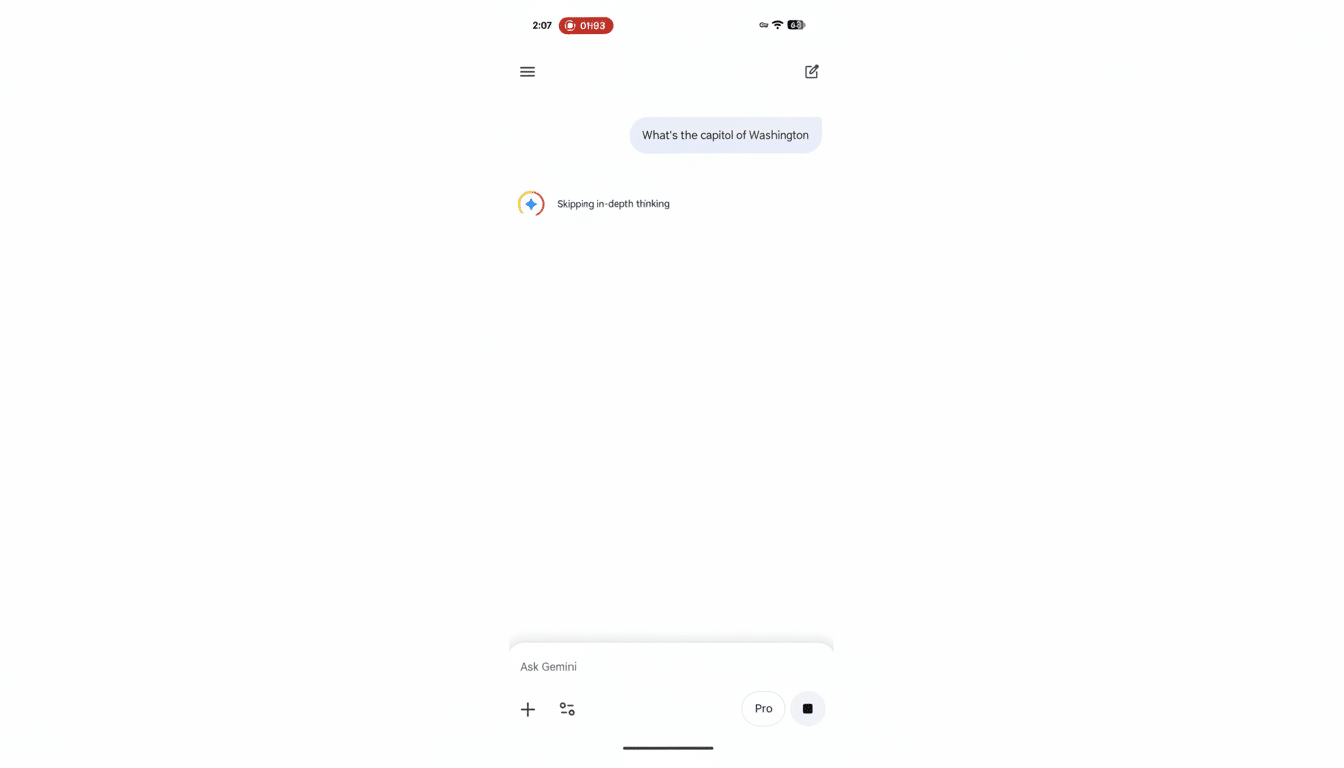
When Gemini begins generating, a new Answer now option surfaces beside the model description. Tap it and Gemini displays “Skipping in-depth thinking” before delivering a short, direct reply—without switching away from the model you selected. This matters because Gemini’s reasoning modes can spend extra cycles planning, self-checking, and iterating, which is helpful for complex tasks but overkill for simple lookups or conversions.
- What the Answer Now button actually does in Gemini
- Where the Answer Now feature is rolling out
- Why it matters for latency, UX, and compute cost
- Examples of when to use Answer Now for quick tasks
- Personalization and connected apps expand fast answers
- How to try Answer Now on mobile and the web
- Competitive context versus rival model selection UX
- The bottom line on Google’s Gemini Answer Now feature
You won’t see the button if you’re already on Gemini Fast, which prioritizes speed by default. Interestingly, early sightings indicate the system doesn’t silently swap to Fast when Answer now is pressed; it simply instructs your current model to compress its work and return the best available answer quickly.
Where the Answer Now feature is rolling out
The control is appearing across the Android and iOS Gemini apps and on the web, noted by observers at 9to5Google. Google hasn’t detailed a full global rollout, but the behavior is consistent with how the company stages new Gemini features: surface them on mobile and web simultaneously so users can develop the habit across contexts.
Why it matters for latency, UX, and compute cost
Reasoning models often generate internal steps and longer outputs, increasing tokens and latency. For simple prompts—What’s the capital of Japan? or Convert 5 feet to meters—those extra steps rarely add value. By letting users interrupt the “thinking” loop, Google trims seconds from round trips and reduces compute load behind the scenes. Speed is not just convenience; research in UX consistently shows users abandon slow interactions quickly. Google’s own earlier findings on mobile behavior linked multi-second waits with sharp drop-offs in engagement, and similar impatience applies to conversational AI.
There’s also an economics angle. Enterprise buyers and power users feel token costs the most on long, reasoned responses. A nudge toward brevity on low-stakes questions can meaningfully lower consumption over time, especially for teams that keep high-capability models on by default.
Examples of when to use Answer Now for quick tasks
Answer now shines on quick facts, unit and currency conversions, simple definitions, flight or stock lookups, or extracting a date from a short passage. If the prompt doesn’t demand step-by-step reasoning or citations, the button saves time. On the other hand, leave it off for debugging code, multi-constraint planning, or tasks where you want the model’s chain of thought to explore alternatives before concluding.
Personalization and connected apps expand fast answers
The button arrives as Gemini deepens personalization. Users in the US with AI Pro or AI Ultra plans can connect Gmail, Photos, Search, and YouTube so the assistant can ground answers in their own content when appropriate. You can enable this in Settings under Personal Intelligence and Connected Apps. Google has signaled Calendar, Drive, and Workspace apps like Docs and Sheets are next, which should make fast answers even more useful for quick scheduling checks, document references, or spreadsheet values.
How to try Answer Now on mobile and the web
Select Gemini Pro or a Thinking model, enter your prompt, and watch for the Answer now control as generation begins. If you rely on Fast for speed, you won’t see the button because you’re already on the snappiest path. On mobile, the interaction is a single tap; on the web, it appears beside the model indicator while the reply is forming. If you change your mind midstream, you can still let the full reasoning complete.
Competitive context versus rival model selection UX
Rivals typically ask users to pick between lightweight and heavyweight models up front—think compact models tuned for speed versus flagship models tuned for quality. Google’s approach keeps you in a high-capability model while offering an instant off-ramp to a concise result. It’s a subtle UX difference, but it reduces friction for anyone who doesn’t want to micromanage model selection every time a prompt shifts from complex to simple.
The bottom line on Google’s Gemini Answer Now feature
Answer now is a pragmatic quality-of-life feature: it preserves the power of Gemini’s advanced models but acknowledges that not every question needs deep reasoning. By giving users a visible, one-tap speed boost, Google is smoothing the edges of everyday AI use—and quietly optimizing latency and compute in the process.
