


Google is expanding its personal information removal program to cover government IDs and non‑consensual explicit images, promising faster takedowns from Search—and surfacing a thorny trade‑off. To flag and scrub these results, you’ll have to hand Google the very details you want hidden, a step that improves monitoring but also creates another copy of highly sensitive data.
What Changed in Google Search for ID and Image Removal
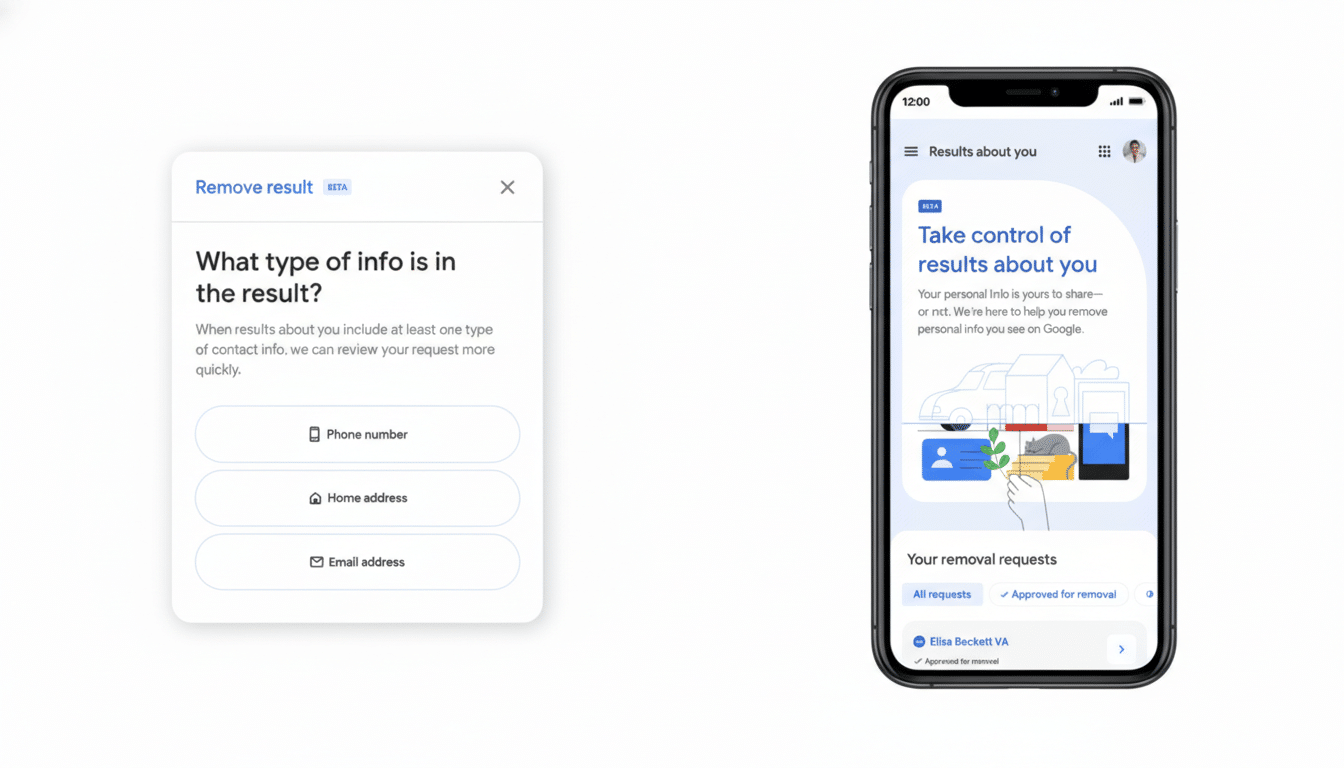
The “Results about you” hub now lets users ask Google to detect and delist items such as passports, driver’s licenses, and Social Security details when they appear in Search. The feature is rolling out in the US first, with broader availability expected. You enter what you want monitored—your address, phone, email, and now specific government identifiers—and Google alerts you if matching results surface so you can request removal.
- What Changed in Google Search for ID and Image Removal
- The Catch and Why Submitting IDs to Google Matters
- What Removal Does and Does Not Do in Google Search
- The Risk Landscape in Numbers for Identity and NCII
- How to Use the New Google Removal Tools Safely
- Bottom Line on Google’s Expanded Personal Data Removals

For explicit imagery, Google is expanding its non‑consensual intimate image (NCII) tools. If a compromising photo of you appears, tap the three dots on that result, choose “Remove result,” then select “It shows a sexual image of me.” You can bundle multiple images in one request. Google says you can also opt in to protections that reduce similar explicit results linked to your name from appearing in future searches.
The Catch and Why Submitting IDs to Google Matters
To enable automated monitoring of IDs, you must submit those identifiers to Google. The company says it uses strong encryption, restricts internal access, won’t share the data, and won’t use it to personalize other products. For Social Security numbers, Google asks only for the last four digits. Even so, security professionals note a perennial truth: every additional place your most sensitive data lives increases long‑term risk, regardless of current safeguards.
That means the decision hinges on your exposure. If an ID number or image is already circulating, empowering Google to find and delist those results can meaningfully reduce harm—especially against identity theft or impersonation. If there’s no sign of exposure, preemptively uploading sensitive identifiers offers less upside and introduces a new storage location to worry about.
What Removal Does and Does Not Do in Google Search
Google removals delist items from Search; they don’t erase the source content from the internet. To tackle the root, contact the site owner or hosting provider, invoke platform policies against doxxing or NCII, and consider a copyright notice if you own the photo. In the European Union, data subjects may also pursue delisting under regional privacy laws, which operate alongside Google’s voluntary tools.
For minors’ intimate imagery and sextortion incidents, organizations such as the National Center for Missing & Exploited Children offer processes like Take It Down that help generate hashes to prevent redistribution across participating platforms. Survivors of adult NCII can use initiatives like StopNCII run in partnership with major platforms to slow reuploads.
The Risk Landscape in Numbers for Identity and NCII
Identity misuse is widespread. The Federal Trade Commission’s latest Consumer Sentinel data shows more than 1 million identity theft reports annually, while overall fraud losses have climbed into the tens of billions in recent years. The FBI’s Internet Crime Complaint Center reported more than $12 billion in losses across online crimes last year, with extortion and fraud schemes continuing to rise. Advocates tracking NCII, including the Cyber Civil Rights Initiative, have documented that victims often face repeated reuploads across sites, underscoring why Search delisting plus source takedowns both matter.
How to Use the New Google Removal Tools Safely
Start in the “Results about you” hub on the web or in the Google app (tap your profile photo). Add only what you need monitored: name, address, phone, and—if you face exposure—specific IDs. For Social Security numbers, provide only the last four digits as prompted. Enable notifications to catch new hits quickly, then submit removal requests directly from alerts.
For explicit images, open the result’s three‑dot menu, choose “Remove result,” and select “It shows a sexual image of me.” Group multiple URLs when possible. If granted, consider opting in to protections that suppress similar explicit results tied to your name in follow‑on searches.
Once your requests are resolved, revisit the hub’s settings and consider deleting the identifiers you uploaded. Pair Search removals with broader safeguards: place fraud alerts or credit freezes with major bureaus if your ID data was exposed; set up bank and email alerts; and use strong passwords plus passkeys or multifactor authentication across critical accounts.
Bottom Line on Google’s Expanded Personal Data Removals
Google’s expansion is a real win for people trying to claw back control of leaked IDs and intimate images. The trade‑off is unavoidable: better detection requires sharing enough detail to find the problem. Treat these tools as targeted, time‑bound interventions—high value when exposure exists, unnecessary overhead when it doesn’t—and always combine Search delisting with source takedowns and basic account security hygiene.
