


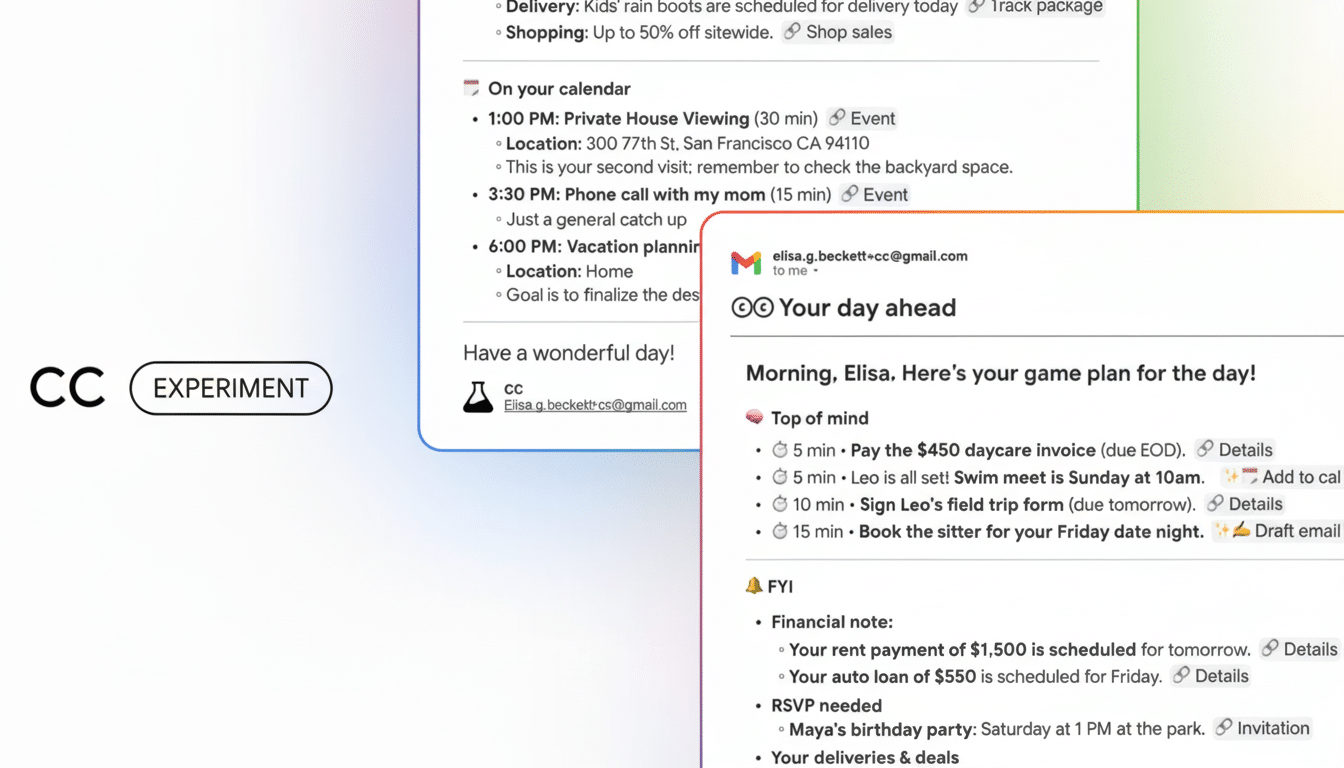
Google is launching CC, a Gemini-backed personal assistant that assembles daily briefings and follows up by sifting through your Gmail, Calendar, and Drive. Positioned as a Labs project, CC wants to make sense of the fragmented trickle of posts, invites, and documents by assimilating them into one consolidated, actionable view of your day — and then get you to act on it.
What CC Does and Why It Matters for Your Day
CC’s central premise is straightforward: it’s a daily briefing that surfaces what you need to know and what you need to do, so you don’t have to sift through inboxes or calendars. It highlights upcoming meetings, deadlines, attachments you should read, and messages that are waiting for your response.
- What CC Does and Why It Matters for Your Day
- How Gemini Powers CC’s Context-Aware Briefings From Your Files
- Examples in the Flow of Work and Real-World Scenarios
- Privacy Controls and Admin Guardrails for CC Users
- How to Get It and Who Gets First Access to CC
- Competition and the Productivity Stakes in AI Assistants
- Bottom Line: What CC Could Mean for Everyday Users
Where it’s interesting is follow-through. CC can suggest a response, propose next steps, and introduce calendar links so you can accept the meeting, reschedule it, or delegate the task in just seconds. Call it a context-aware triage desk that also helps with some of the paperwork.
How Gemini Powers CC’s Context-Aware Briefings From Your Files
Built on Google’s Gemini models, CC shines with the system’s ability to read context through lengthy email threads, meeting notes, and shared Drive files. It is that wide context window that enables the mess of signals — itinerary changes, docs with comments, calendar holds — to be condensed into convincing plans.
You can also tell CC what to remember, like meeting preferences (windows for scheduling meetings), travel patterns, or colleagues who should be in the loop. This is, like Gemini’s memory features, opt-in, and an effort to stop asking repeatedly after a while. The aim is not “assistant you must be constantly managing” but instead, “assistant that learns your tempo.”
Examples in the Flow of Work and Real-World Scenarios
Your flight gets delayed, your client reschedules a review, and a teammate adds a new draft in Drive while you’re asleep. CC’s briefing could pull up the conflict, outline the major changes to the draft, and suggest alternative meeting times with calendar links, along with a pre-written note to send off to the client.
It is exactly the kind of “work about work” that can tie teams up. Asana’s Anatomy of Work research has uncovered that knowledge workers spend a significant portion of their week on coordination instead of skilled tasks. According to Microsoft’s Work Trend Index, more than half of employees would like AI to take over routine communications. That burden is what CC is built to bear.
Privacy Controls and Admin Guardrails for CC Users
Since CC culls from private data in Gmail, Calendar, and Drive, controls are important. Access, Google says, is permission-based and revocable, with settings to control what CC can see and remember. For those using Workspace, the new Labs features and data access policies can generally be governed by IT admins at the domain level.
Google’s public guidance has for years said that personal content in services like Gmail and Drive is not used for ad targeting, and that some enterprise data processing is covered by Workspace agreements. The permissions you grant and the memory options will allow CC to become more reliable, but users are still advised to check them before turning on CC for sensitive jobs.
How to Get It and Who Gets First Access to CC
CC will open through a waitlist in Google Labs. Early access is expected to be prioritized for paid Gemini subscribers, including those in tiers that grant access to Gemini’s most powerful models. Broader availability usually comes after early Labs testing, though the schedule will depend on user feedback and performance.
CC you can expect to find where you already are working (in your Google account rather than a new destination altogether), with the briefing dropping alongside your inbox and calendar rather than being another app you have to open.
Competition and the Productivity Stakes in AI Assistants
CC comes on the heels of an explosion in upstart AI assistants that dwell inside productivity suites. Microsoft has been building out Copilot summaries in Outlook and Teams, while Slack and Notion offer automated digests. The differentiator for CC is its deep, native access to Google’s core capabilities and Gemini’s long-context reasoning.
The bigger bet is that AI triage significantly enhances output. McKinsey projects that generative AI will create trillions of dollars in annual economic value, with the early gains concentrated in customer support, sales, and software development. The daily briefings that reduce coordination time are a step toward achieving those benefits for everyday knowledge work.
Bottom Line: What CC Could Mean for Everyday Users
CC is not some flashy new app — it’s the connective tissue making Gmail, Calendar, and Drive feel smarter when you use them together. If Google gets the brief right — keeping summaries credible, follow-ups painless, and privacy controls clear — CC may actually be the first AI habit that many users build into their morning routine.
