


Google is also solving the number one issue with wireless ADB: dropping off randomly and having to set everything up every time it reconnects.
In recent Android Canary builds, you can now enable wireless debugging via automatic pairing when you connect a device by USB and have previously successfully paired on that network/connection type combination. The system may also automatically turn off wireless debugging when it detects there are no active devices connected to the machine.
Though minor-sounding, it’s a notable relief to developers and power users who use ADB for pushing builds, taking logs, or running automation scripts—removing one daily pain point.
It also brings wireless ADB a little bit closer to “it just works” than “it works until the next timeout.”
What Google Is Changing for More Reliable Wireless ADB
Since Android 11, it is easier to pair ADB over Wi‑Fi with QR and pairing codes in Developer Options as well as by leveraging automatic discovery using mDNS. The theory was splendid; at the nitty-gritty level of reality, it was fragile. Connections would go and drop, mDNS wouldn’t always see the device, and Android was turning off wireless debugging after lack of use, requiring a manual walk back into settings to turn it on again.
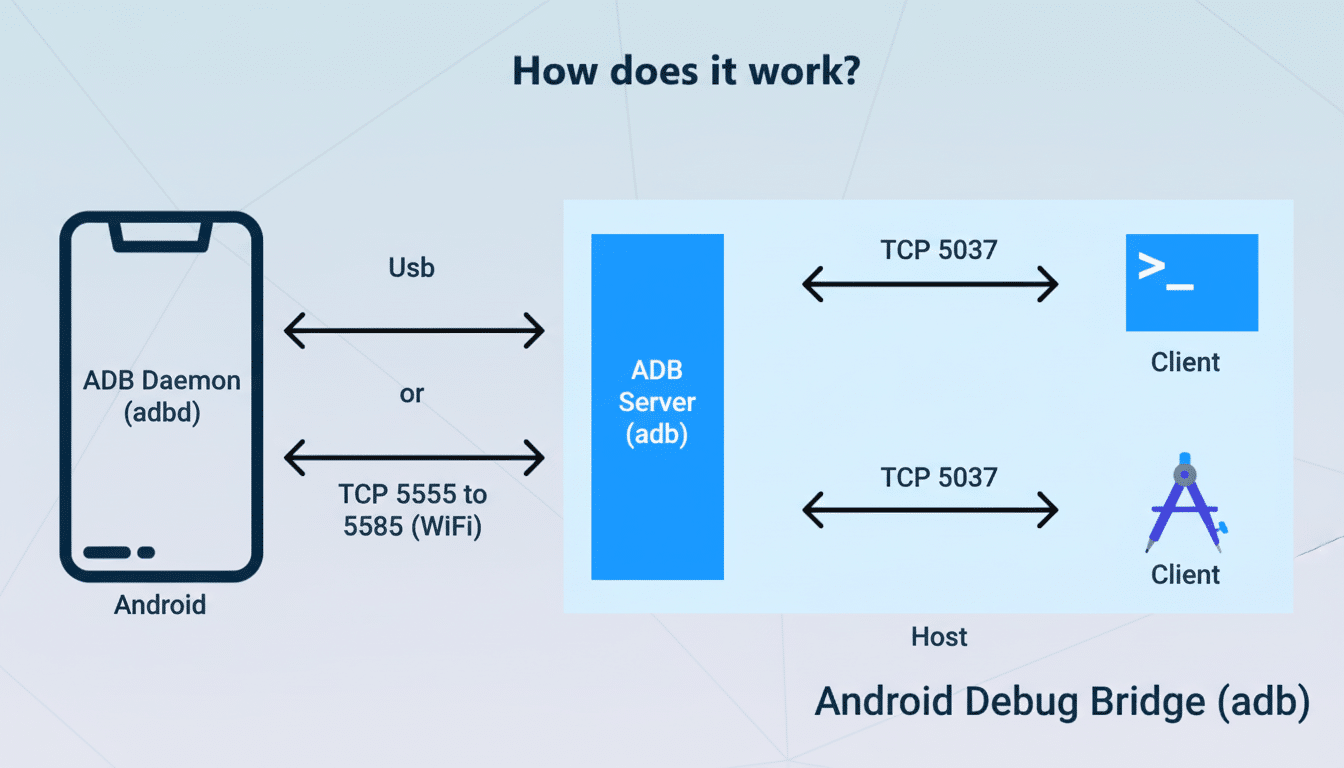
The script is flipped for the new behavior in Canary builds. If your phone connects to a qualified Wi‑Fi network, Android can re-enable wireless debugging and have ADB reconnect automatically. In application, that also translates to fewer pairing prompts, fewer manual toggles, and less of the surprise “device offline” message midway through an iteration. There isn’t anything dramatic happening under the hood when it comes to ADB over TCP; instead, they’re making the auto-reconnect policy for wireless debugging smarter.
Based on AOSP Gerrit activity and code comments, this comes in the form of an allowlist: the OS will consider some Wi‑Fi networks “safe” to auto-enable debugging, with timeouts already working elsewhere. The end result is a better default for the places where you actually work—home, office lab, or some known test network—while not leaving ADB open when you jump on the coffee shop hotspot.
Why It Matters for Developers and Tinkerers
ADB is table stakes for Android work, whether you’re a studio shipping daily builds, a team of QA running automated suites, or an enthusiast who just likes to pop open tools like scrcpy or Shizuku. Repeated disconnections waste time even more so. Every re-pair flow interruption or timeout is either a failed script or missed logging. Multiply that by a team and a sprint, and the cost can add up quickly.
Wireless reliability also counts, because many a team does not want a nest of USB cables. With more than 3 billion active Android devices by Google’s own account, even small efficiency improvements in ADB workflows have a large reach. The auto re-enable strategy addresses one of the main sources of unreliability—silent disabling of debugging—but it still allows mDNS to work for discovery and reconnection.
It’s particularly useful on networks where multicast is unreliable or partitioned. Discovery holes and IP address changes are the norm in enterprise environments. By keeping wireless debugging active on a known network, that’s no longer the case; your device is very likely to be visible to Android Studio without intervention.
Security and Why Trusted Networks Make Sense for ADB
Wireless debugging is mighty, so Android errs on the side of caution. The new logic is not a middle finger to security; it circumscribes automatic enablement for a network the system considers trustworthy for debugging. They still require a code or QR confirmation on your device to pair, and ADB connections continue to be local out of the box, confined by default to the same LAN (unless you futz around with port exposure).
Or, to put it another way: Android is making the pragmatic tradeoff—leave wireless debugging off by default in untrusted areas, but don’t block the user on well-known dev networks. You have the handrails when you need them, and they’re not in your way when you don’t.
Availability and What to Expect Next for Wireless ADB
The feature is live in the latest Android Canary builds, and early adopters are saying it reliably auto re-enables on known networks. A proper rollout could end up in a quarterly platform release sometime down the road—and, based on current talk, the earliest contenders would likely be Android 16 QPR3 or possibly Android 17 if things end up taking longer than anticipated. Look for Pixel devices on preview channels to get it first, and widening availability as OEMs start to support the change.
Developers will also want to look for a new or updated setting in Developer Options related to wireless debugging and network trust. Teams that use Wi‑Fi ADB in labs or CI rigs might consider labeling their networks and exploring discovery across subnets where mDNS behavior differs.
The Bottom Line on Wireless ADB Reliability Improvements
Google’s remedy addresses the very pain point that made wireless ADB feel untrustworthy: the feature silently turning itself off between sessions. By having it automatically re-enable on trusted Wi‑Fi, we can finally consider wireless debugging to be a first-class, persistent tool. It’s a small change with a huge impact, and one that could convince many developers to cut the cord once and for all.
