


Google pushes its Gemini assistant further into Gmail with an AI Inbox and AI Overviews that aim to summarize threads, highlight priorities, and even answer whatever the heck is buried in your messages. Some of the new tools are free; others lurk behind paid tiers, and they pose a familiar question for the world’s most popular email service: is more AI in your inbox a good thing, or is that just yet more noise?
What’s actually new in Gmail’s AI Inbox and Overviews
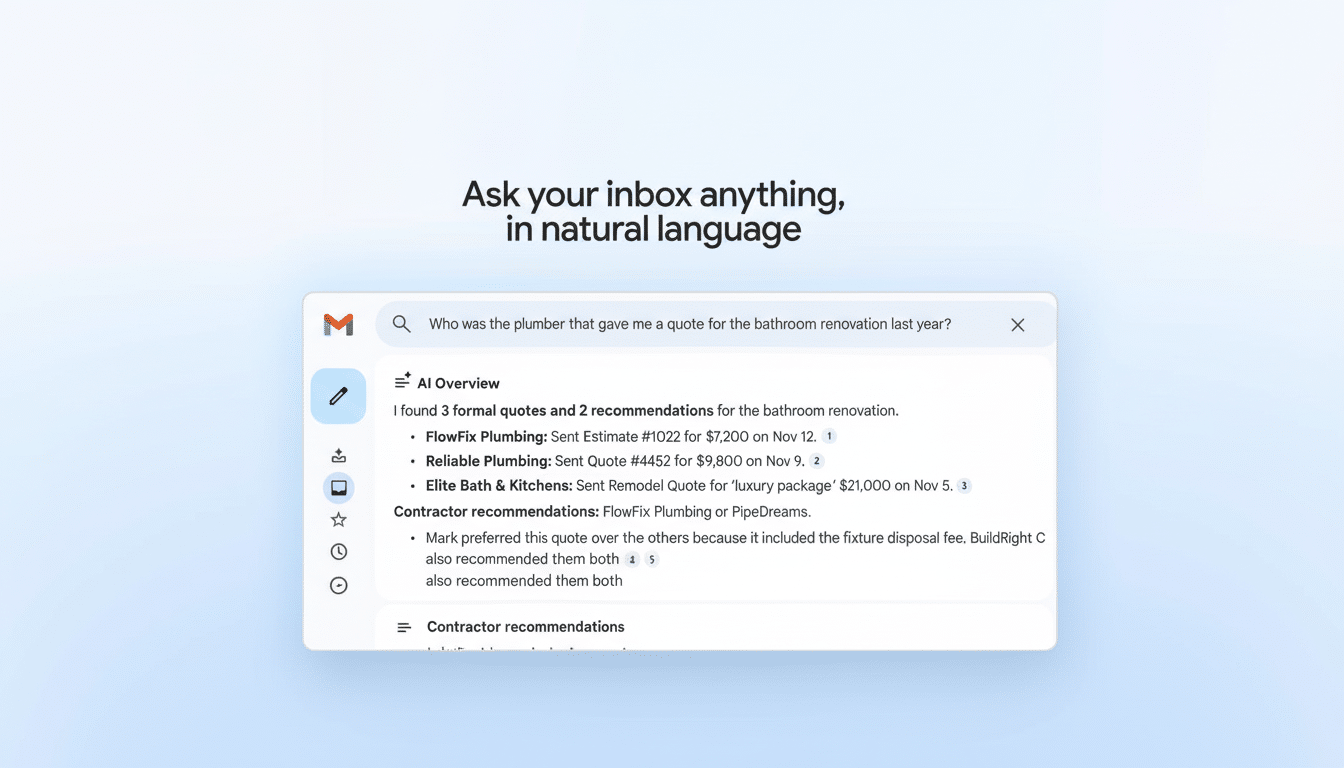
AI Overviews will reduce long email threads to key points, much like the summaries already showing up in Google Search. You’ll also be able to ask Gemini natural-language questions about your mailbox, such as finding out which contractor sent a quote last spring or listing due dates for items you may have overlooked. The chat summaries are rolling out for free, but the interactive Q&A is limited to users who have a Google AI Pro or Ultra subscription.
- What’s actually new in Gmail’s AI Inbox and Overviews
- Why Google is doing this now: email overload and rivals
- Will people trust it? Adoption risks and reliability
- Privacy and the data question for Gmail’s new AI tools
- How it looks in practice: using Gmail’s latest AI tools
- The bottom line on Gmail’s AI upgrades and adoption
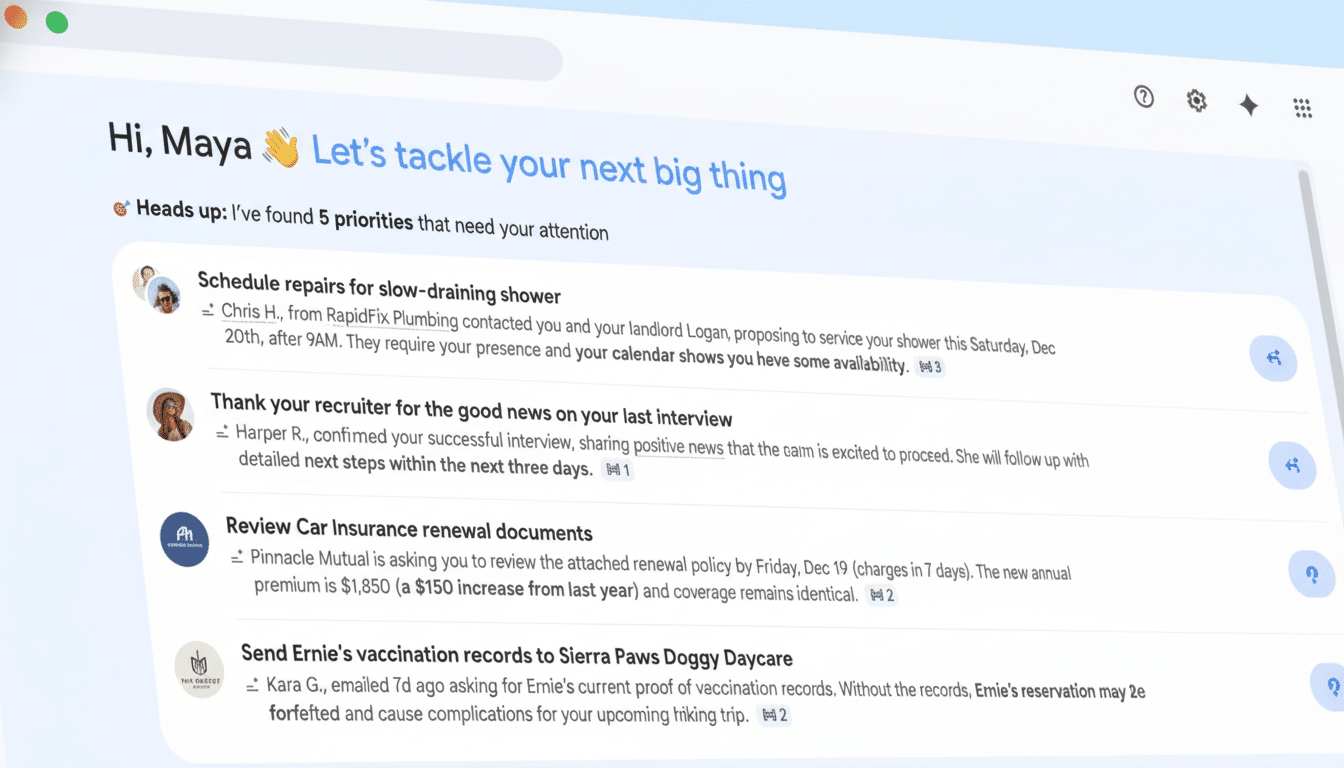
The most prominent addition is called AI Inbox, a new view that employs Gemini to triage your mail and deliver a personalized briefing with recommended to-dos. It will flag “VIPs” with signals like frequent sending and people in your contacts, and it can triage routine items so you can read the messages most likely to matter. According to Google, such analysis takes place with privacy protections, and it will be extended from trusted testers to a wider release in the coming months.
Google is scrapping the paywall on Help Me Write in Gmail, which can help with composing and rephrasing messages using context from your account and soon from other Google apps as well.
A new Proofread mode with advanced grammar, tone, and style checks is subscription-only, while Smart Replies are being renamed as Suggested Replies and will be free to use.
Why Google is doing this now: email overload and rivals
Email volume is relentless. There are more than 360 billion emails sent and received every day around the world, according to estimates from the Radicati Group, and that continues to climb. McKinsey’s oft-quoted research, conducted over a decade ago, judged that knowledge workers spend around 28% of their working week reading and responding to email. Given that situation, any time-saver with credible claims to support it — like the Pocket Pros — is welcome and a strong differentiator.
Competition is also heating up. Apple’s Mail in iOS and macOS now has Catch Up blurbs and priority inbox sorting. Outlook (from Microsoft) includes Copilot for thread recaps and drafting, but key features are under a premium subscription. Productivity upstarts like Superhuman have relied on AI triage for years. Google’s action is a push to make sure Gmail doesn’t look outdated, as rivals invite AI technology into email as table stakes.
Will people trust it? Adoption risks and reliability
Summaries are great until they don’t nail the nuance. Early AI recaps in search and messaging apps have demonstrated that omissions or hallucinations can sap trust. In email, mishaps can lead to missed invoices or muddled deadlines, and tolerance for errors is low. That may be why Google is rolling the AI Inbox out slowly and retaining a human-in-the-loop position — summaries help, but you maintain responsibility for final review.
Public sentiment is mixed. Polling from the Pew Research Center, for example, indicates that Americans are more worried than enthusiastic about widespread AI use, even as adoption nudges upward. The lesson for Gmail: users like speed, without surprises. Transparent controls, easy opt-outs, and clear citations in summaries can make — or break — trust.
Privacy and the data question for Gmail’s new AI tools
According to Google, Gemini’s analysis of emails is user-respecting and keeps data under user control. The company ceased scanning consumer Gmail content for advertising purposes in 2017, which it frequently highlights as part of its introduction of new features. But the optics matter: placing AI across your personal correspondence, calendar, and documents demands plain-language explanations of what’s processed, stored, and kept — if anything — to train future models.
Enterprise customers, particularly large ones, will be examining compliance and data residency as much as — if not more than — accuracy. Workspace admins will ask for detailed policy controls, audit logs, and even the ability to scope which sources contribute to Help Me Write and AI Inbox.
How it looks in practice: using Gmail’s latest AI tools
Gmail’s advantage is context breadth. If Help Me Write can indeed safely access data in Google Docs, Sheets, Drive, and Calendar to draft something accurate on the first try, it could one-up generic assistants that don’t have such situational awareness. Natural replies in your own tone (not a generic robot voice) could also help speed up everyday back-and-forths without feeling too distant.
The risk is overreach. If AI Inbox hides an important update simply because the sender is not in your “VIPs,” or a summary leaves out some contractual jots and tittles, users will disable features. The most successful implementations to date, like Outlook’s Copilot recaps and Superhuman’s triage, typically marry aggressive filtering with clear “show me everything” controls. Gmail requires those safety valves as well.
The bottom line on Gmail’s AI upgrades and adoption
Does anyone actually want AI in Gmail? Many would — if doing so saves time without creating new risks. Free conversation summaries and Suggested Replies offer a relatively low-friction on-ramp, while subscriptions gate the riskier, higher-powered features such as the inbox Q&A and advanced proofreading.
Google’s wager is obvious: the email client of the future is a personal briefing, not a scroll. Whether users adopt that vision will hinge on accuracy of information, clarity of privacy, and how easily they can dial the AI up or down. If Gemini really can disambiguate the noise without muting the signal, everyone will go along. If not, the off switch will remain chic.
