


Today, Google is starting to roll out a notable visual upgrade in the form of satellite, terrain, and live traffic layers to make it easier for you to see far-flung places if those are the types of places your lost items end up. The update brings Find Hub out of its rudimentary street map shell and gives it the same, familiar icons for layers and toggles you’re used to from Google Maps, with which users can more easily find a lost phone or tracker tag in real-world terms. The feature is beginning to show up for some accounts, and early sightings in beta builds and from users testing the feature suggest it’s starting to take hold.
What’s New in Find Hub’s Map Layers Update
Up until now, Find Hub was a basic vector map display. The new options bring three useful overlays: satellite imagery for a ground-truth view of an area, terrain shading to represent elevation and topography, and a traffic layer showing congestion in real time. A layers button appears over the map and behaves as it does in the standalone Maps app, allowing you to switch views while staying within the find flow.
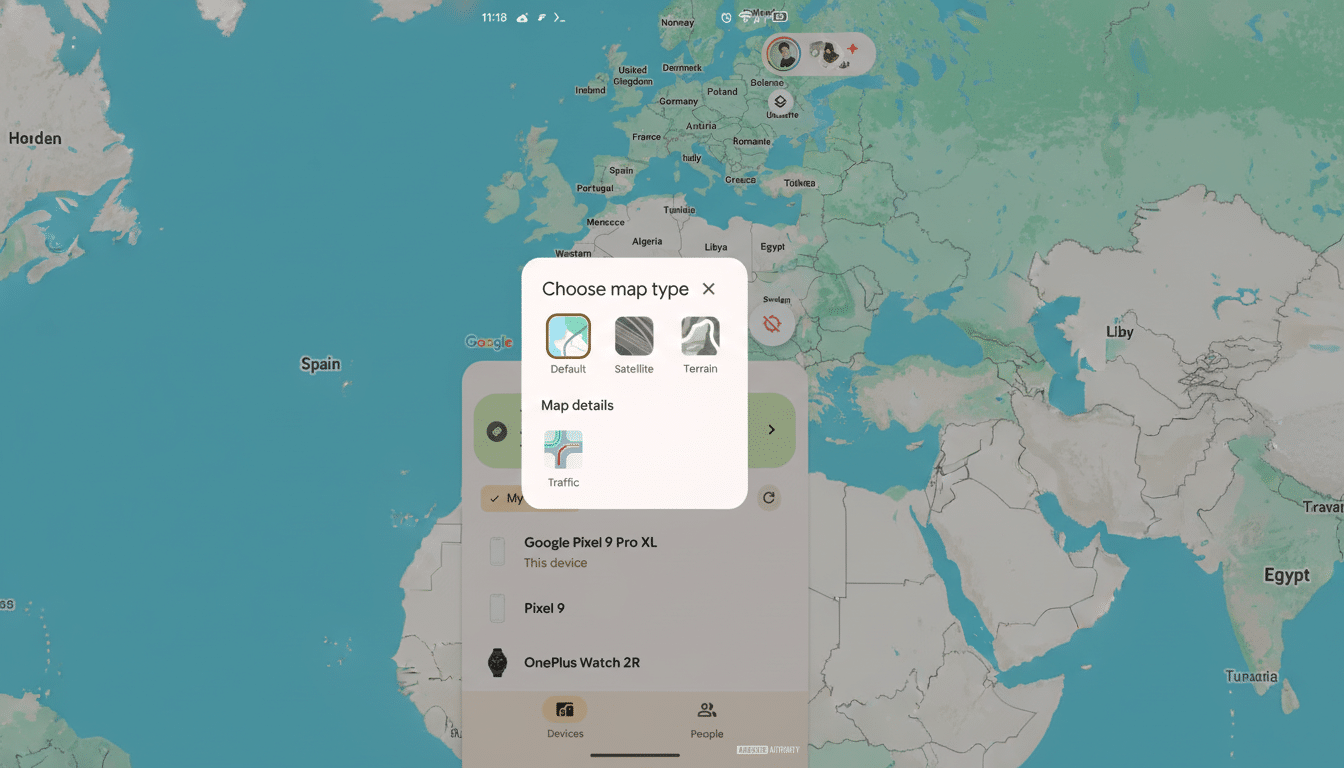
That sounds small, but it closes a gap between Find Hub and Google’s full mapping toolkit that has existed for years. By toggling over to satellite tiles in Maps, you might be able to discern landmarks, tree lines, footpaths, and even building footprints that a stylized street map is quick to obscure. Terrain can suggest slopes, gullies, or dead ends that might impede a search on foot. And traffic density can help you save precious minutes when you’re driving across town to pick up a device before its battery dies.
The feature seems to be making its way out in stages via a newer Find Hub update. Some users have already seen the toggle in beta builds, and industry tracking has confirmed the change as it starts to roll out more broadly. It’s available, of course, as with most Google feature rollouts, region by region and server-side, account by account.
Why Layers Are Important for Real-World Recoveries
People generally do not lose their devices on an empty city block with a large neon sign. They lose them at a trailhead, in a massive park, under the concourse of a stadium, or somewhere in which finding direction takes you into the impenetrable bowels of an apartment complex. This is where satellite and terrain views come in handy. Even if your tracker’s last ping is from the center of some green on the default map, several potential paths may present themselves if you click between a satellite layer and a streets layer: that “green” could be depicting a baseball field, a tangle of trees, or perhaps only the edge of a parking lot berm — three completely different search strategies.
Traffic also matters. If your laptop was last seen near a rideshare pickup at a congested interchange, then taking the right route there based on live congestion can make the difference between finding it before the next rider does and seeing that dot go cold. Google Maps reaches more than 1 billion people monthly already, and it refines its traffic models using real-time signals; bringing that kind of intelligence into Find Hub is an obvious but welcome quality-of-life win.
Scale amplifies the impact. Android runs more than 3 billion devices around the world, and Google’s find network now covers phones, earbuds, watches, and Bluetooth tags from third parties. A prettier map is not just an aesthetic upgrade — it’s an efficiency play across billions of possible recovery diagrams.
How It Compares and What May Be Coming Next
For years, Apple’s Find My has provided a choice of map types, including satellite and hybrid. Adding robust layers helps Google close the parity gap and leverages one of its key strengths: Maps’ rich library of imagery and traffic data. Google also has other features in its arsenal that could play well with Find Hub, like augmented reality walking guidance and indoor maps for malls and transit hubs. No promises beyond layers, but the strength is there for more context-rich guidance.
Another possible next step would be closer integration with 3D buildings and photorealistic tiles in certain cities, allowing people to better understand verticality in notoriously hard-to-navigate urban places.
Even relatively minor wayfinding enhancements — such as indicating the nearest building entrance on a satellite view — could potentially save minutes off a recovery.
Privacy and Safety Considerations for Find Hub Layers
The map layers don’t change Google’s underlying privacy stance toward its finding system. Location sharing in the Android find network is end-to-end encrypted for most detection types, and cross-platform find alerts will notify someone when an unknown tracker has been identified in their presence — a feature we’ve worked on with Apple through its industry specification development process to help prevent unwanted tracking. The new layers are just displaying the same location data with additional environmental context.
As ever, the most sensitive variable is how quickly a user can respond. More context means less guessing, shorter routes, and less experimentation on the ground. In reality, that can translate to less following of false leads, less time spent meandering, and a higher probability of finding a device before it gets moved or powered down.
Bottom Line on Find Hub’s New Map Layers Update
Find Hub’s new satellite, terrain, and traffic layers are an entirely practical update overdue for the device-finding tool that steps its game up with Google Maps’ capabilities. It’s rolling out slowly, but when it goes live it will make recoveries faster, safer, and more reliable — just the kind of incremental improvement that pays off as soon as you really need it.
