


Google is rolling out a new capability for its AI Mode in Search that lets the system reference your Gmail and Google Photos content when you ask personal questions. The aim is simple but ambitious: deliver answers that reflect your actual plans, purchases, and preferences, not generic advice scraped from the web.
Framed as an extension of Google’s push into “Personal Intelligence,” the feature moves Gemini from a general-purpose chatbot toward a context-aware assistant. With your explicit permission, Search can synthesize details from emails and images to produce responses that feel tailored—and faster than manually hunting through inboxes and albums.
What Changed With AI Mode in Google Search and Photos
Until now, Google Search personalization mostly relied on your activity history and broad preferences. The update allows AI Mode to securely tap into two of Google’s most-used services: Gmail, which serves well over a billion users, and Google Photos, which also counts more than a billion monthly users. That scale is precisely why this matters; when people store tickets, receipts, itineraries, and life’s snapshots in these apps, Search can finally reason across the same information you’d check yourself.
Google positions the experience as opt-in, granular, and reversible. You choose which apps to connect, can disconnect at any time, and the company says the personal data accessed this way is not used to train new models.
How AI Mode Works in Practice with Gmail and Photos
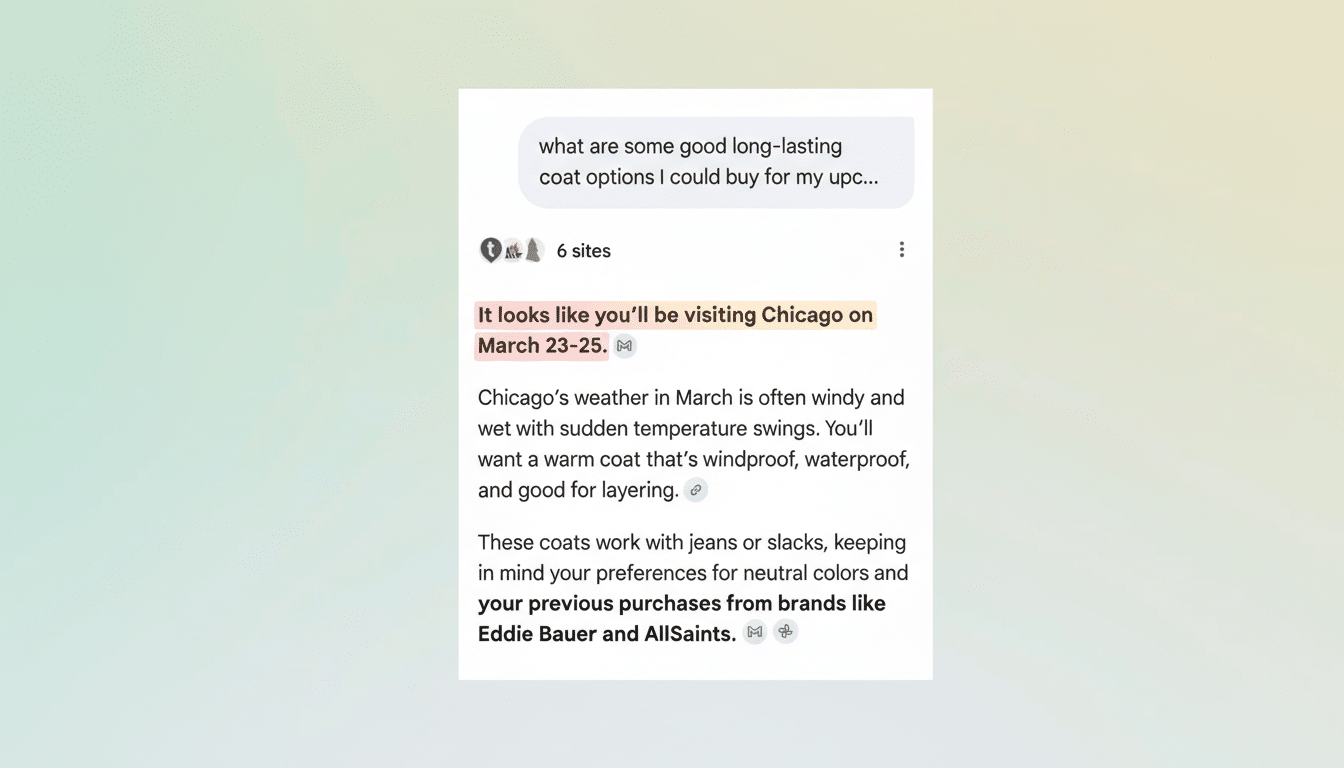
Think of AI Mode as a context layer that sits atop Search. When you ask a personal question—“What’s my travel plan next month?” or “Suggest outfits for my upcoming trip”—Gemini checks your connected sources for relevant signals and composes an answer that merges personal details with public information.
For example, a query about your trip might pull the dates and destination from a flight confirmation email and combine that with seasonal weather and local venue hours. If Photos shows lots of images from museum visits, it may bias recommendations toward art galleries. Shopping prompts could reflect past purchases or your pictured style—think “similar to that blue shirt you wore in Rome”—while factoring in climate at the destination.
You can refine results with follow-up prompts, and there’s a thumbs-down option to steer the system away from wrong assumptions. Expect occasional misfires: if you have many photos of a friend’s dog, AI Mode might momentarily treat you as a pet owner until you correct it.
What Personal Data AI Mode Can See and How It’s Used
When enabled, the system can scan relevant Gmail messages—like receipts, shipping updates, or itineraries—and Photos content and metadata to answer your prompt. Google says access is scoped to what’s needed to fulfill the request, and personal content is encrypted in transit and at rest as part of the company’s standard security practices.
Importantly, Google states that your Gmail and Photos content connected through AI Mode is not used to train models. That aligns with broader industry trends after regulatory scrutiny and user backlash over indiscriminate data collection. Users maintain the ability to revoke access in Search settings, and to adjust broader account controls in My Activity and Privacy Checkup.
Availability And How To Turn AI Mode On in Search
Google is labeling the feature experimental and rolling it out to individual accounts first. At launch, it’s available in English in the US for eligible subscribers on consumer accounts, not for enterprise or education tenants. That limited footprint suggests Google is still hardening accuracy and governance before wider deployment.
To enable it, open your profile in Search, select Search Personalization, choose Connected Content Apps, then connect Gmail and Google Photos. You can disconnect either app at any time, and you can manage the personalization level if you prefer a lighter touch.
Why This Matters for Search, Privacy, and Assistants
For most people, the bottleneck isn’t information—it’s retrieval. Receipts are buried, itineraries scatter across threads, and photos hold useful context that’s hard to surface on demand. If AI Mode works as advertised, it collapses that friction into a single prompt, turning Search into an active concierge instead of a passive index.
The trade-off is familiar: personalization requires trust and transparency. Google’s assurances—opt-in controls, data isolation from training, and clear settings—will be tested by real-world behavior and edge cases. Early adopters should treat it like any powerful assistant: verify critical details, watch for hallucinations, and use the feedback tools liberally.
For Google, this is also a strategic move. By bridging Gemini with core apps where users already live, the company makes its AI more sticky and harder to substitute. If the experience proves reliable, expect more connectors—Calendar, Drive, Maps—and deeper controls that let you dial personalization up or down. The line between “search engine” and “personal operating system” just got a little blurrier.
