


Lost an important file or 10 years of photos? Now for a limited time, a price cut on EaseUS Data Recovery Wizard makes recovering again much more affordable. The crowd-pleasing recovery utility is currently available for $34.97 with the code RECOVER, a huge drop from its regular list price, and it claims to recover everything from accidentally lost files to data on formatted or corrupt drives.
Why Deleted Doesn’t Really Mean Gone on Most Devices
When you “delete” a file, most operating systems leave the actual bits in place until they’re overwritten. That’s why recovery is possible — if you act fast enough and do not write new data to the device. Guidance from NIST media sanitization recommendations and the ATA TRIM specification for SSDs explains why timing is relevant: TRIM can proactively wipe flash storage blocks, reducing recoverability if you wait.
- Why Deleted Doesn’t Really Mean Gone on Most Devices
- What EaseUS Recovers Across Devices and Formats
- How This Works in Practice for Typical Recoveries
- Limits and Best Practices for Successful File Recovery
- Pricing and Availability for This Limited-Time Offer
- Bottom Line on Data Recovery and the Current Discount
Hard drives fare differently. Backblaze’s regular drive reliability reports have shown some consumer HDDs fail at single-digit annualized rates (in the low singles for most models), but that still equates to a regular drumbeat of data-loss incidents. And in many of those cases, logical recovery software will be able to recover data without you having to send it off to a cleanroom.
What EaseUS Recovers Across Devices and Formats
EaseUS Data Recovery Wizard offers a broad array of scenarios, including those involving accidental deletion, partition loss, quick-format errors, and it also may help with lost files due to corruption. Based on supported devices, you can recover over 1,000 file types, from everyday documents (DOCX, XLSX, PDFs) to high-end formats (RAW photos from Canon, Nikon, and Sony; PSD; ProRes).
It operates on all common file systems — NTFS, FAT/exFAT, HFS+, and APFS — and scans a variety of media: desktops and laptops, external hard drives, USB sticks, and SD cards; even your phone (as long as it is acting like a USB key). The company claims top recovery rates “up to 99.7%” in perfect-world conditions — marketing numbers should always be taken with a grain of salt, but they do show how much good logical recovery can do as long as the data hasn’t been overwritten.
How This Works in Practice for Typical Recoveries
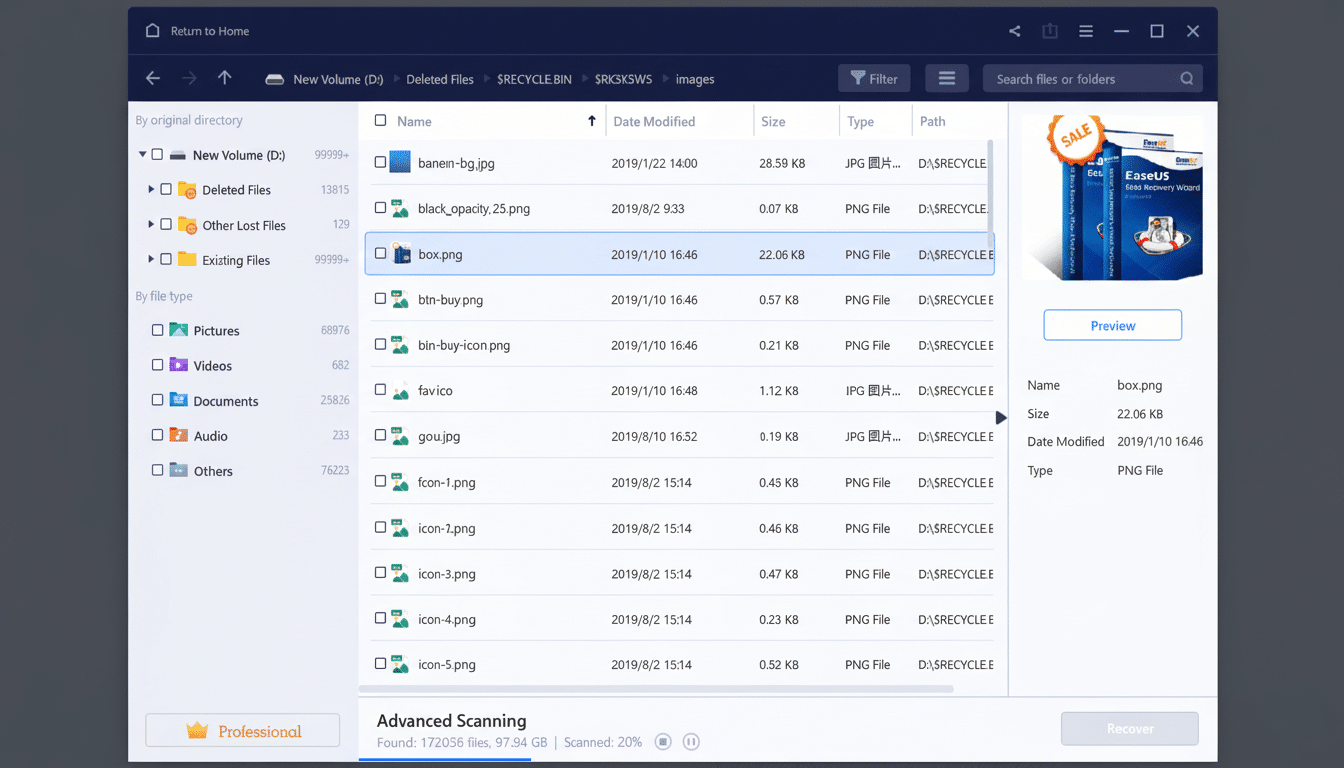
After installing the software on a drive other than the one you’re rescuing, select a target device and begin scanning. A quick scan surfaces newly removed items, and a deeper pass looks for raw signatures without intact metadata. You can choose the types of files to recover, search for file names, preview items to verify quality, and restore them to a secure destination drive.
Real-world use is generally straightforward. A student who accidentally deleted a thesis may be able to scan a laptop’s internal storage and recover the file; it may have been saved as a version of a Word document the OS thought was free space. For example, a photographer with a “formatted” SD card after an event shoot can often recover hundreds of RAW photos because all formatting does is rebuild the file table — your files aren’t immediately erased.
Limits and Best Practices for Successful File Recovery
No software can guarantee 100% recovery. If TRIM is on, an SSD can erase its “clean” blocks very quickly; full-disk encryption makes that more complex to execute without valid keys; and a mechanical drive with physical failure will likely require a cleanroom lab. Full data recovery services from companies like Ontrack or DriveSavers can cost anywhere from a few hundred to several thousand dollars, depending on the severity of the damage — software is a far less expensive first step when hardware is still in working order.
To optimize the outcome:
- Discontinue use of the affected device immediately.
- Do not install the recovery app on the problem drive.
- Connect the malfunctioning disk via USB or a dock.
- Consider making a sector-by-sector image and scan that image.
- Always recover files to a separate, safe destination drive.
If you have an older hard drive that’s clicking or struggling to mount, or a device that won’t appear on the desktop when plugged in, err on the side of powering down and getting professional help — continued use may worsen the problem.
Pricing and Availability for This Limited-Time Offer
The sale drops EaseUS Data Recovery Wizard to $34.97 when you use the code RECOVER, down from its standard MSRP of $149.95. A free tier lets you scan and preview results — handy for confirming your files are recoverable — before you pay. There are versions for both Windows and macOS, and the deal is on a lifetime plan as well, which is a nice selling point if you’re also the de facto tech support for friends and family.
Bottom Line on Data Recovery and the Current Discount
It’s not if an organization will lose data, but when it happens and how quickly that data can be recovered. Data loss is going to happen; the chances are better than good that they’ll lose some information that needs to be recovered. With wide format support, clear previews even at the darkest of times, and a deep scan mode that finds files no matter how long ago they were trashed, EaseUS Data Recovery is a commendable first responder for any data-loss emergency — and at $34.97 it’s a pretty obvious addition to a personal or small-business toolkit. Combine it with a regular backup strategy, and you’ll not only prevent failure, but have a Plan B when — as has been inevitable since the first hard drive spun into action — things go wrong.
