


ChatGPT is launching Your Year with ChatGPT, your own custom year-in-review wrap that transforms the prompts, projects, and experiments of everyday life into some truly shareable highlights. Imagine Spotify Wrapped for your AI life, replete with whimsical awards, eye-popping visuals, and a data snapshot of how you have truly utilized that chatbot this year.
What the ChatGPT Year-in-Review Recap Includes
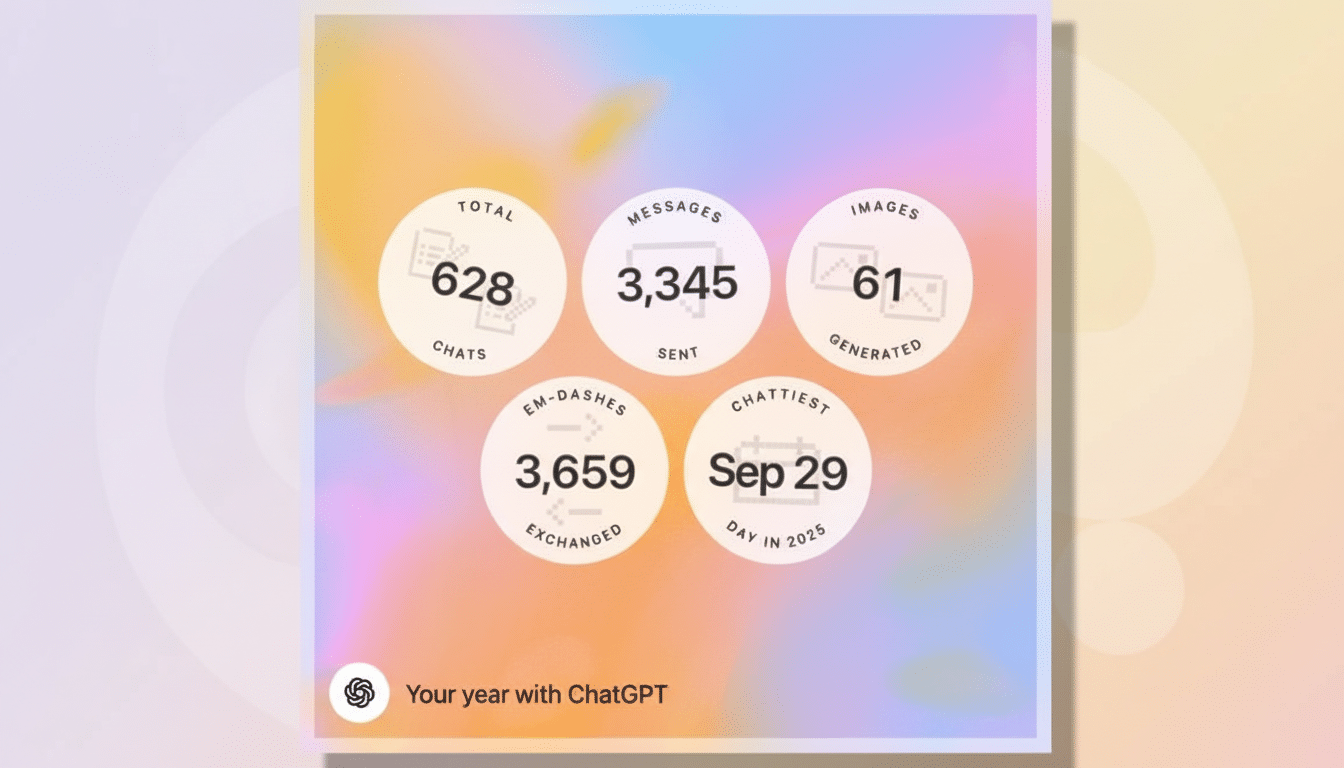
The recap draws on your interactions for a roundup of headline stats — messages sent, distinct chats, images created, and even some quirky counts like “em-dashes exchanged.” It also throws in playful superlatives based on behavior patterns, such as whether you used ChatGPT to brainstorm, automate routine tasks, write content, learn new skills, or create art.
To make it as shareable as possible, the package comes with AI-generated visuals and a brief (custom) poem. A pixel-style graphic playfully riffs on your interests; stat cards are formatted to be easily shareable on social feeds. Already, users are sharing tongue-in-cheek awards like “Most Likely to Automate His Entire Personality,” highlighting how personal the summaries can be.
How to Access and View Your Year with ChatGPT Recap
Open the ChatGPT mobile app on iOS or Android, or sign in through the web. Find the Your Year with ChatGPT prompt on your home screen and tap through to produce your summary.
If it doesn’t appear, type “show me my year with ChatGPT” into a new chat. Ensure you have the latest app version and that data features are turned on in your Settings. You’ll specifically require both Chat History and Memory enabled for the system to have the necessary data to create your recap.
If you have scant history or have had these controls turned off, the recap won’t show up.
You can turn them on and return after you have used ChatGPT more, or just look through the shared examples to see what the feature is like.
Who Gets the Feature, and Where It’s Available
The experience is open to free users and paying subscribers, including Plus and Pro. Availability right now is limited to the U.S., U.K., Canada, Australia, and New Zealand, with access rolling out slowly. If Your Year with ChatGPT hasn’t arrived yet, it’s possible you’re still in the rollout.
Privacy, Data Controls, and Managing Your Settings
Your recap relies on the content in your account, so your settings for data still count. You have options to enable whether or not future chats will contribute to your model, configuring the chat history and training in Settings, as well as controlling Memory for letting ChatGPT remember preferences across conversations. You can clear memory, remove single chats, or export your data at any moment.
If you want less overhead, trim away older conversations and disable Memory for delicate topics. Your friends can share, but you are the one posting.
Why This Year-in-Review Feature Matters for Users
Recaps offer more than just novelty; they help people make sense of new habits. OpenAI previously reported that it had 100 million weekly active users, a sign that generative AI has become part of daily habits for some. Independent researchers have noted the trend, too: According to Pew Research Center, about one in four U.S. adults had experimented with ChatGPT by 2024, and the Stanford HAI AI Index as well as McKinsey’s State of AI studies observed increasing workplace experimentation with generative tools.
A personal wrap makes that sprawling story into something concrete. Understanding how often you relied on AI for drafts, code, summaries, or images can help reveal when it saves time — and when it may be taking the place of something deeper. It might also turn up some reliance patterns (like using ChatGPT for brainstorming and reverting to manual editing, or overreliance on image generation for concepts when all design work stays in-house).
At the team level, the recap’s format offers a glimpse of what corporate analytics might look like in years to come, as long as privacy protections remain strong: aggregate views of how AI underpins research, customer service, or documentation. For individuals, it’s a soft nudge to reset settings, renegotiate boundaries, and build more healthful digital habits for the year ahead.
Bottom Line: How to Get Your Year with ChatGPT Recap
Your Year with ChatGPT packages up your AI antics into a sleek, social media-friendly snapshot. Simply launch the app or web client, locate the banner, and make sure to have all your Chat History and Memory settings on. If it hasn’t already been pushed to your device, be on the lookout for its arrival as the rollout progresses in eligible territories.
