


Apple and Google are looking to ease the agony of jumping between Android and iOS, with growing signs it’s simply going to be OK in the future for users to move up a level: both firms plan faster, richer transfers built right into the out-of-the-box experience. Early evidence noted in Android’s Canary channel and comments to 9to5Google indicate a simplified flow that cuts down on steps, welcomes more data types, and generally makes switching feel less like a chore and more like powering up a new phone.
Today’s cross-platform moves tend to be accompanied by standalone apps such as Apple’s Move to iOS or Google’s Switch to Android. The new method seeks to make that handoff a native one, getting users through the transition as part of initial setup on both platforms—without having to juggle multiple apps or cables unless absolutely necessary.
- What’s new in the setup flow for switching phones
- Why it matters for consumers and platform competition
- What might transfer next when moving between platforms
- The likely limits you should expect at first rollout
- How to prepare for a smooth switch between Android and iOS
- The bottom line on the new cross-platform setup improvements
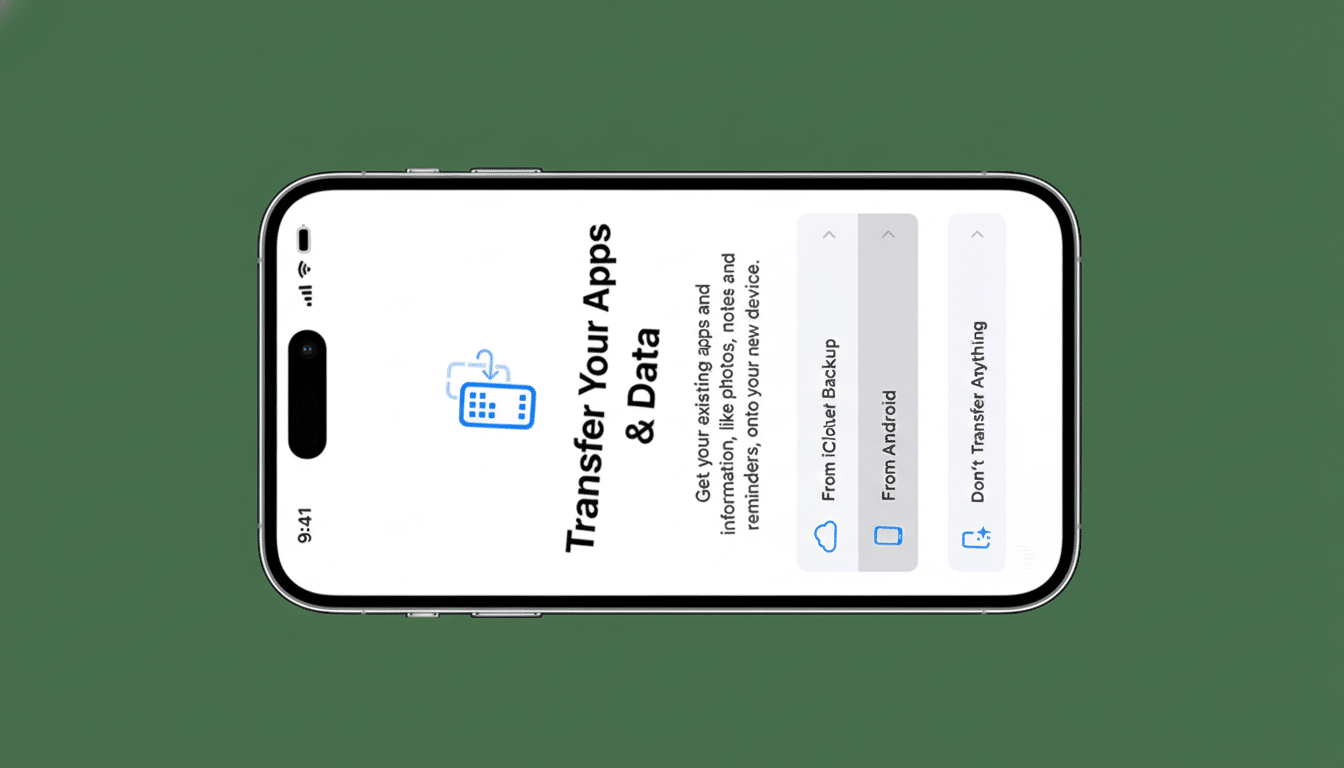
What’s new in the setup flow for switching phones
Based on testing discovered by Android watchers and confirmed by the companies, the new flow will present itself immediately as you power up your device. Look for clearer prompts, less manual decision-making, and handoff logic that can smartly identify your old phone, authenticate in a secure manner, and shuttle the mass of your personal data across all at once.
Details are still thin on the ground, but indications so far suggest support for additional categories over and above contacts, calendars, photos, and videos. Users are mostly interested in app recommendations, their message history for supported services, and device settings. The technology probably relies on secure local connections—say, Wi‑Fi Direct or cable—so large payloads move fast between devices without bouncing through the cloud.
Why it matters for consumers and platform competition
For years, platform switching has been a nightmare: errant messages, incomplete app data, and a setup labyrinth that intimidated even tech‑savvy buyers. Analysts for firms like Counterpoint Research and CIRP frequently observe that it’s these switching costs that keep people locked in; to the extent those barriers are lowered, they increase consumer choice and can incentivize both ecosystems to compete more vigorously on features and values.
There’s also regulatory gravity here. Data portability and easy switching became priorities in large markets with rules that created incentives for gatekeepers to offer less lock‑in, and building a best-in-class cross-platform transfer experience wasn’t just good UX—it was moving the industry where policymakers wanted it to go.
What might transfer next when moving between platforms
Message history is still the #1 requested feature. WhatsApp itself has shown that cross‑OS chat migration is a surmountable problem, and more universal support for communication data would be a win. There’s also the eSIM problem: carriers, Apple, and Google have been working in stages on digitizing SIM transfers within their respective spheres of influence; a proper cross‑platform handoff for an eSIM would kill off one of your last good reasons for going to the store.
Other examples might be Wi‑Fi passwords, accessibility settings, and app‑level sign‑ins that should ideally be reconstituted via secure tokens rather than through re‑login fallout. Media rights, health data, and wallet passes are more tangled because of encryption approaches and licensing, but any partial support—better export/import prompts, say—would be a positive step.
The likely limits you should expect at first rollout
Have realistic, initially minimal expectations for what’s going to jump platforms on day one. Some app data is sandboxed or bound to platform‑specific frameworks. Some features and availability vary by device and market; some content may not be available in all areas; additional purchases, rentals, or charges may apply. Support for high dynamic range is available on iTunes. And since SMS/MMS will shift, the platform‑exclusive messaging features won’t map one-to-one.
There will also be some privacy guardrails around what is possible. Both companies have highlighted end‑to‑end protection and explicit consent. These would be secure, transparent flows with clear choices about what moves and stays rather than inscrutable all‑or‑nothing transfers.
How to prepare for a smooth switch between Android and iOS
Prepare to switch by updating both phones to the newest software, backing up data, and signing in with your primary accounts. Scrub your camera roll clean and remove old apps to save yourself some transfer time. “Make sure you can access your email and 2FA methods—migrating codes from authenticator apps (or to SMS or passkeys) ahead of time so you don’t get locked out,” he wrote.
If you are leaving iOS, be sure to deregister iMessage and FaceTime so that you don’t miss texts. If you’re coming from Android, make sure your photos are safely backed up or prepared for local transfer. For eSIM, also ask your carrier in advance if the line can be transferred smoothly.
The bottom line on the new cross-platform setup improvements
It is a native, guided, and faster cross‑platform setup flow that is the most meaningful step change in phone switching in years. It recognizes that people traverse between ecosystems and turns the burden of making it painless onto the platforms—not the users. If the early signs are true, it’ll transform switching from something you do one weekend after purchase into an opening‑it‑up‑for‑the‑first‑time routine.
