


Google is quietly working on a major overhaul of screen recording on Android, and it’s taking some seriously cool cues from Samsung that could be particularly exciting for tablets, large smartphones, and Chrome OS.
Unlike so many other Google app updates in which the changes coming to iOS are a muddy reflection of new features already offered by the equivalent Android app, Google’s work here may promise meaningful improvements.
- A Toolbar Designed for Large Screens and Better Ergonomics
- Post-Capture Tools, All Inside the System
- Partial Area and External Display Support
- Privacy and Security Considerations Built Into Android
- When You Can Get It on Phones, Tablets, and Chrome OS
- Who Benefits Most From Android’s Screen Recorder Upgrade
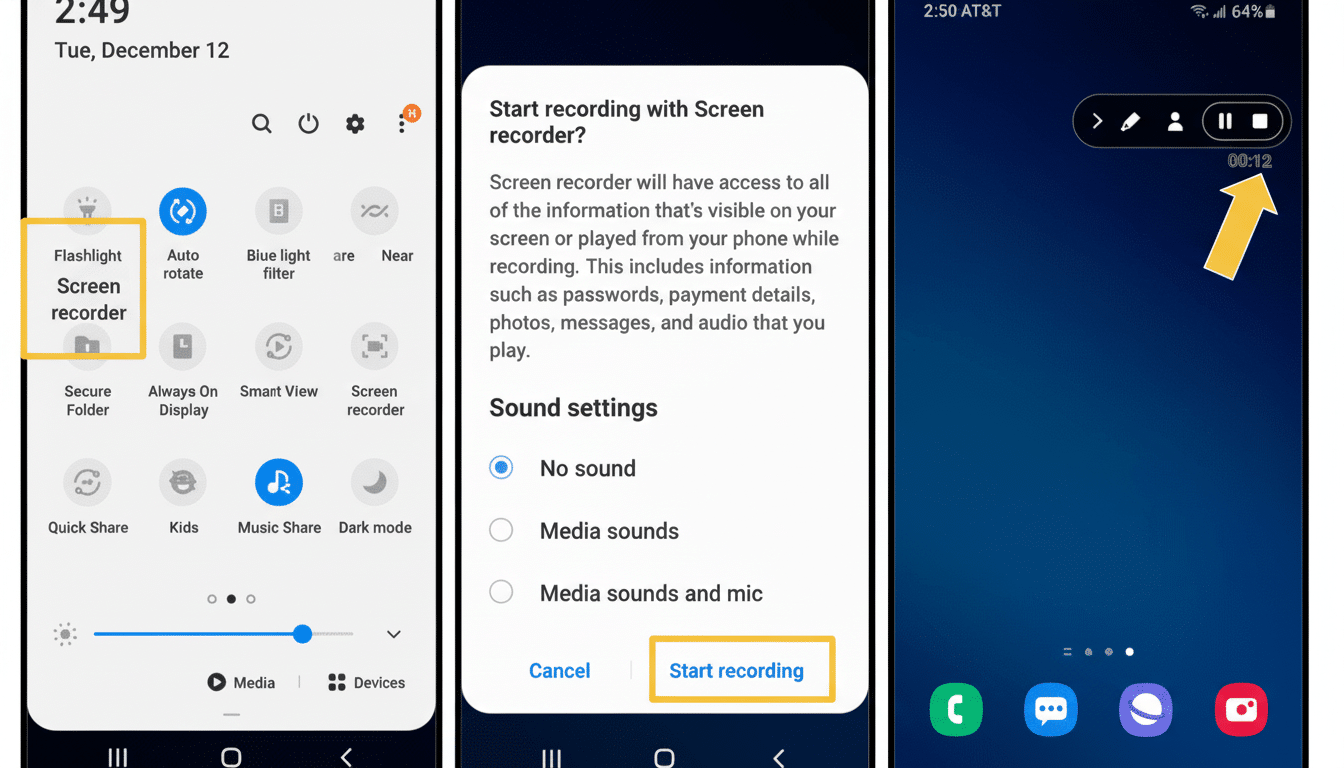
According to reports based on early beta builds and Android Open Source Project changes, a new on-screen toolbar is in the works along with a selfie camera overlay, clean audio controls, and a proper post-capture review screen.
The output should feel more like a first-class workflow for creators, educators, and support teams, rather than a bolted-on utility.
A Toolbar Designed for Large Screens and Better Ergonomics
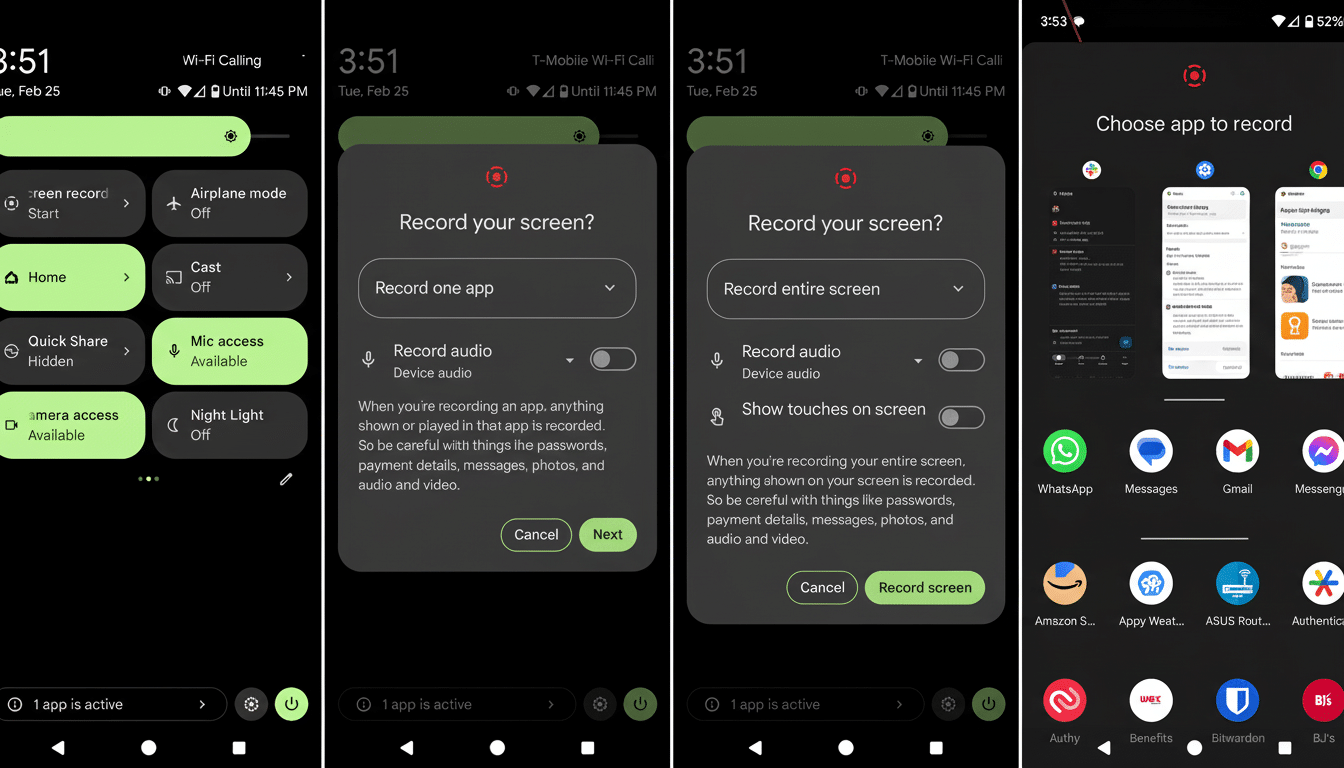
The current pop-up dialog will be gone, replaced by a small floating toolbar that pops up when you tap on the Quick Settings tile. It floats over your existing app so you can frame the shot without requiring a means to see through content, and that’s a small echo of desktop-style ergonomics. (Though early iterations indicate that it’s still not resizable or movable, the layout leaves far less wasted space and seems optimized for larger canvases.)
The toolbar retains essential options such as single-app recording, touches, and audio capture, but breaks down audio options into separate on/off toggles for clarity. The most notable is a “show selfie camera” setting that allows the front lens to serve as a picture-in-picture overlay during capture. That feature — a staple of livestreaming suites for Windows and macOS — is bound to be invaluable for walkthroughs, lectures, and gameplay commentary.
Post-Capture Tools, All Inside the System
Android’s present flow takes you to a notification and leaves the rest up to your gallery app. The enhancement introduces a native post-capture screen that shares the same slick screenshot UI: an in-page player with a seek bar, play/pause and mute controls, as well as quick actions to retake, edit, delete, or share. This shaves minutes off those repetitive tasks and brings Android closer to the lean experiences users get from modern OS utilities.
Small touches matter here. The one-tap retake is for simply flubbing a line. There’s a delete button available with a confirmation prompt to tidy up, and you don’t have to go hunting through albums. And an edit shortcut that hands off to compatible video apps offers power users a clear route without confusing menus.
Partial Area and External Display Support
Strings in the most recent builds suggest Android is adding a “selected area” option for both screenshots and screen recordings, so you can capture an exact portion rather than the whole display.
Speaking of desktop-style workflows, anticipate a customizable keyboard shortcut as part of this push. Also notable is the new feature to record external displays, showing that Google is testing and tuning the stack for productivity setups and a potential Desktop Mode.
The direction is similar to what users can already see with Windows platforms that allow you to target windows or regions, and on systems like DeX or Chrome OS, which are all-in for multi-window work. Selective capture is what distinguishes a hacky workaround from a refined workflow, at least on Android tablets and PCs.
Privacy and Security Considerations Built Into Android
Shifting more screen recording capability within the system helps strengthen Android’s privacy stance. Third-party tools are limited by platform rules and by instances where permissions were misused. With app-only capture, clearer audio toggles, and tighter integration, the OS can protect sensitive notifications and background content better—while still allowing creators the fidelity they need.
When You Can Get It on Phones, Tablets, and Chrome OS
The code for these features is in current beta builds but not live, indicating they’ll ship once Google has finished tweaking the UI and testing edge cases on different classes of devices. Because the changes do not seem to necessitate large SDK adjustments, they could land in a quarterly platform release or be saved for an operating system update after that. Pixel phones usually get these features first, followed by wider availability as manufacturers bring in upstream changes from AOSP.
Who Benefits Most From Android’s Screen Recorder Upgrade
That’s good news for educators recording lessons, IT teams documenting troubleshooting steps, and gamers sharing runs. Market data backs up the audience — Android tablets make up about two-thirds of recent global tablet shipments in IDC reports, and mobile gaming makes up half of the world’s games revenue according to Newzoo. A smoother, desktop-like recording process on Android isn’t some kind of niche bonus; it’s table stakes for a platform that spans pocket-sized devices to tablets and laptops.
The bottom line is straightforward. Featuring a new toolbar, selfie camera overlay, customizable capture options, and a post-capture console to add some additional tweaks, Android’s screen recorder is going from “good enough” to “built for work.” The point is, for anyone who shows, instructs, illustrates, or entertains on a large screen of any kind, the sooner we have this upgrade to our technology arsenal, the better.
