


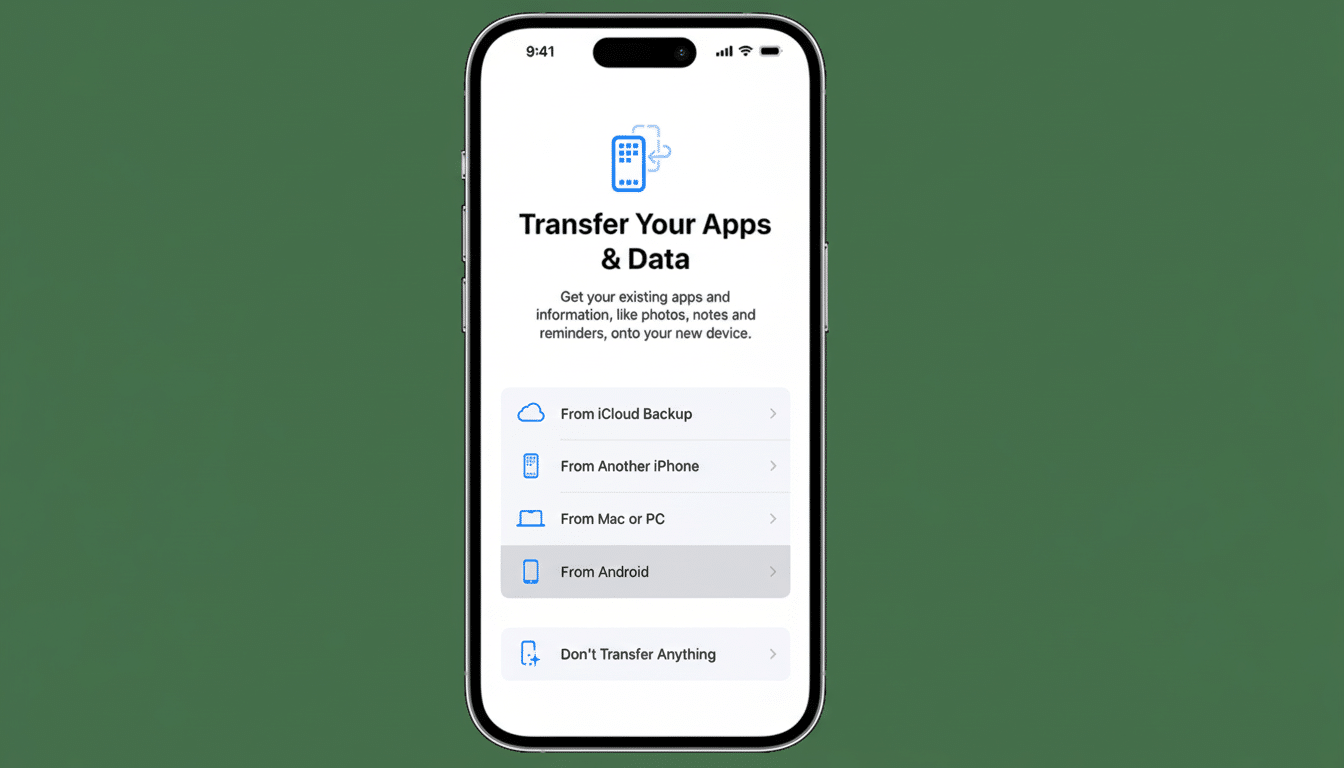
Migrating between an Android phone and iPhone has always been bristly business, as you balance Google with iCloud to get your contacts, mail and calendars — not to mention your apps — onto a new device. That is starting to change. Apple and Google are testing a more streamlined, potentially less hands-on migration process that early users on Android’s Canary channel have already seen on Pixel phones (as in the image above), with an iOS developer beta set to follow.
If it’s the same in stable releases, then the update should shave steps, lower failure rates and transfer more of your personal data over all at once — cutting some of the friction that gets in the way when people consider switching sides.
- What to expect in the setup flow for switching devices
- How it works and what transfers during phone migration
- Why this matters for switchers, carriers, and retailers
- How it compares with existing migration tools and apps
- Security and privacy considerations for cross-platform moves
- What to expect next as testing expands beyond early builds
What to expect in the setup flow for switching devices
Per reporting by 9to5Google and developer notes, the new experience includes a direct option for platform-to-platform transfer in initial setup screens. Instead of popping between independent “Move to iOS” or “Switch to Android” apps and system alerts, the procedure initiates natively, guiding you through connection possibilities and confirming what can be shuffled across before it kicks in.
That matters because most of the failures occur at handoff points — you’re asked to download another app, toggle a permission or try a different kind of cable. Taking everything into the setup wizard would minimize those breakpoints, and make the migration path feel like a first-class feature — not a workaround.
How it works and what transfers during phone migration
The upcoming flow seems to currently support wired or wireless transfers, favoring the fastest and most effective delivery method. Assume the basics — contacts, calendars, SMS/MMS, call history, photos and videos — are heading across with better progress indicators and less chance of things timing out. App-to-app transfers are still limited by platform, but app lists with reinstall links will be provided and some services can recover your account data after you log in.
Messaging is the thorny piece. Most iMessage and RCS chat history doesn’t transfer — they are different ecosystems, and while the migration of chat history is getting better on an app-by-app basis (witness WhatsApp’s cross-platform transfer success), system-level message migration hits limitations. The companies have already been moving in this direction, with RCS adoption on the rise and Google’s recent claim that RCS now reaches over a billion users, so getting to a consistent setup around messaging identities, default apps and fallback paths makes sense.
Why this matters for switchers, carriers, and retailers
Churn between platforms is meaningful. Consumer Intelligence Research Partners has determined that approximately 10–20% of new iPhone owners in the US typically switch from Android, and similarly for Android phone manufacturers, which draw a constant flow of iOS switchers. Every flawed move is a lost sale — or a return — so carriers and retailers have long agitated for smoother, more dependable migrations.
There are big practical stakes for users as well. Transferring a 128GB photo library over Wi-Fi in this app can take hours, and if you hit a single permission snag, you need to restart it. A mindful, resilient process at least lessens that pain. Look for smarter filtering to prevent redundant copies, clearer prompts when a cable or adapter is faster and improved handling of large archives that previously failed due to device timeouts.
How it compares with existing migration tools and apps
Today, for the most part people depend on Apple’s Move to iOS app or Google’s Switch to Android. They function, but they’ve felt tacked on — separate downloads, lumpy outcomes and uneven treatment of special cases like voice memos, secure folders or giant WhatsApp backups. The new process bakes migration into the operating systems’ setup experience, which ought to go a long way to increase reliability, simplify permissions and make troubleshooting easier for store associates.
There’s a parallel effort on ad hoc sharing as well. A recent tease from Google has described new updates to its Quick Share feature for Pixel that can now send files to nearby devices “even with an iPhone.” That’s not quite as satisfying as full phone-to-phone migration, but it supplements the setup flow to make everyday cross-platform sharing feel a bit less like a tech project.
Security and privacy considerations for cross-platform moves
Seamless cannot mean less secure. Look for enhanced on-device prompts, one-time pairing codes and transport encryption for both wired and wireless connections. That approach mirrors best practices of cloud backups and third-party apps. The companies have also emphasized modern encryption in messaging — RCS does support end-to-end encryption under many circumstances, while iMessage is end-to-end encrypted — so aligning migration with those standards makes sense.
What to expect next as testing expands beyond early builds
For now, the feature is appearing in Android’s Canary builds — in other words, builds meant for developers to test — on Pixel phones. For most users, it’s probably better to hold off for broader betas and final releases on both platforms. When it lands, expect carriers and big-box stores to update in-store flows, with shorter setup benches and fewer “come back tomorrow” transfers.
The larger lesson is philosophical: Apple and Google don’t have to make the experience of switching as painless as possible — but they increasingly are. With ecosystems making their play for cameras, AI features and battery life, an attempt to cut down on friction at the front door is a good strategy. And for anyone who has spent a Saturday prodding a cable-based transfer to the finish line, it’s about time.
