


Linux no longer requires an advanced degree in command-line gymnastics. And for day-to-day work, there’s a decent ecosystem of thoughtful graphical apps that cover the sort of jobs people used to do in a terminal, with new rails installed around them now that prevent you from making really expensive mistakes. That adjustment counts: StatCounter’s desktop stats already have Linux climbing past the four percent range, and the Stack Overflow Developer Survey annually ranks Linux as a leading development platform. The lesson is clear—Linux doesn’t have to look or feel like the command line in order to be powerful.
Grsync Makes Backups Straightforward and Safer
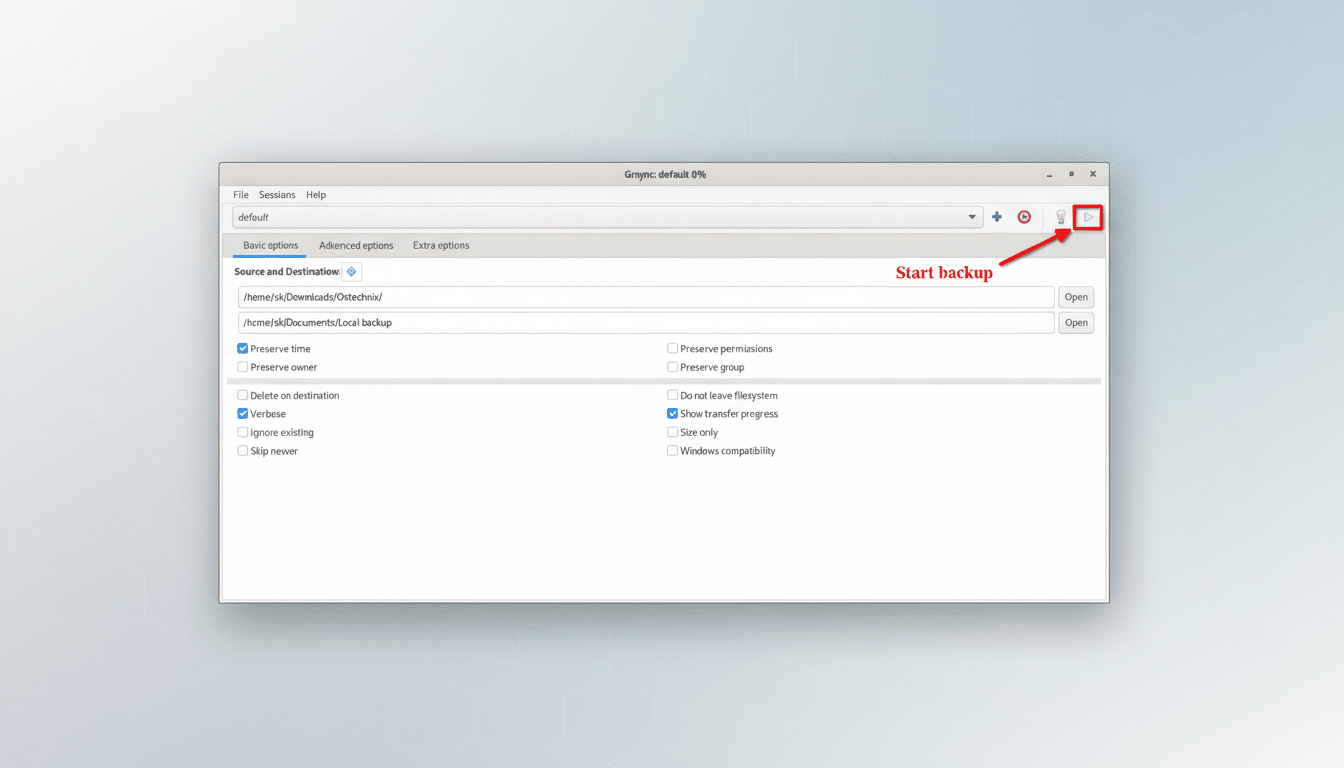
Rsync is the stuff of legends, offering incremental backups at a speed few can argue with—but it also has so many options that they feel like alphabetical soup. Grsync is an rsync with a nice, clean face: choose your source and destination, check off options like “preserve permissions” or “delete extraneous files,” and run a dry run to ensure you’ll get what you want. It’s particularly useful for backing up to an external drive, or syncing a laptop with a home server. Pro tip: rsync sees a difference between paths with and without trailing slashes, and Grsync makes that behavior easily discoverable to discourage you from nesting folders.
- Grsync Makes Backups Straightforward and Safer
- GNOME Files Handles Day-to-Day File Operations
- GNOME Disks Demystifies Storage Management Tasks
- Stacer Neatens Cleanup and Startup Jobs on Linux
- Meld Makes Differences Obvious for Text and Code
- GNOME Text Editor Keeps Config Edits Calm
- GNOME Software Lets You Use Multiple App Formats Easily
- Remmina Takes the Pain Out of Remote Access
GNOME Files Handles Day-to-Day File Operations
Listing folders, creating folders, moving or copying files—GNOME Files brings the common shell verbs ls, mkdir, mv, cp, tar, and touch right to the desktop. It also includes batch renaming, built-in search, and connections to network shares through SMB or SFTP. Toggle “Show Hidden Files” to access dotfiles, and lightning-fast project directories via the sidebar’s bookmarks. For most of us, it eliminates a “files” obsession in the terminal workflow.
GNOME Disks Demystifies Storage Management Tasks
Many newbies are afraid of the command line: partitioning and mounting. GNOME Disks provides safer, graphical tools to replace the more common utilities of parted, mount, fsck, and dd. You can add and resize partitions, format drives, and set (and see the effects of) mount options that apply across reboots without hand-editing fstab; icing on the cake, you can even benchmark performance. It also brings up SMART data for failing disks. The app does still require your full attention—reformatting is destructive—but confirmations, labels, and obvious device IDs mean you’ll be less likely to fall into the classic “wrote to the wrong drive” trap.
Stacer Neatens Cleanup and Startup Jobs on Linux
Stacer is your system dashboard. It brings together package cache cleaning, log rotation, autostart session list maintenance, as well as monitoring of services with simple widgets. Those tasks include commands like rm, ps, kill, and the sundry package managers; Stacer sorts them into tabs with toggles and graphs. It can be extremely useful to have around after major software updates or when a rogue process diabolically eats one of your CPU cores. Like any tidy-up tool, check the items you’re getting rid of before hitting “Confirm.”
Meld Makes Differences Obvious for Text and Code
diff is fast but rather unforgiving. Meld provides you with side-by-side diffs of line changes, colored accordingly—along with 2- or 3-way merges. It has built-in support for Git (and other VCS) and can compare against the folder it resides in. It also makes it easy to choose lines to keep, as you can simply select parts of text that differ between master and development versions, and it automatically highlights all differences. It’s good for auditing configuration changes or looking at code. Plain text is really where it shines; binary formats are handled better in other places.
GNOME Text Editor Keeps Config Edits Calm
Every edit doesn’t have to begin in nano or Vim. GNOME Text Editor offers a simple, clean window with syntax highlighting, autosave, and a modern interface that is approachable for everything from textual notes to configuration edits. And when a file, for example, needs to be edited as root, most Linux distributions have an “Edit as Administrator” action in the file manager or provide a Polkit prompt. For batch edits of anything in /etc/, go for a backup first; I can’t count the number of times that’s been pounded into us by the Linux Foundation trainers and their courseware when they talk about versioning and rollback safety.
GNOME Software Lets You Use Multiple App Formats Easily
If you’re more of an apt-get, dnf, or pacman kind of person, then GNOME Software comes to your rescue with its storefront-like interface where applications are grouped into pinned “featured” selections but can also be browsed by category, with apps listed alongside screenshots, changelogs, and ratings pulled in from the Open Desktop Ratings service.
It can work with Flatpak repos alongside traditional distribution repositories, handle updates, and revert bad installs. For Plasma users, KDE Discover has a similar sort of offering; conceptually from the same idea—safe search and install, with no need for remembering flags.
Remmina Takes the Pain Out of Remote Access
SSH is fundamental, but many users flounder with key management and port flags. Remmina stores connection profiles for RDP, VNC, SSH, and SPICE, supports stored public keys (to use with private servers without exposing your ~/.ssh/ files), and it features tunnels and clipboard synchronization. For small teams, or if you have a homelab setup of your own, keeping hosts around with nice names is better than having to retype long SSH commands. A lot of distros come with Remmina out of the box; many others have it in their official repositories.
Altogether, these eight free-of-charge downloads cover backups, file management, storage, cleanup, comparison, editing, software installation, and remote access—the core tasks that used to force people into a terminal.
The command line is still a superpower for connection, automation, and scale, but on the new generation of Linux desktops (which range from Ubuntu to Fedora to Pop!_OS and KDE Neon), it is now a matter of choice for your daily work. That’s a practical win for newcomers and a quality-of-life upgrade for veterans.
