


What to Check Before Buying Last Year’s Robot Vacuum Deal
A robot vacuum sale on last year’s hardware is hard to ignore when the shelf tag sits far under the current model. Sometimes that gap is honest. You can still buy filters, the companion app installs without drama, and the map survives a normal week of life with pets and furniture. Robot vacuum deals turn sour in smaller ways that show up after the return window, not on the front of the box. Think filters that vanish from the brand store, a battery that quits halfway through the big room, or maps that fight you once you redraw no-go lines after a layout change.
The sticker is one data point, not the verdict. What follows covers app support, parts, navigation, and when newer hardware is worth it. The closing checklist adds battery, dock warranty, and a price-history pass, so a headline sale is not confused with everyday shelf pricing.
Table of Contents
- Software support matters more than the discount
- Replacement parts decide how long the deal lasts
- Navigation age shows up in daily use
- Pre-buy checklist for older robot vacuums on sale versus the current lineup
- Conclusion
Software support matters more than the discount
The companion app and firmware carry schedules, maps, no-go zones, and mop tweaks while the brush motor does the physics. When phone OS cadence outpaces patches, you pay with half-loaded maps or failed night installs, not missing suction on paper. Constant feature drops are optional; mapping, schedules, obstacle rules, and docking should still behave.
Before choosing the best robot vacuum on sale, open the brand support page for your exact SKU. You want recent firmware notes, a compatibility row that still lists your phone OS, and manuals that actually download. Archived docs plus map complaints in fresh app reviews mean the discount needs to be steep.
Ignore marketing polish. Note the firmware timestamp, mirror it on the App Store or Play listing, and skim same-version reviews for crashes. Dead-quiet downloads are not proof that the line is retired, but they warrant a blunt email about patches. Without printed end-of-service dates on consumer robots, you lean on those timestamps and the reply you get.
Replacement parts decide how long the deal lasts
Filters, brushes, mop pads, rollers, dust bags, and small tank parts are what keep a robot useful after the first few months. A low sale price stops feeling like a bargain when the right filter is gone or is only sold by questionable third parties.
Check the exact model number. Similar-looking robots often use different rollers or bags, and parts for the newer SKU may not fit last year’s clearance unit. That is doubly true for self-emptying or self-cleaning bases with proprietary bags, trays, tanks, or mop hardware.
Before you check out, confirm the roller, main filter, side brushes, and any station bags or trays under the exact model code actually add to cart from the brand or an authorized seller. If only aftermarket listings appear, verify dimensions and return policies. Scarce OEM stock now usually means worse availability a year out.
A good robot vacuum discount still leaves a clear maintenance path. If official parts are hard to find today, assume tomorrow will not be easier.
Navigation age shows up in daily use
Older vacuums can still pick up dirt, but navigation is where age shows first. A bumper-driven bot may survive a small open room, yet it loses time once chair legs, pet bowls, cords, rugs, and thresholds multiply. Laser maps, obstacle avoidance, and stable no-go zones decide whether you have to clear the floor before every run, not just whether the unit eventually wanders through every doorway.
Use this quick check before you buy.
| Sale model feature | What to ask before buying |
|---|---|
| Random or bumper navigation | Will it miss rooms or repeat the same area |
| Gyroscope mapping | Does it save maps reliably after furniture moves |
| LiDAR or laser mapping | Can it clean by room and avoid no-go zones |
| Obstacle detection | Does it handle cords, socks, pet bowls, or toys |
| Mop lift or carpet avoidance | Will rugs stay dry during hybrid cleaning |
Gyro-based mapping drifts after furniture moves. LiDAR remaps faster after layout changes, so last year’s LiDAR clearance can still feel current while a gyro sale unit feels older than the sticker. Camera VSLAM needs light and texture, and can stumble in dark or glossy halls without extra depth hardware. Newer generations in the same line often add multimap, quicker zones, and tighter edge passes that older clearance firmware never received, so compare app screenshots before you trust the story.
If the discount is on an older bumper robot, the savings rarely offset the extra time you spend clearing the floor beforehand and clearing jams mid-run. Spending a little more on mapping can matter more than buying the strongest motor in last year’s lineup.
Pre-buy checklist for older robot vacuums on sale versus the current lineup
Older models are not automatically bad buys. The real question is whether the discount trades away the time-savers you care about, from carpet pickup and hair handling through mopping and mapping.
The earlier checks collapse into the table below. Skim it before you pay.
| Check | What to look for |
|---|---|
| Software support | Recent firmware, a current app listing, and a live support page for that exact SKU |
| Parts availability | Roller, filter, bags or station trays, mop pads, all purchasable under the same model code from brand or authorized seller |
| Navigation type | Bumper, gyro, LiDAR, or camera; each caps map quality and obstacle handling differently |
| Battery condition | New, open-box, or certified refurb, plus who honors the warranty |
| Base station coverage | Whether dock pumps, seals, bags, and drying share the robot warranty or sit under separate terms |
| Warranty and after-sales | Brand or authorized seller; marketplace listings may route service elsewhere |
| Price history | Compare the tag to Keepa or CamelCamelCamel on Amazon, or a comparable tracker for other retailers |
If a row stays fuzzy after a quick search, pause and treat that as a red flag. Even with green rows, a busy week with pets, mixed floors, and clutter can still send you back to pre-clearing. That drag is usually mapping and mop chores, not a missing Pa on the spec sheet.
The eufy Robot Vacuum Omni C28 is built for busy mixed-floor homes with pets and furniture that stays put between runs. It lines up 15,000 Pa suction, DuoSpiral detangling brushes for pet hair, HydroJet self-cleaning roller mop, plus a 5-in-1 Omni Station that handles dust emptying, mop washing, tank refilling, hot-air drying, and wastewater collection at the dock, and iPath 2.0 navigation tuned for obstacles under furniture and in low light. Mostly hard floor, little pet hair, and no mop automation? A verified older sale unit with solid parts support can still be the smarter money.
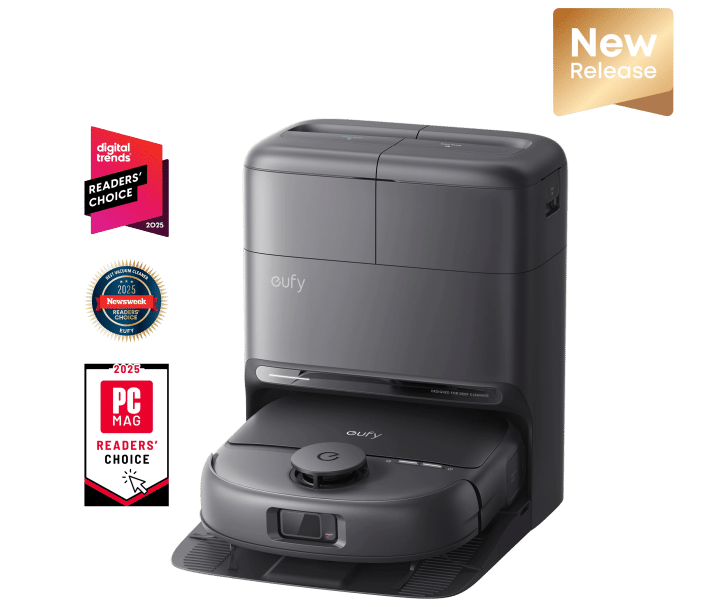
eufy Robot Vacuum Omni C28
Conclusion
A sale price is useful only if the robot can stay useful. Once you’ve checked the software, parts, navigation, battery, and warranty terms, you can decide whether the discount still makes sense. If the discounted model has LiDAR or reliable mapping, available filters and brushes, a healthy battery, and active app support, it may be worth buying. If those pieces are uncertain, compare them with current models before you decide. The eufy robot vacuums collection is a practical place to compare suction, navigation, station type, mop features, and maintenance requirements side by side.

