


A Lighter Way to Configure Your Gear in Your Browser
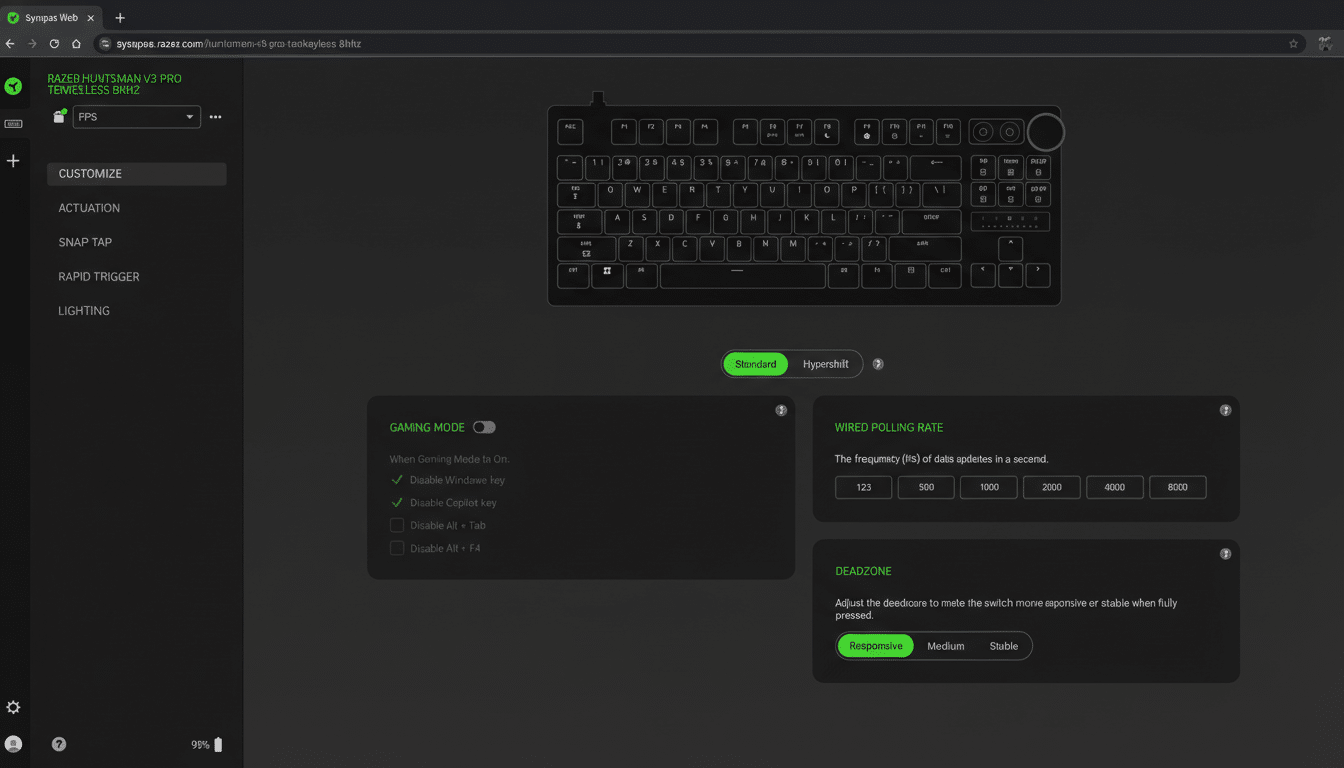
Razer has introduced a browser-based beta of its Synapse configuration suite, giving PC users a way to set up compatible peripherals without installing the heavyweight desktop app. The initial release focuses on Huntsman V3 keyboards, letting users adjust keymaps, lighting, and macros directly from a web page, with broader device support promised over time.
The pitch is straightforward: plug in a supported device, open a modern browser, and make changes that previously required a persistent background service. For gamers on shared machines, students on locked-down school PCs, or anyone who prefers a lean system, the ability to configure hardware without permanent software is a meaningful shift.
- A Lighter Way to Configure Your Gear in Your Browser
- Why This Move Matters For Configuring Peripherals Online
- How a Browser Can Talk to USB Devices Securely Today
- What Works Today and What’s Next for Razer Web Synapse
- Competitive Landscape and User Impact as Web Tools Grow
- What to Watch as Razer Expands Its Browser-Based Synapse
Why This Move Matters For Configuring Peripherals Online
Peripheral software suites are powerful, but they’ve earned a reputation for bloat. Communities routinely report that utilities from major brands can consume hundreds of megabytes of RAM and spawn multiple background processes, even when you’re not actively changing settings. Beyond resource usage, some users worry about privacy, telemetry, and system instability.
A web-first approach reduces that friction. You launch it when needed, close it when done, and avoid another always-on agent in your startup list. For IT-managed environments, where installing drivers or services is often prohibited, a browser tool can also sidestep policy roadblocks while still enabling essential tweaks.
How a Browser Can Talk to USB Devices Securely Today
Modern browsers can communicate with human interface devices after explicit user permission. Chromium-based browsers support device APIs such as WebHID and WebUSB, designed to let sites interact with peripherals like keyboards, gamepads, and specialized controllers. A typical flow prompts the user to select the device, grants limited access in that tab, and revokes it when the session ends—an approach that balances convenience with security.
While Razer hasn’t detailed the plumbing, the pattern fits what hobbyist communities already use. The VIA configurator and the QMK web tools, for example, let enthusiasts remap custom keyboards in the browser and write changes to onboard memory. Bringing that philosophy to a mainstream ecosystem signals how far the web has come as a platform for device management.
What Works Today and What’s Next for Razer Web Synapse
At launch, the beta targets the Huntsman V3 family. Expect core functions like per-key mapping, multi-layer macros, and RGB profiles. If a device supports onboard storage, changes can typically be saved directly to the peripheral so settings persist across machines—useful for tournament play and hot-desking.
There are caveats. Many advanced features across the industry—game integrations, device synchronization, or system-wide overlays—still rely on desktop services. Some legacy peripherals also lack robust onboard memory, meaning software must be running for complex effects. And because this is a beta, broader coverage for Razer mice, headsets, and keypads will roll out gradually.
Competitive Landscape and User Impact as Web Tools Grow
The move underscores a broader shift. Logitech’s G Hub, Corsair’s iCUE, and SteelSeries GG have matured into sprawling platforms, but they’ve also drawn consistent feedback about resource usage. A complementary web tool offers a middle ground: keep the desktop suite for advanced, always-on features, and use the browser for quick edits, travel setups, or machines where you have limited privileges.
Industry data points to sustained demand for high-end input devices as PC gaming and hybrid work continue to grow, according to analysts at firms that track peripherals and gaming hardware. A lighter configuration path removes friction for that expanding base, particularly in regions where shared or borrowed PCs are common and administrative rights are not guaranteed.
What to Watch as Razer Expands Its Browser-Based Synapse
The key questions now are pacing and depth: how quickly Razer expands compatibility, whether profiles can sync across sessions, and how much functionality reaches parity with the desktop app. Cross-platform reach is another angle—web-based tools can run on Windows, macOS, Linux, and ChromeOS with minimal differences, which could simplify support and testing.
If Razer executes, expect rivals to follow with their own browser utilities or pared-back agents. For users, that competition could mean fewer always-on processes, leaner installs, and configuration that feels like it should have all along—quick, portable, and largely invisible when you don’t need it.
