


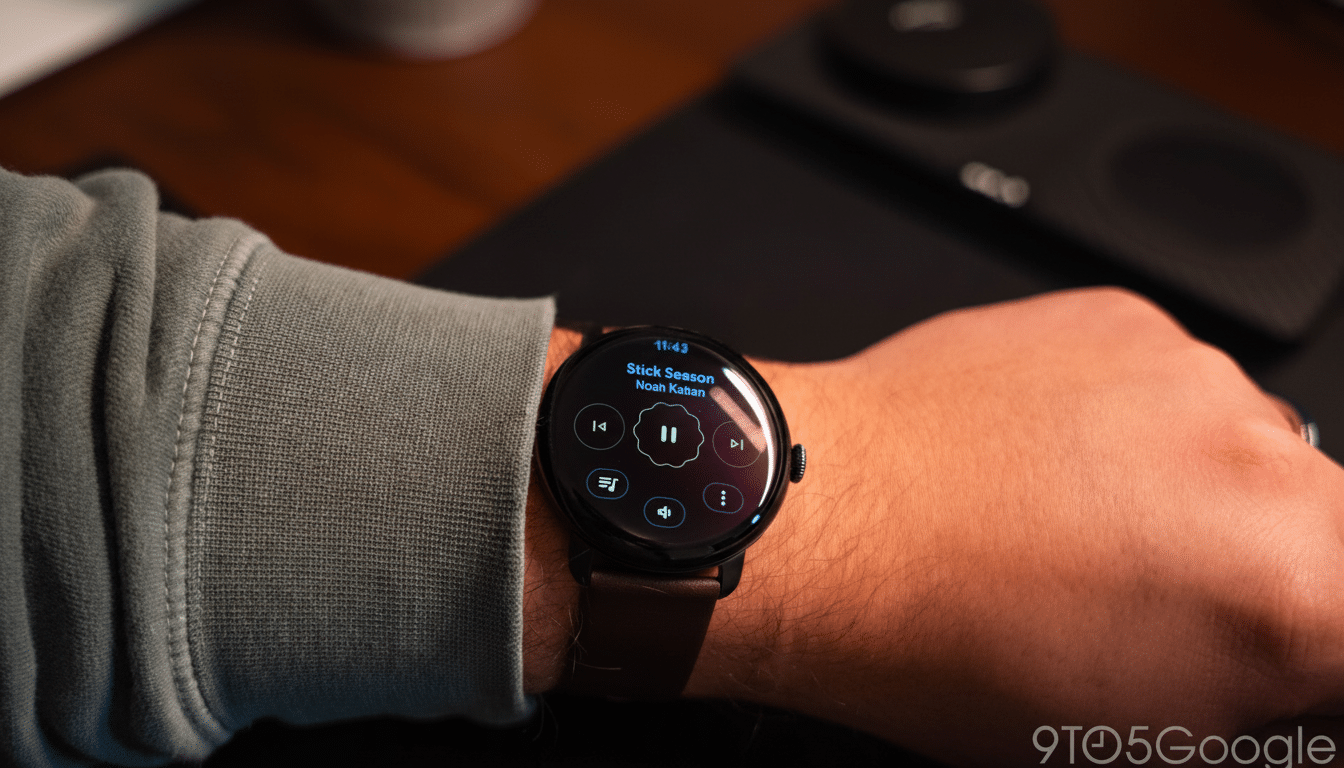
Google is introducing a small quality-of-life improvement to the Pixel Watch family today with media controls (like stop/play, etc.) staying visible on the always-on display even in ambient mode. The sense, introduced with Wear OS 6, is that playback buttons and the countdown will no longer blur or fade away after a few seconds have elapsed, making essential information glanceable without having to either wake up the watch or touch its screen.
What’s New in Wear OS 6 for Always-On Controls on Pixel Watch
Before, the Pixel Watch would offer a transparent view of system media controls and the Timer app for a brief moment, then it would slide to a blurred version of these interfaces that hid any tappable elements until the display had come fully on. In this update, those same controls stay in a reduced-power state with some other items, so you can see the play/pause button and track progress/timings at a glance.
- What’s New in Wear OS 6 for Always-On Controls on Pixel Watch
- Why It Matters Day to Day for Pixel Watch Media and Timers
- How Google Makes It Power Efficient for Pixel Watch AOD
- Compatibility and Examples in the Real World
- How It Stacks Up Against Apple and Samsung Wearables
- The Bigger Wear OS Picture and Google’s Glanceable Strategy
Noted by independent testers in the latest software and reported by 9to5Google, the behavior aligns with a wider Wear OS 6 push for glanceability. The UI switches to ambient mode, populated by high-contrast, legible readings that don’t shorten battery life.
Why It Matters Day to Day for Pixel Watch Media and Timers
Micro-interactions are what make a smartwatch useful. If you’re in the middle of a run and timing sprints, you can check your lap countdown sans prodding the display with sweaty digits. If you’re cooking, a timer can tick down as you stir a pan. Traveling, and going from track-or-podcast-skipping to a proper one-glance-and-done activity instead of wake-and-tap is not so bad.
It’s a small enough thing, but this is exactly how wearables earn their keep—cut out the frictions for all those regular tasks. Research on the industry side out of user-experience labs regularly shows that shaving one or more seconds off a habitual interaction leads to both increased feature use and higher satisfaction overall—this is doubly true for fitness and media features we check dozens of times per day.
How Google Makes It Power Efficient for Pixel Watch AOD
Ambient Mode on Pixel Watch is designed to minimize battery consumption and images are toned down to also lower the risk of OLED burn-in. In always-on, the watch display shows simplified graphics — fewer colors, less detail and restrained motion — while using pixel shifting to prevent burn-in. And in ambient states, the system reduces refresh rates when hardware permits to save power.
As the refreshed media controls and timers are kept in that ambient pipeline, it should have less of an impact on battery percentage compared to fully waking your display every time. Your actual endurance will depend on things like brightness, workout tracking, and notification volume … but let’s face it—keeping controls in ambient mode is simply going to be more efficient than waking hundreds of times per day.
Compatibility and Examples in the Real World
The update works with the system-level media controls in popular apps like YouTube Music, Spotify and podcast players, so you don’t have to wait for each developer to implement a bespoke always-on view. Speaking of timing, the ambient display of the Timer app remains visible, handy if you’re doing interval training, Pomodoro stuff or have a multi-timer affair going in your kitchen.
For runners, this is monitoring a 400-meter interval without losing time or rhythm. A quick look at a paused audiobook is now hands-off for commuters. And for those who have the watch out on a counter as a timer, remaining seconds are readable from across the room.
How It Stacks Up Against Apple and Samsung Wearables
Apple Watch and Samsung Galaxy Watch already offer some form of minimalist always-on state for many aspects of an app that might be active, like timers or now-playing screens. Wear OS 6 is how they went about changing the behavior on Pixel Watch to meet those expectations while still aligning the design language with their own watch faces and tiles. It’s a small parity move, but an important one in a market where convenient always wins out over raw stats.
The Bigger Wear OS Picture and Google’s Glanceable Strategy
It’s the kind of glanceable information Wear OS has consistently focused on—tiles, complications and watch faces, all engineered to provide at-a-glance data. “In the best of times,” Google’s developer advice has long emphasized ambient-mode designs that maintain key data points. This update takes that philosophy to the applications you’re likely using the most and it should mean we will start to see more first-party apps take advantage of persistent ambient states.
If battery life is a priority, the always-on display can be turned off in settings. However, AOD staying on is probably more appealing to most Pixel Watch users due to the fact that core controls and timers are visible. It’s the sort of refinement that makes a smartwatch seem smarter without making it more complicated.
