


Today’s update to the Pixel Camera app quietly corrects some of that functional tone-deafness, restoring us shooters’ proper place atop a hierarchy of digital control.
The design change wasn’t earth-shattering, but it was a clear-headed sign of poor conventional wisdom, all in service to casual/rapid uptake with input from non-professionals — basically death before (shooting) dishonor.
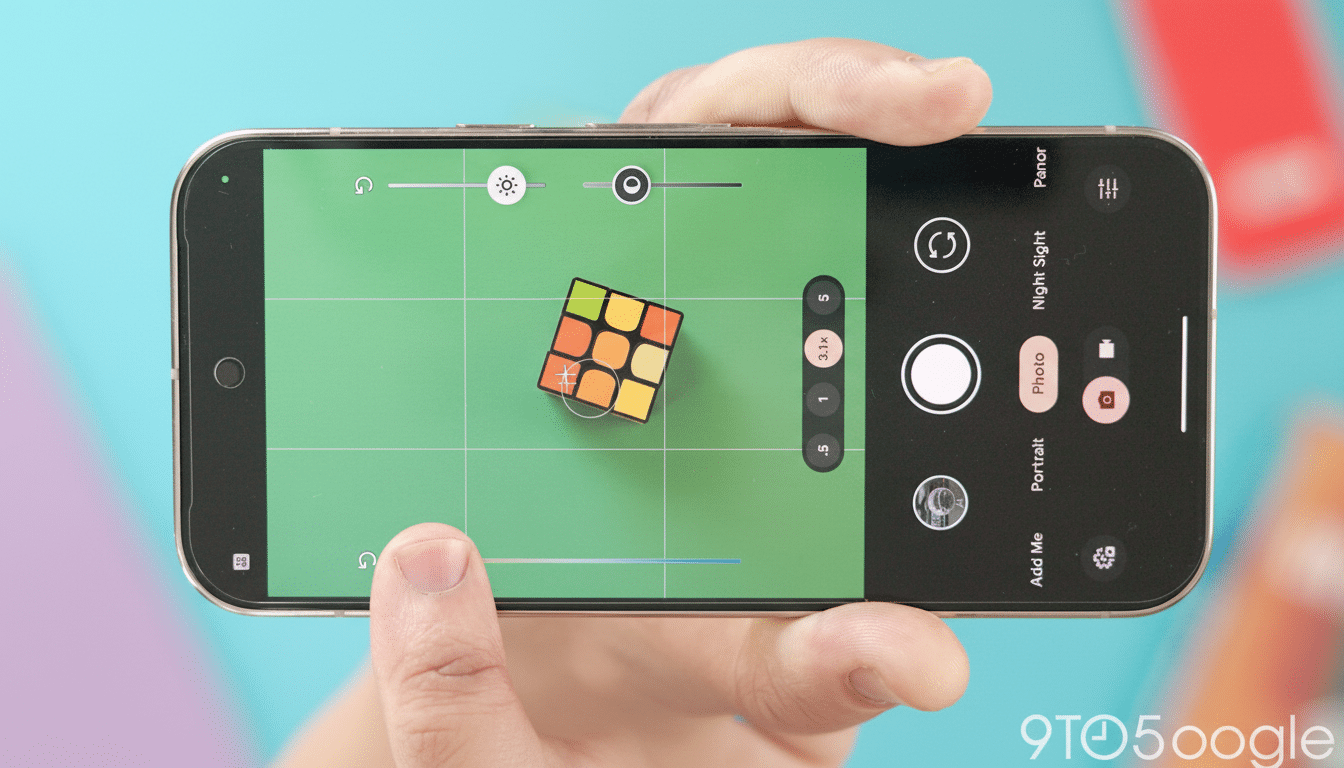
As 9to5Google reports, the update returns the original positions of Shadows and Highlights that were switched in a previous release, restoring untold amounts of muscle memory for Pixel photographers.
What’s New in Pixel Camera 10.2: Slider Order Restored
Tap anywhere in the viewfinder on a Pixel and you will find pop-up sliders for tonal control (Shadows, Highlights, or just brightness) and White Balance. Google initially flipped the order of Shadows and Highlights on earlier builds by mistake, mistakenly forcing users to experiment with the wrong adjustment mid-shot. In the 10.2 version, sliders go back to their age-old arrangement so that your thumb reliably hits the one you want without a second look or thought.
On top of familiarity, the Pixel’s sliders are great because they don’t rely on your overall exposure. That means you can deepen shadows for mood or lift them to recover detail without blowing out the scene, with live preview that mirrors Google’s computational pipeline in real time. It’s a quick, photographer-friendly way to manipulate an image before you take it instead of after.
Why This Small Tweak Makes a Big Impact for Pixel Shooters
Consistency is a key principle of good camera UX. When a control that’s in constant use changes even a little, it creates cognitive load at the worst possible time — immediately before you trip the shutter. Returning the sliders to positions low on the grip reduces friction for one-handed point-and-shoot operation and accidental changes, particularly for users who rely on frequent, fast, repeatable thumb gestures while shooting.
Some common use cases come to mind: backlit portraits in which you nudge Shadows up and lift some faces without destroying the sky, or indoor scenes in which you pull Highlights down but keep some window detail. In both cases, speed matters. That restored order translates to less tapping and more confidence in getting the look you want.
A Course Correction With History in Pixel Camera Design
Those sliders have been on a wild ride. They were brought to the surface when Google re-engineered the Pixel Camera a few generations ago, then vanished from view for a while, in light of Google’s refocusing on on-device control of its default camera. The rollback in 10.2 feels a lot like rectifying in response to feedback directly from the Pixel community, oftentimes including long-running conversations at enthusiast water coolers and in Android-watcher media.
It’s also indicative of a larger paradigm with Google’s approach to cameras: move fast, listen, and course-correct when a small tweak in design has an outsized impact on usability. The Pixel Camera is one of the few default camera apps to bring a shadow slider directly into auto shooting, where competitors often bury similar controls in pro modes.
How to Get the Update on Your Pixel Camera App
The change comes with the Google Play update of the Pixel Camera app. To see which version you have, long-press the Camera icon, tap App Info, and confirm that you are running 10.2 or higher. If you don’t see it yet, open the Play Store, tap Manage Apps, and check for updates — rollouts can sometimes be gradual based on your region and device.
The slider restoration should presumably work on recent Pixel models that have the latest Camera builds’ support, including current flagships and midrange offerings at that. If you switch between multiple camera modes, give the viewfinder a tap in Photo and Portrait to make sure it feels familiar again.
What It Means for Shooters Using Pixel Camera 10.2
Switching the location of a control might sound trivial, but it completely changes how quickly you can assemble an image. Whether you’re shooting street, reportage, or travel, the ability to pre-sculpt highlights and shadows in less than a second is frequently what separates a keeper from an almost-ran; the Pixel’s live-preview tone sliders were designed for that kind of speed.
Design-wise, the update fits within Material Design guidelines about predictability and reduces the cognitive overhead of switching between devices or modes. And it’s a Pixel differentiator for anyone comparing systems: granular but real-time tonal control of your images, right in the out-of-the-box camera without plunging into pro.
Bottom line: Pixel Camera 10.2 isn’t changing how the phone captures light so much as it’s adapting how quickly you get to tell it what to do with that light. That’s the kind of UX tweak photographers actually feel right away.
