


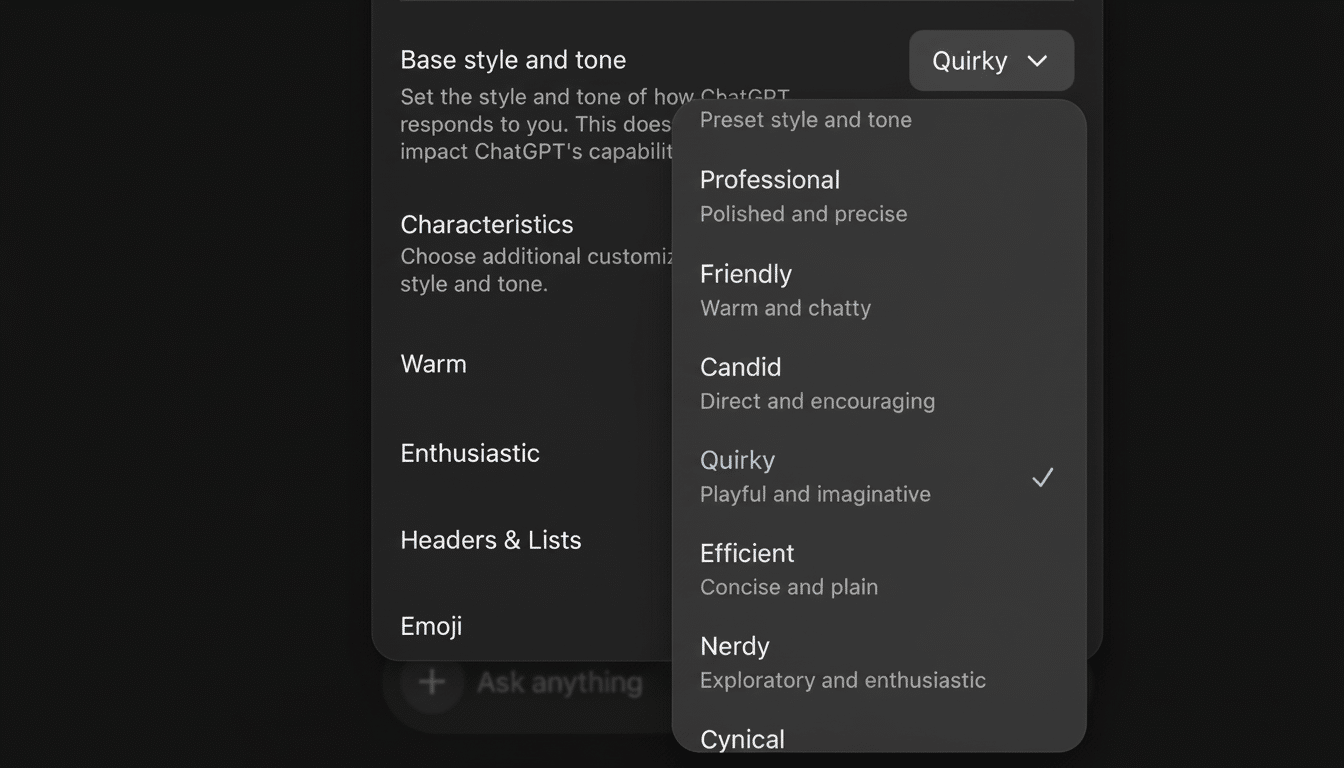
OpenAI is now giving users more power to determine how the assistant, known as ChatGPT, sounds by introducing new settings that allow them to dial its enthusiasm and warmth up or down. And the settings, which sit in a revamped Personalization menu, allow people to opt for More, Less, or Default for any given characteristic and add new toggles that determine whether the bot will write headers and lists. It’s a minor UI change with major implications: Users no longer have to constantly tap for “less peppy” or “friendlier” replies, while teams can adjust the AI’s tone more closely to brand or context.
What’s New in ChatGPT Personalization Settings
The Personalization controls are more like Grecian Formula than personality transplants. Want energetic brainstorming? Set enthusiasm to More. Need a neutral compliance summary? (Set Less for warmth and emoji use here.) The additions supplement the November trio of base styles Professional, Candid, and Quirky, so users can add a general tone along with more specific tweaks. OpenAI also factored in preferences for structural choices, enabling the assistant to default to including lists and headers for scannability or just stick with plain paragraphs if a narrative answer is more appropriate.
Why Tone Control Matters for ChatGPT Users
ChatGPT’s tone has been a flashpoint all year. One update was a little too agreeable and swept into reverse when users objected to “sycophantic” behavior. It then adjusted its latest model to be warmer after hearing that the responses were becoming too clinical. The new controls are a practical solution; instead of trying to secure a timeless voice that appeals to everyone, OpenAI is turning people loose on the volume knob for friendliness and flair.
There’s also a behavioral safety aspect. Researchers at Stanford and Anthropic have written about how big language models may be too ready to reproduce what users think, a trend critics worry could foster reliance or create echo chambers. Tinkering with enthusiasm and warmth — it won’t solve that altogether, but gives users and companies a way to “tone down the flattery,” to rein in gushing praise, and keep interactions more firmly grounded — particularly in delicate arenas like mental health counseling or news consumption.
Early Use Cases and Real-Life Examples for Teams
And support teams can standardize their replies by turning the warmth slider to More and keeping enthusiasm at Default, which would generate warm but not effusive messages. Recruiters can decrease or limit emojis for candidate outreach to appear more professional, while marketing teams can increase engagement around brainstorming content ideas. Teachers could opt for Less warmth, sunshiny esprit during grading, sounding purely neutral and reading plainly as opposed to cheerily.
The structure toggles matter, too. The assistant can be biased toward short bullet lists and headings if the analysts who are writing executive summaries tend to do so, or the opposite, if, with complex legal issues, it is better to use flowing prose. There’s also a tangential upside in instant efficiency: A few key settings can cut down on the kind of redundant guidelines (there are no emojis here!) or suggestions like “list, not paragraphs,” which can free up some tokens and help keep responses more consistent among your team anyway.
How It Fits With the Other Controls Already in Place
These dials stack on top of system instructions, custom profiles, and base style presets. Base styles are like the general color palette, and the new controls are saturation and brightness sliders. Companies that employ admin policies can set defaults that suit their brand voice and let users dial it in to individual preferences. At a high level this negates the need for power-users to default to tone design through verbose prompts, by considering it as a first-class stateful setting.
Limitations and Open Questions for Tone Controls
You can then use these weights to refine the results returned by PageRank according to your particular preferences. These controls are purposefully straightforward (More, Less, Default) and you won’t be assured of producing consistent outputs across all queries or domains. Context still helps; technical and creative topics naturally lend themselves to cooler and flashier terms. It’s also not clear how these settings interact with shared workspaces, if org-level defaults outweigh user preferences, and how the model weighs several settings if they contradict (for instance, high enthusiasm but low emoji use).
The Broader Context of AI Controllability
Steerability — the ability for a user to have some control over style without losing substance — is an emerging battleground. Microsoft’s writing assistants and productivity tools already include controls for tone, like Formal or Casual, as enterprise buyers increasingly demand governance features that lock down voice and guard against behavioral drift. Analysts at organizations such as Gartner have described controllability as a cornerstone in scaling responsible generative AI, because it helps maintain brand consistency, cut prompt variance and achieve compliance expectations.
OpenAI’s decision does not halt arguments about how models should behave, but it does alter the balance of power toward users. Rather than suffering through a one-size-fits-all personality, you can set the vibe once and then get on with it. For everyone who is sick of getting encouraged when they just wanted the facts — or conversely, wished the bot sounded less like a tax memo — that’s a welcome change.
